node-red-contrib-meraki-cmx
node-red-contrib-meraki-cmx
A Node-RED node to receive WiFi and Bluetooth beacon location data from a Cisco Meraki wireless network.
Install
Run the following command in your Node-RED user directory - typically ~/.node-red
npm i node-red-contrib-meraki-cmx
Restart Node-RED
node-red
Description
A Cisco Meraki Scanning API node to receive presence information from a Meraki WiFi network.
Formely called CMX or Location API
Meraki WiFi access points will send their WiFi and Bluetooth beacon observations, via the Meraki cloud, to this node. The JSON stream will be available in the msg.payload object on the Data output.
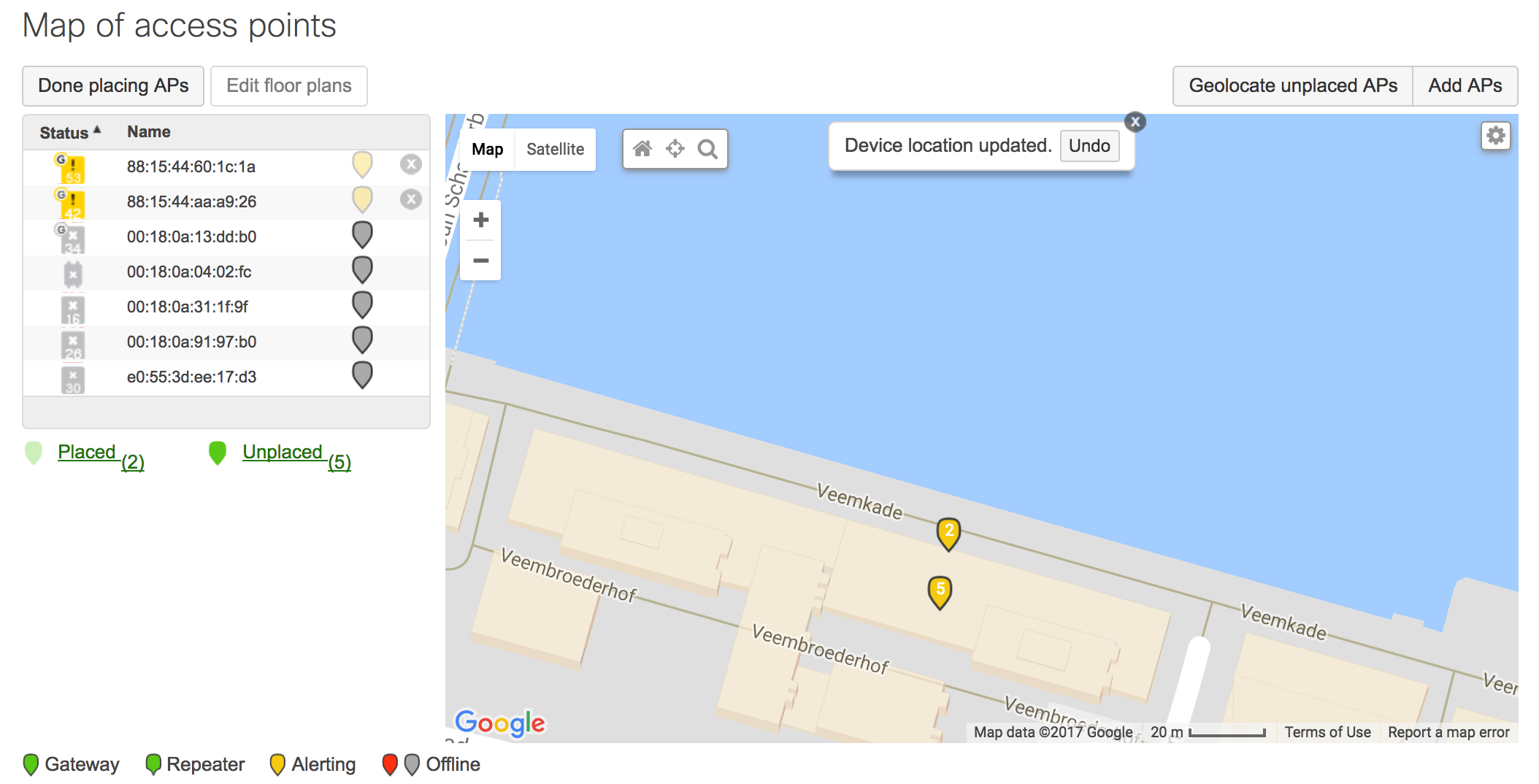
Note: The access points must be placed appropriately on the map in the Meraki Dashboard.
Outputs
- Data
Sends the observation data
msg.payload
{
    "version": "2.0",
    "secret": "supersecret",
    "type": "DevicesSeen",
    "data": {
        "apMac": "00:18:0a:13:dd:b0",
        "apFloors": [],
        "apTags": [
            "dev",
            "home",
            "test"
        ],
        "observations": [
            {
                "ipv4": "/192.168.0.56",
                "location": {
                    "lat": 51.5355157,
                    ...
- Status
Sends various topics depending on event status and additional parameters
{
    topic: "type"
    payload: "discarding radio type"
    remoteAddress: "127.0.0.1"
    _msgid: "913d6108.aadcf"
    supportedType: "BluetoothDevicesSeen"
    type: "DevicesSeen"
    statusCode: 200
}
More information on the Scanning/CMX Location API can be found on the Meraki Developers Portal. http://developers.meraki.com/tagged/Location
How it works
The Node requires the following configurations
Validator
- Used by Meraki to validate the receiver. The CMX Node will respond with the validator when Meraki performs a [GET] request to your server.
Secret
- Used by the CMX Node to ensure the JSON stream is from the appropriate sender.
URL
- The URL that will listen for the JSON stream. This path will be appended to the servers domain name and port.
http://yourserver:port/URL
Note:
- Multiple Nodes with an identical URL will not function properly. Instead, use a "link" node to send the data to multiple flows.
Changelog
August 2017
- Fixed "invalid data" issue. (Heroku was impacted by this)
- Removed reference to
msgobject - Handle invalid secret better.
July 2017
- Added Status output
- Return status codes
- Added Radio Type selector!
- Fixed validator key display in settings
- Housekeeping
Written by Cory Guynn, 2016(2017)
http://www.InternetOfLEGO.com
http://developers.meraki.com
Screenshots
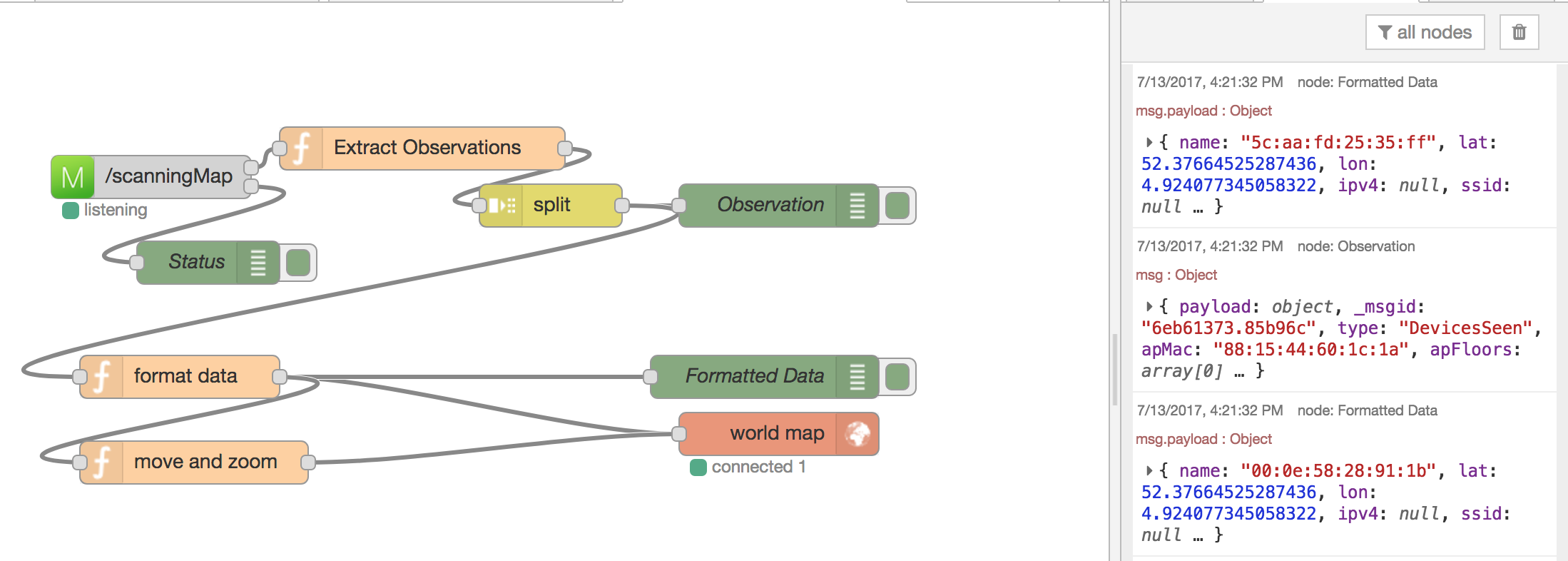
Node Basic Flow
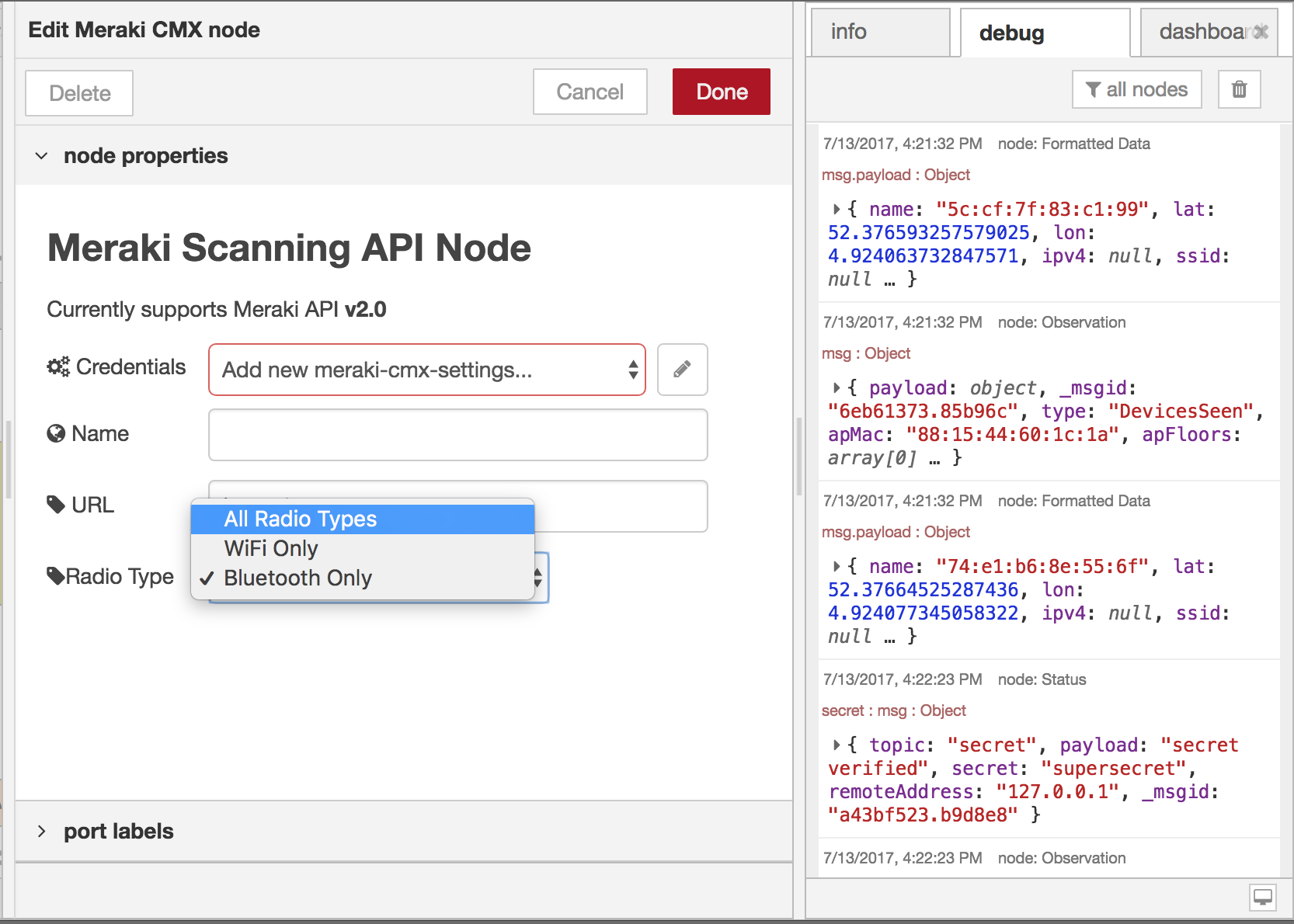
Node Settings
Meraki Dashboard AP Map Placement
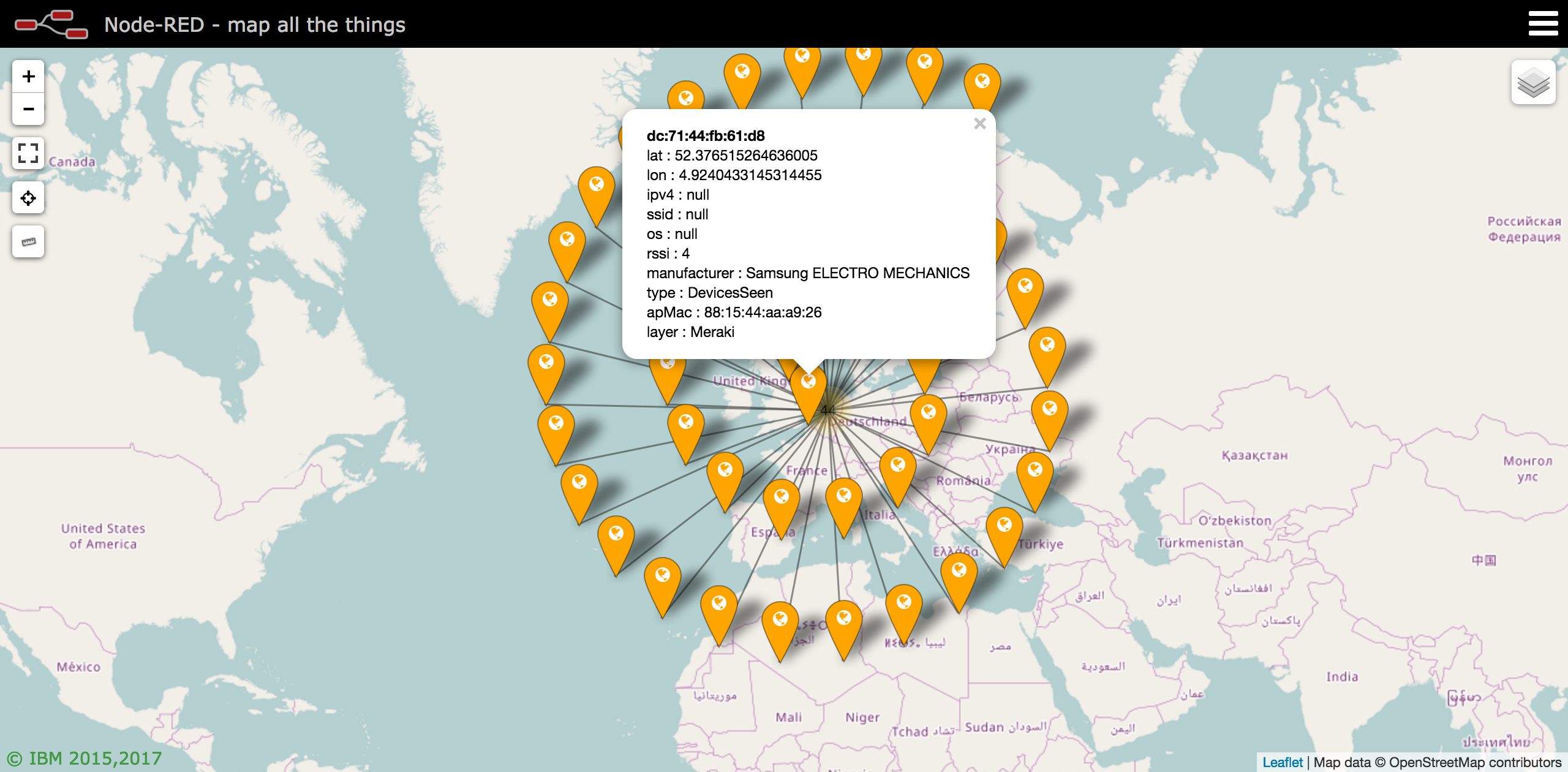
Meraki Location Data on Worldmap
Sample Flow
[{"id":"8d0a63e4.7ff19","type":"debug","z":"9560177e.d80b58","name":"Data","active":true,"console":"false","complete":"payload","x":510,"y":120,"wires":[]},{"id":"e6a6b005.01677","type":"Meraki CMX","z":"9560177e.d80b58","name":"","url":"/scanning","settings":"","radioType":"BluetoothDevicesSeen","x":100,"y":140,"wires":[["8d0a63e4.7ff19","23f1e4d9.3149ec"],["a303ae76.9149d"]]},{"id":"6b254578.dfd17c","type":"debug","z":"9560177e.d80b58","name":"Status: Data","active":true,"console":"false","complete":"true","x":490,"y":200,"wires":[]},{"id":"aa97b7a4.7e4b18","type":"split","z":"9560177e.d80b58","name":"","splt":"\\n","spltType":"str","arraySplt":1,"arraySpltType":"len","stream":false,"addname":"topic","x":330,"y":520,"wires":[["5700cec1.0367b"]]},{"id":"cb89fe11.4c4b5","type":"function","z":"9560177e.d80b58","name":"Extract Observations","func":"// Flatten JSON\nmsg.type = msg.payload.type;\nmsg.apMac = msg.payload.data.apMac;\nmsg.apFloors = msg.payload.data.apFloors\nmsg.apTags = msg.payload.data.apTags;\nmsg.payload = msg.payload.data.observations;\n\nreturn msg;","outputs":1,"noerr":0,"x":240,"y":480,"wires":[["aa97b7a4.7e4b18"]]},{"id":"5700cec1.0367b","type":"debug","z":"9560177e.d80b58","name":"Observation","active":true,"console":"false","complete":"true","x":490,"y":520,"wires":[]},{"id":"a303ae76.9149d","type":"switch","z":"9560177e.d80b58","name":"","property":"topic","propertyType":"msg","rules":[{"t":"eq","v":"data","vt":"str"},{"t":"eq","v":"version","vt":"str"},{"t":"eq","v":"validator","vt":"str"},{"t":"eq","v":"secret","vt":"str"},{"t":"eq","v":"type","vt":"str"},{"t":"eq","v":"error","vt":"str"},{"t":"else"}],"checkall":"true","outputs":7,"x":290,"y":300,"wires":[["6b254578.dfd17c"],["53f245f.0b2c2bc"],["5287b886.c827f8"],["4668f0fa.353d8"],["7946f407.72013c"],["adce6018.ce8af"],["4c7a8875.a90598"]]},{"id":"5287b886.c827f8","type":"debug","z":"9560177e.d80b58","name":"Status: Validator","active":true,"console":"false","complete":"true","x":480,"y":280,"wires":[]},{"id":"4668f0fa.353d8","type":"debug","z":"9560177e.d80b58","name":"Status: Secret","active":true,"console":"false","complete":"true","x":480,"y":320,"wires":[]},{"id":"7946f407.72013c","type":"debug","z":"9560177e.d80b58","name":"Status: Type","active":true,"console":"false","complete":"true","x":490,"y":360,"wires":[]},{"id":"adce6018.ce8af","type":"debug","z":"9560177e.d80b58","name":"Status: Error","active":true,"console":"false","complete":"true","x":490,"y":400,"wires":[]},{"id":"4c7a8875.a90598","type":"debug","z":"9560177e.d80b58","name":"Status: Otherwise","active":true,"console":"false","complete":"true","x":470,"y":440,"wires":[]},{"id":"23f1e4d9.3149ec","type":"link out","z":"9560177e.d80b58","name":"Meraki Scanning","links":["21b70a5e.6a00c6"],"x":275,"y":160,"wires":[]},{"id":"21b70a5e.6a00c6","type":"link in","z":"9560177e.d80b58","name":"Split Observations","links":["23f1e4d9.3149ec"],"x":60,"y":480,"wires":[["cb89fe11.4c4b5"]]},{"id":"ae4f659c.475398","type":"comment","z":"9560177e.d80b58","name":"Workflow Examples","info":"","x":120,"y":440,"wires":[]},{"id":"53f245f.0b2c2bc","type":"debug","z":"9560177e.d80b58","name":"Status: Version","active":true,"console":"false","complete":"true","x":480,"y":240,"wires":[]},{"id":"e7a18191.9674a","type":"comment","z":"9560177e.d80b58","name":"Meraki Scanning Node - README","info":"Update the Meraki node with your Meraki Network's\nvalidator and secret","x":410,"y":60,"wires":[]}]
Owner
Contributors
Github contributorsCategories
Products
Cisco MerakiProgramming Languages
JavaScriptLicense
Apache License 2.0
Code Exchange Community
Get help, share code, and collaborate with other developers in the Code Exchange community.View CommunityCisco provides Code Exchange for convenience and informational purposes only, with no support of any kind. This page contains information and links from third-party websites that are governed by their own separate terms. Reference to a project or contributor on this page does not imply any affiliation with or endorsement by Cisco.