Errors and Troubleshooting
HTTP Status Codes
The CER Configuration API support thes following standard HTTP status codes and error responses.
| Status Code | Status Message | Meaning |
|---|---|---|
| 200 | OK | All looks good |
| 201 | Created New resource | created |
| 400 | Bad Request | Request was invalid |
| 401 | Unauthorized | Authentication missing or incorrect |
| 403 | Forbidden | Request was understood but not allowed |
| 404 | Not Found | Resource not found |
| 405 | Method Not Allowed | Application attempts a wrong method type |
| 500 | Internal Server | Something wrong with the server |
| 503 | Service Unavailable | Server is unable to complete request |
Troubleshooting
The CER Configuration API is always enabled in CER. To enable the logs and troubleshoot pls use the following steps
The API logs are logged separate module under System -> Server Settings -> check on CER_APPSERVICES
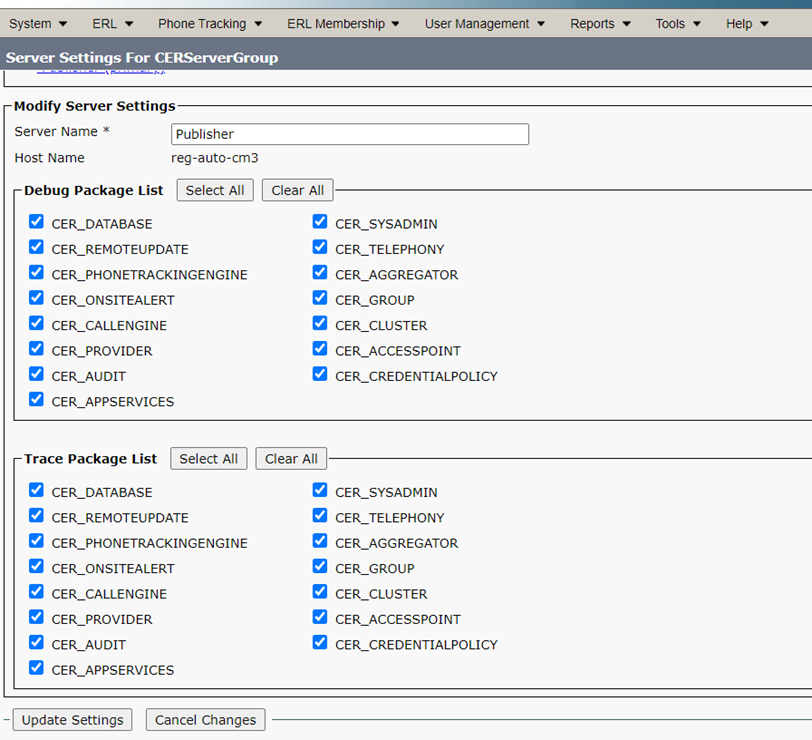
The logged API logs can be viewed /download in Cisco ER Serviceability -> System logs -> CER Logs -> CER API Services

To check API specific error, In the Logs the Request from the corresponding IP’s could be found like, “New REST request received from IP: 10.107.36.74”