Defining Expanded Call Variables
Expanded Call Context (ECC) are data fields used by all applications in the Cisco Unified CCX Cluster. There can be as many as 200 user-defined fields defined in the Field List (index numbers 0-199) of expanded call variables. These field values do not appear in the ContactCallDetail records as there are no fields reserved for them.
The Cisco Unified CCX system, and the Cisco Finesse Desktop pass ECC variables to each other. However, you must separately define ECC variables on both sides of the system that sends and receives the variable data.
To define an ECC variable in the Cisco Unified CCX Editor, do the following.
Procedure
| Step 1 | From the Cisco Unified CCX Editor menu bar, choose . The Expanded Call Variables window appears. 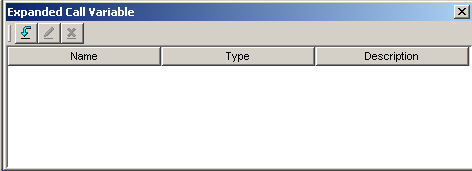 | ||
| Step 2 | In the tool bar, click the Add New Variable (down arrow) icon. The Edit Expanded Call Variable dialog box appears. 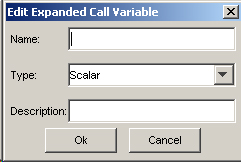 | ||
| Step 3 | In the Name text field, enter the ECC variable name as defined in the Cisco Unified ICME configuration (or the Cisco Finesse Administration using Cisco Unified CCX). | ||
| Step 4 | In the Type drop-down menu, choose the type of expanded call variable (scalar or array). | ||
| Step 5 | In the Description text field, enter a description of the variable. | ||
| Step 6 | Click OK. The Edit Expanded Call Variable dialog box closes, and the variable name, type, and description appear under their respective columns in the Cisco UnifiedICME Expanded Call Variables window (or the Cisco Finesse Administration using Cisco Unified CCX). | ||
| Step 7 | Click the dialog box’s Close (X) button. The Expanded Call Variables window closes, and the ECC variable is now available to your script. It will be listed in the Enterprise Call Info step’s drop-down list as ---name--, where name is the value you entered in the Variable Name field. To define am ECC variable in the Cisco Finesse Administration, select . When creating a new Field, a unique Index number (Index) between 0-199 is assigned. The Field Name (Field Name) is the name of the field called by the layout list and is case sensitive. The Display Name (Display Name) is the name (Field) that will show on the agent desktop with the value of the field.
|