The Accept Step
Continue the SNU.aef script by dragging an Accept step from the Contact palette into the Design pane of the Cisco Unified CCX Editor window.
A script uses an Accept step to accept a contact. (A contact can be a telephone call, an e-mail message, or an HTTP request. In the SNU.aef script, the contact is a call.)
Figure shows the customizer window for the Accept step.
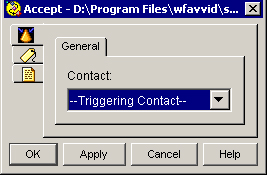
To use the Accept customizer window to configure the Accept step, select a Contact from the drop-down list and click OK.
The Accept customizer window closes, and the name of the Contact variable appears next to the Accept step icon in the Design pane of the Cisco Unified CCX Editor.
The default Contact is “--Triggering Contact--”, which simply means that whichever contact triggers the execution of the script is the triggering contact for this step.