Set Contact Info Step
Use the Set Contact Info step to modify the context information associated with a contact. You can use this step at the begining of the script to mark the contact as handled in the following scenarios: redirect, transfer, terminate, and abandon. The default value for all of these attributes is true.
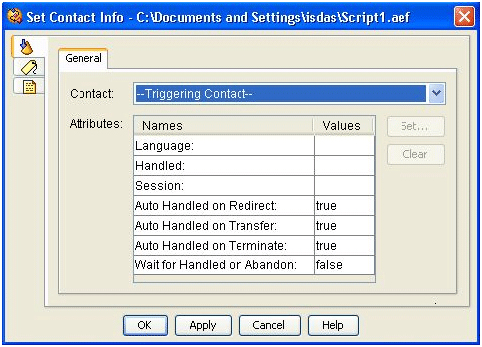
The Set Contact Info step often follows a Redirect step in the script, in order to mark the contact as Handled.
A contact can be marked Handled only while it is active. Once a contact becomes inactive (for example, after a successful transfer), the script has a maximum of 5 seconds to mark the contact as Handled; otherwise the mark will have no effect in reporting.
The system automatically marks a contact as Handled when the contact is connected to a Cisco Unified CCX or Intelligent Contact Management Enterprise (ICME) agent.
Note | You cannot mark a contact as unhandled. Once a contact is reported as Handled, it will always be reported as such. |
The following table describes the properties of the Set Contact Info customizer window
|
Property |
Description |
|---|---|
|
Contact |
Contact variable for which you want to set information. Default is Triggering Contact, unless another contact is defined. |
|
Attributes/Names and Values |
Attribute names and values of contact information types. Valid choices are:
|
|
Set (button) |
Select an attribute and click Set. The following happens:
|
|
Clear (button) |
To remove Attribute information, highlight a value in the list and click Clear. |