The Select Resource Step
Continue the icd.aef script by dragging a Select Resource step from the ACD palette to the Design pane.
Next, configure the Select Resource step to connect a call or to queue it to a specific set of agents configured in the Cisco Unified CCX Administration web interface.
Note | For more information on configuring agents, see the Cisco Unified Contact Center Express Administration and Operations Guide. |
Figure shows the configured Select Resource customizer window.
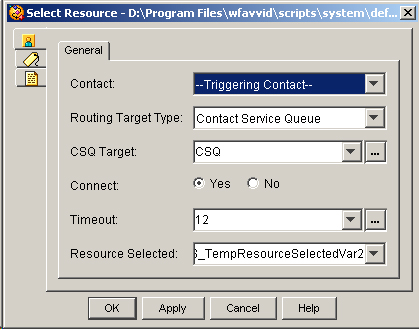
Configure the Select Resource customizer window as follows:
-
Contact—Triggering Contact
The call that triggered the contact is the one that the step connects to the resource.
-
Routing Target Type—Contact Service Queue
Variable indicating the routing method. One of the following:
-
Contact Service Queue - Call will be routed to an available agent in the specified CSQ.
-
Resource - Call will be routed to the specified agent. Select this option for Agent Based Routing feature.
-
Note | If you set this field to Resource, the CSQ Target field is renamed to Resource Target. Resource Routing Target Type is only available for Cisco Unified CCX Enhanced Edition. |
-
CSQ Target—CSQ
The CSQ variable stores Contact Service Queue information from which to find a resource.
-
Connect—Yes
The step automatically connects the call to the available resource the instant the resource becomes available.
Note | If you choose the No option, the step chooses the resource, if available, but does not yet connect the call. You can choose this configuration if you want to add additional Cisco Unified CCX Editor steps to the Selected output branch before using a Connect step to connect the call to the resource. (If the resource is unavailable, the step queues the call.) |
-
Timeout—12
The value 12 seconds is the length of time before the step retrieves the contact back into the queue.
-
Resource Selected—SRS_TempResourceSelectedVar2
The SRS_TempResourceSelectedVar2 user variable identifies the selected agent or Resource.
The Select Resource step contains two output branches, Connected and Queued:
-
Connected—If a resource is available, the Connected output branch executes, and the Select Resource step connects the call.
-
Queued—If a resource is not available, the Queued output branch executes, and the call is placed in a queue.