Get User Info Step
Use the Get User Info step to make user attributes available to the script.
Note | To support E.164 compliance, Unified CCX allows you to add “+” preceding to an agent extension or a route point directory number. |
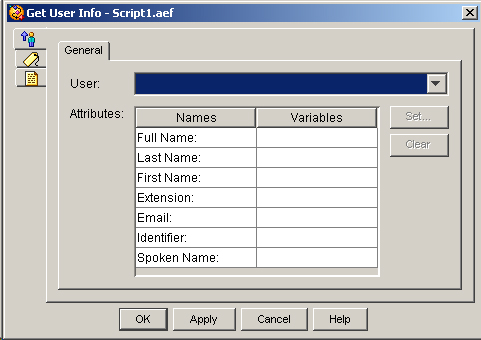
The following table describes the properties of the Get User Info customizer window:
|
Property |
Description |
||
|---|---|---|---|
|
User |
The variable that identifies the user for whom you want to get information. |
||
|
Attributes (Names and Variables) |
The attribute names with the associated variables for the user.
|
||
|
Set (button) |
To set a variable, select an Attribute name and click Set. Choose a variable from the Select Variable drop-down list and then click OK; the variable name appears in the Variable column next to the attribute you selected. |
||
|
Clear (button) |
To remove User information, highlight a value in the list and click Clear. |
The following table describes the attributes that can be retrieved by using the Get User Info step:
|
Attribute |
Description |
|---|---|
|
|
String representing the e-mail ID for this user. The user ID field is currently returned. |
|
Extension |
String representing the primary extension selected in the User pages of the Cisco Unified CCX Administration web interface. |
|
First Name |
String for the first name of the user. |
|
Full Name |
String for the full name of the user as configured in the Cisco Unified CCX Administration web interface. |
|
Last Name |
String for the last name of the user. |
|
Spoken Name |
Document object representing the recorded name of the user. |
|
identifier (User ID) |
The user ID of the user as configured in the Cisco Unified Communications Manager. |