Examples
Find end-to-end path from Sender to Receiver
Find end-to-end path
import requests
import json

"""
Modify these please
"""
url='https://<dcnm-ip>/rest/pmn/topology/pathtrace/<sender-ip>-<multicast-ip>-active/<sender-ip>/<receiver-ip>'
dcnmuser='<User_ID>'
dcnmpassword='<Password>'

{
  routes:[
            {
              "destinationNodeName": <destination host IP address or switch name>,
              "startingNode": <starting host IP address or switch name>,
              "isReceiverHost": <true or false>,
              "details": {
                            "interface1Name": <starting interface name>,
                            "destinationNodeName": <destination host IP address or switch name>,
                            "interface1DestName": <destination interface name>,
                            "startingNodeName": <starting host IP address or switch name>
                        },
              "interfaceId": <starting-interface-database-id>,
              "interfaceName":  <starting interface name>,
              "interfaceNameDestination": <destination interface name>,
              "isSenderHost": <true or false>,
              "interfaceIdDestination": <destination-interface-database-id>,
              "startingNodeName": <starting host IP address or switch name>,
              "destinationNode": <destination host IP address or switch name>
            }
        ],
  topology:{
            pathtrace: […],
            nodeGroupList: […],
            edgeList: […],
            nodeList: […],
            edgeGroupList: []
            }
}
{
  routes: [
            {
                destinationNodeName: "pmn-108-leaf",
                startingNode: "1.1.1.1",
                isReceiverHost: false,
                details:
                {
                    interface1Name: "Ethernet1/8",
                    destinationNodeName: "pmn-108-leaf",
                    interface1DestName: "Ethernet1/8",
                    startingNodeName: "1.1.1.1"
                },
                interfaceId: 90,
                interfaceName: "Ethernet1/8",
                interfaceNameDestination: "Ethernet1/8",
                isSenderHost: true,
                interfaceIdDestination: 90,
                startingNodeName: "1.1.1.1",
                destinationNode: "80"
            },
            {
                destinationNodeName: "pmn-107-spine",
                startingNode: "80",
                details:
                {
                    interface1Name: "Ethernet1/1",
                    destinationNodeName: "pmn-107-spine",
                    interface1DestName: "Ethernet1/1/3",
                    startingNodeName: "pmn-108-leaf"
                },
                interfaceId: 590,
                interfaceName: "Ethernet1/1",
                interfaceNameDestination: "Ethernet1/1/3",
                interfaceIdDestination: 4270,
                startingNodeName: "pmn-108-leaf",
                destinationNode: "3200"
            },
                {
                destinationNodeName: "pmn-109-leaf",
                startingNode: "3200",
                details:
                {
                    interface1Name: "Ethernet1/1/2",
                    destinationNodeName: "pmn-109-leaf",
                    interface1DestName: "Ethernet1/1",
                    startingNodeName: "pmn-107-spine"
                },
                interfaceId: 4240,
                interfaceName: "Ethernet1/1/2",
                interfaceNameDestination: "Ethernet1/1",
                interfaceIdDestination: 2640,
                startingNodeName: "pmn-107-spine",
                destinationNode: "2130"
            },
            {
                    destinationNodeName: "2.2.2.2",
                    startingNode: "2130",
                    isReceiverHost: true,
                    details:
                    {
                        interface1Name: "Ethernet1/9",
                        destinationNodeName: "2.2.2.2",
                        interface1DestName: "Ethernet1/9",
                        startingNodeName: "pmn-109-leaf"
                    },
                    interfaceId: 2210,
                    interfaceName: "Ethernet1/9",
                    interfaceNameDestination: "Ethernet1/9",
                    isSenderHost: false,
                    interfaceIdDestination: 2210,
                    startingNodeName: "pmn-109-leaf",
                    destinationNode: "2.2.2.2"
            }
            ],
topology:
            {
                pathtrace: { },
                nodeGroupList: [ ],
                edgeList: [],
                nodeList: [],
                edgeGroupList: [ ]
            }
}
Response Schema
It returns a JSON object which has keys on routes and topology. For the end-to-end path, you can ignore the "topology" key. The path is defined inside the "routes" key, and the value of the route key is an array of segment. In each segment, the "details" key is significant, because its value represents a unidirectional edge from startingNodeName with interface1Name to destinationNodeName with interface1DestName. For the first and last segment, the interface1Name inside the "detail" key is the same as the interface1DestName. The first segment isSenderHost has value of true, the last segment isReceiverHost has value of true.
Note: This sample response is generated for Cisco Data Center Network Manager, Release 11.0(1).
Sample end-to-end path
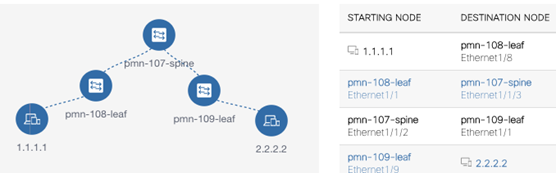
The above diagram shows the end-to-end path from sender host IP 1.1.1.1 to receiver host IP 2.2.2.2. It is composed of four segments. In the corresponding response, under the "routes" key, we should have four segments or objects. Each segment is unidirectional from source to destination.
Note: The source node of the first segment does not show the interface name and the last segment Destination Node, because they carry the same value as the other end of the interface name.
Fetch Bandwidth of a Fabric Link
Fetch Bandwidth of a Fabric Link
import requests
import json

"""
Modify these please
"""
url='https://<dcnm-ip>/rest/pmn/topology/linkbw/<starting-switch-database-id>/<starting-interface-database-id>/to/<destination-switch-database-id>/<destination-interface-database-id>'
dcnmuser='<User_ID>'
dcnmpassword='<Password>'

{
  "linkid": "<starting-switch-database-id>/<starting-interface-database-id>/<destination-switch-database-id>/<destination-interface-database-id>",
  "bandwidth": {
                "tx": {
                      "usable": <string format with units of gb/s or mb/s or bits/s>,
                      "available": <string format with units of gb/s or mb/s or bits/s>,
                      "capacity": <string format with units of gb/s or mb/s or bits/s>,
                      },
                "rx": {
                      "usable": <string format with units of gb/s or mb/s or bits/s>,
                      "available": <string format with units of gb/s or mb/s or bits/s>,
                      "capacity": <string format with units of gb/s or mb/s or bits/s>
                      }
                },
  "linkname": <starting-switch-name>/<starting-interface-name>-<destination-switch-name>/<destination-interface-name>
}
{
  "linkid": "2130/2640-3200/4240",
  "bandwidth": {
                "tx": {
                      "usable": "8 gb/s",
                      "available": "8 gb/s",
                      "capacity": "10 gb/s"
                      },
                "rx": {
                      "usable": "8 gb/s",
                      "available": "8 gb/s",
                      "capacity": "10 gb/s"
                      }
                },
  "linkname": "pmn-109-leaf/Ethernet1/1-pmn-107-spine/Ethernet1/1/2"
}
Response Schema
It returns a JSON object with "linkid", "bandwidth", and "linkname" keys. The linkid is the same as the URL path suffix after the linkbw. The linkname shows the corresponding switch or interface name specified in the linkid. The bandwidth object, contains tx which stands for transmit, and rx stands for receive. rx carries the ingress bandwidth of the starting switch, and tx carries the ingress bandwidth of the destination switch. The value of usable will have the value of available minus the reserved-bandwidth. The "capacity" key will carry the physical capacity of the link (for example: 10G). The value of the usable, available, and capacity is in string format and contains the unit as gb/s, mb/s or bits/s. If all the value of usable, available and capacity is "0", it implies that there is an issue in getting the bandwidth information from the switch. The issue can be an authentication error or a timeout issue.
Note: This sample response is generated for Cisco Data Center Network Manager Release 11.0(1).
Get Topology Nodes and Edge to find Switch or Interface database ID
Get Topology Nodes and Edge
import requests
import json

"""
Modify these please
"""
url='https://<dcnm-ip>/rest/pmn/topology'
dcnmuser='<User_ID>'
dcnmpassword='<Password>'
{
  "nodeList": [...],
  "edgeList": [
                {
                  "id": "2130:2640_3200:4240",
                  "srcId": "3200",
                  "destId": "2130",
                  "cssClass": "sb-health-critical topo_bandwidth_down",
                  "tags": null,
                  "data": {
                    "fabricKey": null,
                    "switch1": null,
                    "switch2": null,
                    "sw1Id": 2130,
                    "sw2Id": 3200,
                    "lastScanTime": 0,
                    "numVsan": 0,
                    "operMode": 0,
                    "status": "last seen 2018/08/10-15:58:12",
                    "operStatusCause": 0,
                    "port1": null,
                    "port2": null,
                    "speedStr": "10Gb",
                    "speed": 10000000000,
                    "vsanMembership": null,
                    "isChannel": false,
                    "channel_id": -1,
                    "displayHdrs": [
                                      "Fabric",
                                      "Vsans",
                                      "From Switch",
                                      "From Interface",
                                      "To Switch",
                                      "To Interface",
                                      "Speed",
                                      "Status"
                                    ],
                    "displayValues":[
                                      "Default_LAN",
                                      "",
                                      "pmn-109-leaf",
                                      "Ethernet1/1",
                                      "pmn-107-spine",
                                      "Ethernet1/1/2",
                                      "10Gb",
                                      "last seen 2018/08/10-15:58:12"
                                    ],
                    "index": 2,
                    "fromSwitch": "pmn-109-leaf",
                    "toSwitch": "pmn-107-spine",
                    "fromInterface": "Ethernet1/1",
                    "toInterface": "Ethernet1/1/2",
                    "fabricName": "Default_LAN",
                    "vsanStr": "",
                    "network": "LAN",
                    "data": null,
                    "fromInterfaceIndex": 0,
                    "toInterfaceIndex": 0,
                    "sw1Wwn": null,
                    "sw2Wwn": null,
                    "sp1Id": 2640,
                    "sp2Id": 4240,
                    "sp1OperStatus": 0,
                    "sp2OperStatus": 0,
                    "islid": 4830,
                    "scope": null,
                    "memberIsl": null,
                    "memberLinks": null,
                    "isFexIsl": false,
                    "isViaFex": false,
                    "isVpcPeerLink": false,
                    "pmnTxConsumedBandwidth": 0,
                    "pmnRxConsumedBandwidth": 0,
                    "pmnTotalBandwidth": 0,
                    "maxRx": -1,
                    "maxTx": -1,
                    "totalRxTx": -1,
                    "sourceIfIndex": 436207616,
                    "destIfIndex": 939528192
                  },
                      "isFexIsl": false,
                      "isViaFex": false
                }
            ],
  "nodeGroupList": [],
  "edgeGroupList": [],
  "pathtrace": {}
}
From the response, the "edgeList" array is significant, which contains a list of objects. Inside each object, the following keys/fields contains the switch or interface name/database id. We can make use of this information to provide the mapping between switch name to switch database-id and interface name to interface database-id and vice versa.
Note: This sample response is generated for Cisco Data Center Network Manager Release 11.0(1).
| Key | Description | Example |
|---|---|---|
| data { sw1Id } | Key sw1Id inside key "data". It contains the database id corresponding to the "fromSwitch" key. | 2100 |
| data { sw2Id } | Key sw1Id inside key "data". It contains the database id corresponding to the "toSwitch" key. | 3200 |
| fromSwitch | The name of the starting switch. | pmn-109-leaf |
| toSwitch | The name of the destination switch. | pmn-107-spine |
| sp1Id | Database id of the starting interface. | 2640 |
| sp2Id | Database id of the destination interface. | 4240 |
| fromInterface | The name of the starting interface. | Ethernet1/1 |
| toInterface | The name of the destination interface. | Ethernet1/1/2 |