Application types
Broadly, IOx applications can be categorized as below:
PaaS style apps: These applications are more portable, typically developed using dynamic languages such as Java, Ruby, Python etc, and are designed to run in specific PaaS frameworks.
Container apps: These apps are comprised of application code, 3rd party dependent libraries, native binaries (and entire root file system, minus the kernel) packaged into one archive.
Docker style apps: These applications are similar to LXC/Container style applications. The only difference is at the time of application development, where the developer can use docker tooling to generate their root file system.
VM packaged apps: These are applications packaged as virtual machines. It contains complete OS (kernel + root file system), libraries, and application code packaged into one package.
An application typically comprises of the following artifacts:
- Application code / binaries
- Specific third party dependencies
- Any OS library dependencies
Further, applications may have various dependencies on web servers, database servers, OS kernel version, kernel drivers etc. The portability of application to different hosting environments decreases as the dependency on lower level OS and Kernel aspects increases. And depending on application type, who is responsible for which application component varies and also drives the portability of applications.
PaaS style applications
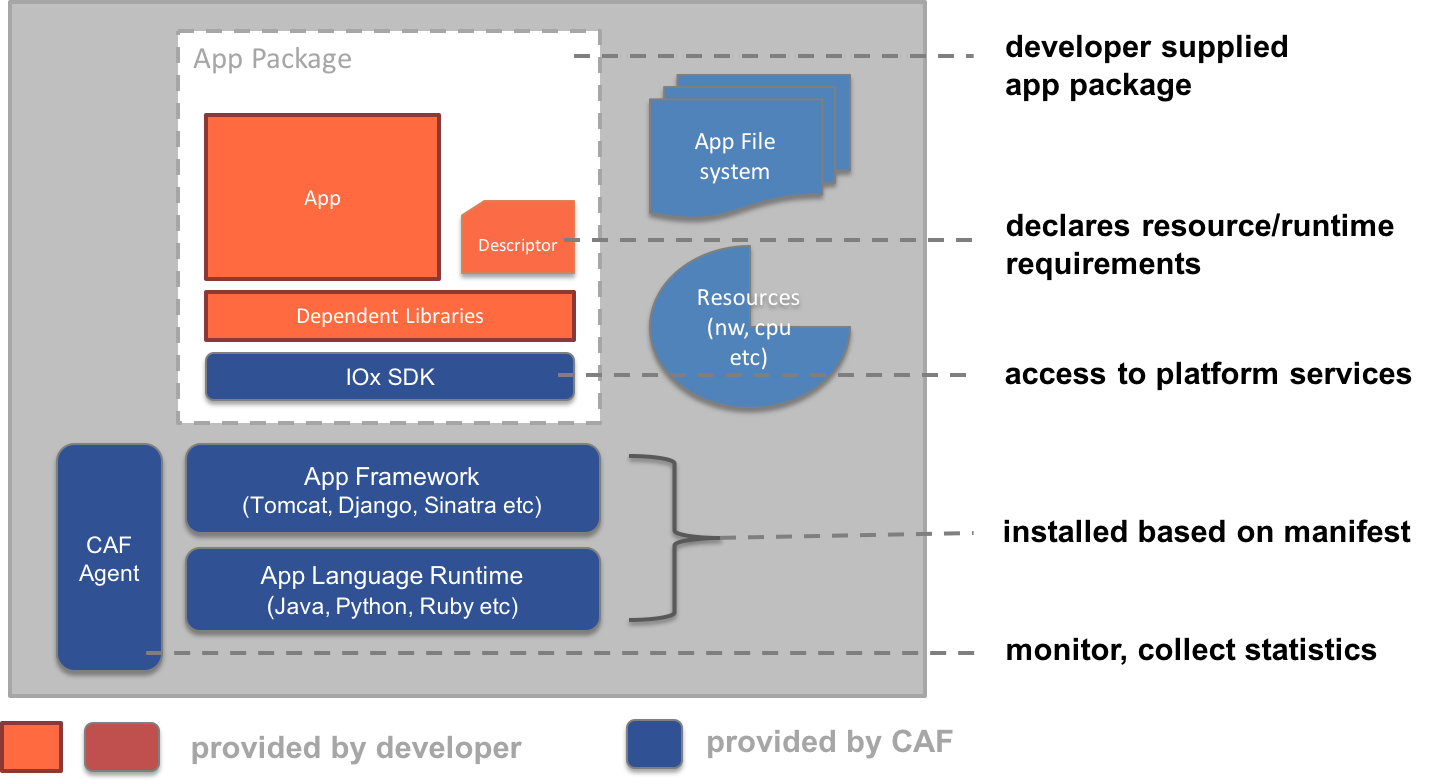
These applications are self-contained, portable, typically developed using portable languages such as Java, Ruby, Python etc, and are designed to run in PaaS framework provided by CAF.
In this case, the application developer is responsible for the following application artifacts:
- Application code
- Dependent libraries
- Configuration files, scripts etc
- Application descriptor file that captures application’s metadata and runtime requirements.
During application deployment, CAF provides provides the necessary application container, sets up required language runtime and starts the application. The following diagram depicts which of the application components are provided by developer and which are supplied by CAF during deployment.
PaaS style apps are particularly suitable for:
- Greenfield applications
- Low-end network devices that do not have lot of resources
- Rapid development of new applications that can make use of IOx middleware services
- Applications that do not have any native dependencies such as low level kernel drivers, natively compiled binaries etc.,
Some Pros and Cons:
- Self contained, Portable across many hosting environments
- Complete flexibility to developer on choice of language and entire framework stack except for some OS specific libraries.
- Order of magnitude smaller in size as applications contain only application specific code and dependent libraries.
- Developer doesn't have to worry about how to bring the required language runtimes into the environment, cross compilation process etc.,
- Existing generic Java, Python applications would need minor changes to run in CAF PaaS framework.
- Existing (Brownfield) applications may not easily yield to be a PaaS style app
- Complex applications that have multiple artifacts written in different languages cannot be packaged as a PaaS app
- Applications that have kernel level dependencies cannot be PaaS apps
- CAF may not support the language runtime needed by the application (Ex. An app may be written in Ruby, but CAF may not support it on the hosting environment) in which case PaaS cannot be used.
Container style applications
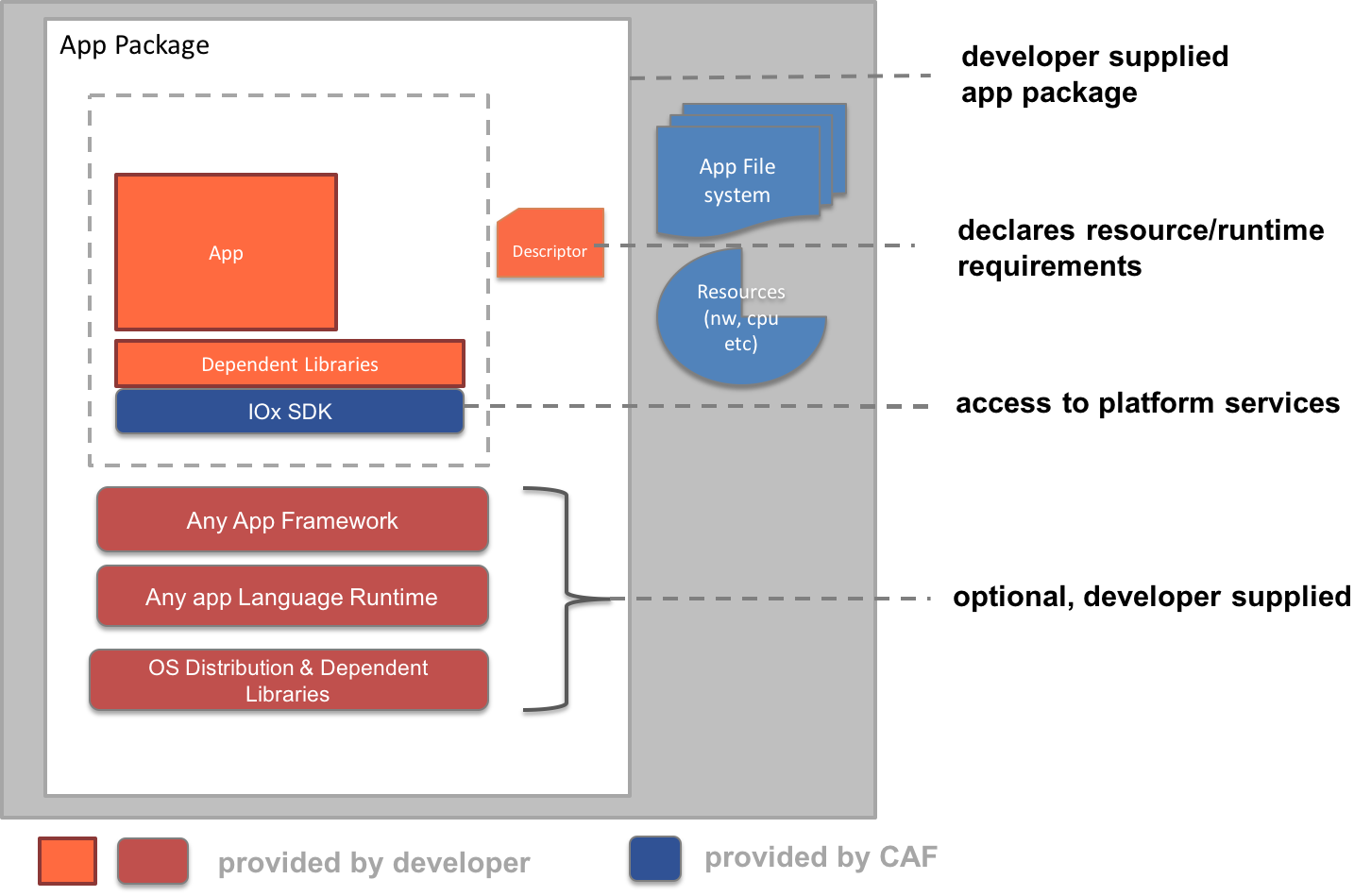
These applications are compiled to run natively on a Host OS and is self-sufficient in a given Host OS environment.
A developer is responsible for the following application artifacts:
- Compiled application code
- Dependent libraries
- Configuration files, scripts etc
- Any Language runtimes and frameworks used by application
- Complete root file system
- Application descriptor file that captures application’s metadata and runtime requirements.
Container style apps provide some additional flexibility over PaaS style apps, but have a dependency on the Host OS environment such as specific (or minimum) version of the kernel.
Some Pros and Cons:
- Self contained but application is aware and tied to Host OS environment and container framework (lxc/docker etc.,).
- These applications must be compiled to the target device's cpu architecture and therefore will not be portable across devices.
- Complete flexibility to developer on choice of language and entire framework stack.
- Application size will be relatively bigger than PaaS style apps since these apps must bring the entire OS distribution
Docker style applications
The docker style applications are very similar from deployment standpoint to container applications described in the section above. The only notable difference the build process - developer would make use of docker tooling to create application root file system.
VM Packaged applications
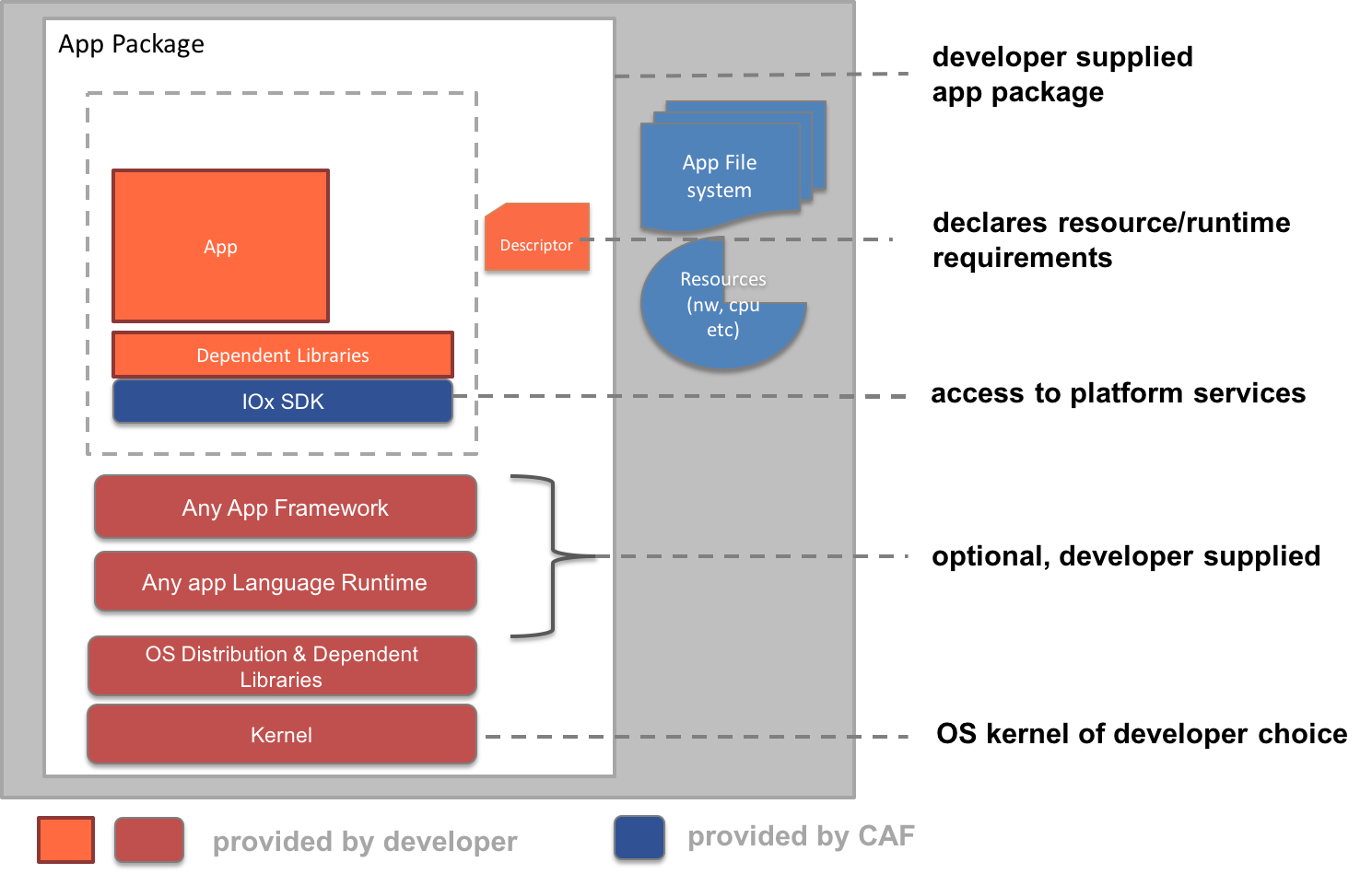
These are applications packaged as virtual machines. That is, the virtual machine contains OS, libraries, and application code packaged into one package
A developer is responsible for the following application artifacts:
- Application code
- Dependent libraries
- Configuration files, scripts etc
- Language runtimes and frameworks
- Root file system
- OS kernel
- Application descriptor file that captures application’s metadata and runtime requirements.
VM Packaged apps are particularly suitable if:
- Application has a dependency on a specific kernel version that is not provided by the hosting platform
- Application needs custom device drivers to be installed, for example customer brings his own hardware module/interface that can be plugged into router.
- Legacy applications
- Applications that need a specific and custom OS environment
- Applications that need BYOI (Bring your own interface) & BYOS (Bring your own OS) support with the ability to install custom device drivers
Some Pros and Cons :
- Self contained
- These types of applications are also tied to hosting hardware’s processor architecture.
- Application is also tied to the underneath hypervisor infrastructure (ex. KVM/QEMU)
- Complete flexibility to include any custom kernel patches, loadable kernel modules etc.
- Application size will be order of magnitudes bigger than PaaS style since it must bring complete rootfs and kernel
- Developers need to do significant amount of work to package (& maintain) the application into this format.
Criteria and Rules
This section summarizes different application types, behaviors and rules associated with each of them.
|
App Type |
App Package Contents |
App Startup |
App Networking |
Access to environment variables |
Misc Rules/Remarks |
|
PaaS style |
- Application descriptor file (package.yaml) - Bootstrap config file (package_config.ini) : Optional - Application code, dependent libraries, config files etc., |
- CAF orchestrates the application startup. - Application is provisioned into an appropriate container and the main entry point specified in startup->target section of package.yaml is run. |
- CAF sets up networking for the application. - Application need not worry about setting up network config, running dhcp etc., |
Environment variables will be injected into the process namespace of the entrypoint process. Applications can use language specific constructs to access environment variables. For ex., python apps can use os.getenv(VAR) construct. |
- PaaS apps are by definition portable. Therefore the app cannot contain any native code. - Can request for language runtime cartridges. |
|
Container / LXC style |
- Application descriptor file (package.yaml) - Bootstrap config file (package_config.ini) : Optional - Application code, dependent libraries, config files etc., - Complete root file system that contains: - application code, dependent libraries, binaries etc., - dependent language runtimes - other utilities, daemons that are required |
- CAF starts the container's entry point. - Typically MUST use an init system (ex. /sbin/init) - The app/container should ensure the init system then starts the required daemons, application processes etc., |
- CAF hooks up the container to appropriate logical networks. - However, the application has to ensure that appropriate network configuration is setup (ex. /etc/network/interfaces, running dhcp client etc.,) |
Environment variables are stored in a sourceable file at /data/.env. The processes within the container can source this file to access enviornment variables. |
- Cannot request or use cartridges |
|
Docker style |
- Application descriptor file (package.yaml) - Bootstrap config file (package_config.ini) : Optional - Application code, dependent libraries, config files etc., - Complete root file system in docker image format that contains: - application code, dependent libraries, binaries etc., - dependent language runtimes - other utilities, daemons that are required |
- Application MUST not use an init system. - CAF orchestrates the application startup by running the entry point specified in startup->target section of package.yaml |
- CAF sets up networking for the application. - Application need not worry about setting up network config, running dhcp etc., |
Environment variables will be injected into the process namespace of the entrypoint process. Applications can use language specific constructs to access environment variables. For ex., python apps can use os.getenv(VAR) construct. |
- Cannot request or use cartridges |
|
VM style |
- Application descriptor file (package.yaml) - Bootstrap config file (package_config.ini) : Optional - Application code, dependent libraries, config files etc., - Complete root file system in docker image format that contains: - application code, dependent libraries, binaries etc., - dependent language runtimes - other utilities, daemons that are required - MUST also contain a suitable kernel |
- CAF boots the kernel or the bootup disk |
- CAF hooks up the VM to appropriate logical networks. - However, the application has to ensure that appropriate network configuration is setup (ex. /etc/network/interfaces, running dhcp client etc.,) |
Environment variables are stored in a sourceable file at /data/.env. The processes within the container can source this file to access enviornment variables. |
- Cannot request or use cartridges |