CML 2.10 Release Notes
Cisco Modeling Labs (CML) is a network simulation platform. CML 2.10 is the latest feature release of CML. This release introduces Model Context Protocol (MCP) Server integration for your AI tools, packet capture streaming, lab autostart, and node staging improvements. The reference platform image set now includes XRd, Meraki vMX, Snort3, and Wireless images. Other notable updates include custom icon enhancements, unmanaged switch improvements, and experimental support for wireless networking and RADIUS user authentication to CML.
New and Changed Information
This table shows published changes to this CML 2.10 release notes document.
| Date | Changes |
|---|---|
| October 15, 2026 | Updated guidance for CML 2.10.1 upgrades. |
| October 1, 2026 | CML 2.10.1 maintenance release. See Summary of Changes, Bug Fixes, and Known Issues and Caveats for the list of changes in CML 2.10.1. |
| July 11, 2026 | Updated Known Bugs with new issues that affect CML 2.10. |
| May 13, 2026 | Initial version for CML 2.10.0 FCS relase. |
Installing or Migrating to CML 2.10
Upgrading to CML 2.10
Take these steps before upgrading your CML intance:
- Review Known Issues and Caveats before upgrading.
- Unless you are performing an offline upgrade, ensure that your network environment allows connections to Docker repositories hosted at
https://download.docker.comover the Internet. Otherwise, the upgrade to CML 2.10.1 will fail. - Don't forget to disable maintenance mode after the upgrade is complete.
Your upgrade path depends on which version of CML you are currently running.
| Current CML Version | Upgrade Path |
|---|---|
| CML 2.7.2 or later | You may perform an in-place upgrade directly to CML 2.10.1. See the In-Place Upgrade page for detailed upgrade instructions. |
| CML 2.3.0 - CML 2.7.1 | If your CML instance is older than CML 2.7.2, you cannot upgrade it directly to CML 2.10.1. You must first perform an in-place upgrade to CML 2.7.2. Once you have successfully upgraded to CML 2.7.2, you may perform an in-place upgrade to CML 2.10.1. If you have not upgraded to CML 2.7.2 yet, see the CML 2.7 Release Notes for more details about the process to upgrade to CML 2.7.2. |
| CML 2.2.3 or earlier | If your current CML instance is version 2.2.3 or earlier, please contact CML Support for assistance with your upgrade. In-place upgrades are not supported from these older releases, and a migration is required. The migration process from CML 2.2.3 is detailed in the CML 2.7 Release Notes. Once you have migrated your data to the new CML 2.7.2 instance, you will be able to perform in-place upgrade from CML 2.7.2 to CML 2.10.1. |
Upgrading a CML Cluster to CML 2.10
If you have deployed a CML Cluster, you may upgrade it to CML 2.10.1 provided that your CML cluster is already running CML 2.7.2 or later.
Installing CML 2.10
The CML Installation Guide provides the required installation workflow.
- Verify the latest System Requirements.
- In CML 2.10, all the reference platform virtual machine (VM) images must be copied to the local disk of the CML instance. Be sure to provision enough disk space for your new CML instance to accommodate the reference platforms.
- During Initial Set-Up, wait for services to stabilize before continuing.
Summary of Changes
This section details new and changed features in the new release. Bug fixes are listed in the subsequent section.
Model Context Protocol (MCP) Server for Better AI Integration with CML
MCP enables you to interact with CML using English, or one’s local language, commands using your preferred AI tool. MCP is a protocol that helps AI understand how to interact with APIs. Once you configure your AI tool with the CML MCP Server, you will be able to create topologies with configured nodes, run commands on the nodes, and evaluate the network without complex scripting or calling the CML APIs yourself. Overall, this feature will allow users to Speak their lab into Existence with AI-Driven Cisco Modeling Labs and MCP.
Custom Icons
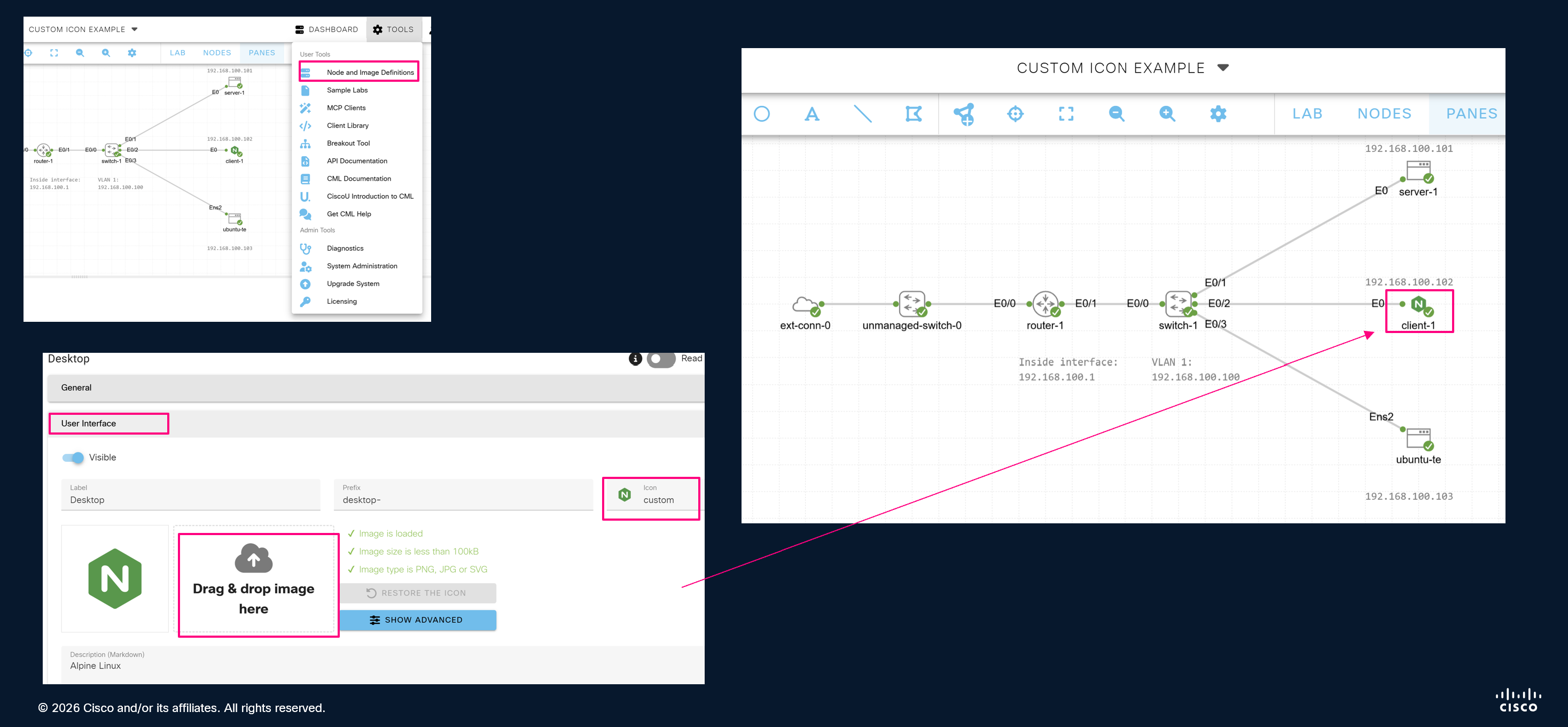
We have gotten numerous requests for custom node icons ever since the first CML release. In CML 2.10, this feature is now available for users to be able to set and assign custom icons within lab topologies. When you override the default node icons, you also have the option to include custom icons when you export or import the lab.
Packet Capture Streaming
Prior to CML 2.10, you could only see active packet capture traffic in the CML UI. The CML UI can show active packet captures in the Link Packet Capture pane, which provides the ability to expand each packet to see the decoded messages. In CML 2.10, you are now able to configure the Breakout UI and stream the captured data through it into Wireshark instances that run on your local computer. This feature allows more convenient packet analysis as the data arrives.
Lab Autostart
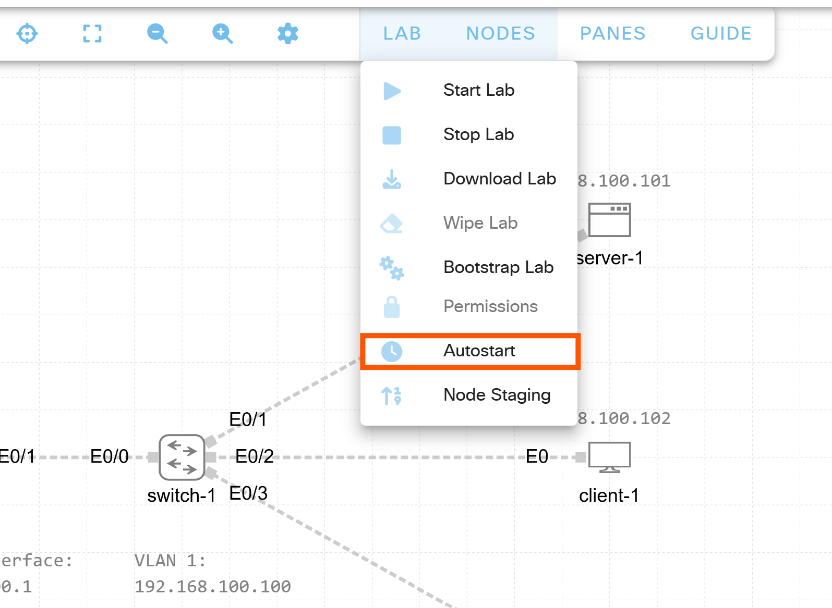
If you would like a specific lab to start automatically as soon as the CML server boots up, check out the Lab AutoStart feature in CML 2.10. If you’re a CML administrator, you can now flag a lab for "autostart." You can even flag multiple labs and set a stage value to dictate the order that CML should start the flagged labs. Lab AutoStart is especially useful in an education environment, where you may be using CML to simulate the same sample network for each student. CML-Enterprise administrators who always want CML to run a simulation of their company’s production network or individual learners who are using a particular lab for their studies may also find Lab AutoStart useful.
Node Staging
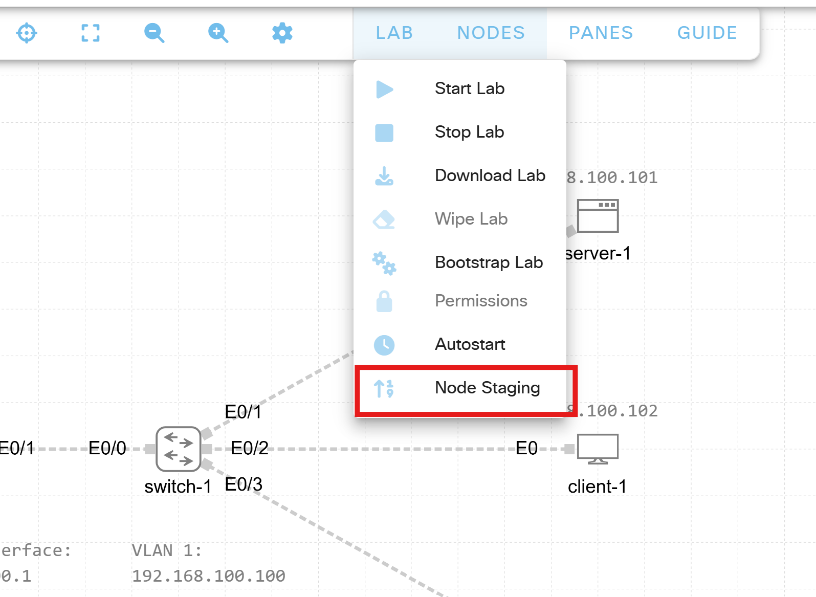
The Node Staging feature in CML 2.10 allows you to set priorities on nodes in your lab to control the order that CML starts the nodes when you start the lab. If you are using resource-intensive node types, such as IOS XRv 9000 or NX-OS 9000, in your CML labs, node staging may help you ensure that all of the nodes in your lab reliably boot up when you start the lab. When you use this feature, CML starts nodes with a higher priority first, and it waits for all nodes with a higher priority to finish booting up before it starts any nodes with a lower priority.
While Node Staging priorities are not generally needed to start labs in CML, specific labs may start up more reliably when you use this feature. In particular, if you have a lab where some nodes fail to boot up to the prompt when you start the lab, but all of the nodes seem to run well and without error once you stop and restart the nodes that initially failed to boot up, you should consider using this feature. By tuning the order in which CML starts the lab’s nodes and the number of resource-intensive nodes that CML starts up simultaneously, you may be able to ensure that all nodes boot up reliably when you start the lab.
Unmanaged Switch Improvements
CML 2.10 adds an additional option for your unmanaged switches that allows you to toggle it to behave as a hub for SPAN support. This feature will allow traffic from a device to go to another device for troubleshooting or learning purposes.
RADIUS User Authentication (beta)
CML 2.10 Enterprise and Education deployments now support RADIUS as a method for user authentication. RADIUS authentication is currently a beta feature, and it is disabled by default while functionality is still being expanded. Early customer feedback is requested, and you can submit your feedback on this feature by sending e-mail to [cml-info@cisco.com](mailto:cml-info@cisco.com?subject=CML RADIUS feedback) with subject "CML RADIUS feedback".
Enable the RADIUS Authentication Option
Before you can use RADIUS as an authentication method, you must first enable this feature for your CML instance. Edit /etc/default/virl2 and set CML_FEATURES to include radius.
# Optional feature toggles are configured via CML_FEATURES as a
# comma-separated feature list (for example: "foo,bar,baz").
CML_FEATURES="radius"
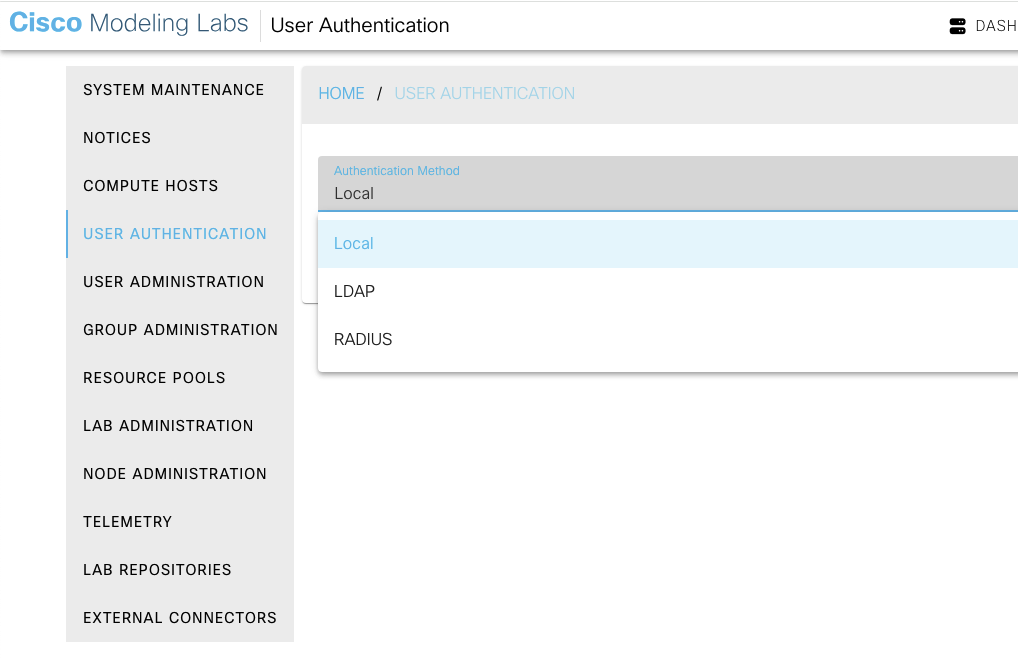
After this change, restart controller services with systemctl restart virl2.target. RADIUS now appears as a selectable option in the Authentication Method dropdown.
Wireless Support
Wireless support is available starting in CML 2.10. We will be introducing this feature in phases across multiple CML releases. CML's wireless support will provide network engineers, students, and instructors with a realistic, comprehensive, and flexible virtual environment to design, test, troubleshoot, and learn about wireless network technologies.
CML 2.10 adds beta support for simulated Wi‑Fi in the lab so you can run wireless clients and access points alongside your wired nodes--no physical radios required. Wireless-capable nodes use a reference image based on Ubuntu 24.04 with wireless support included. This support includes a virtual wireless radio and either wpa_supplicant and hostapd, which facilitates the wireless client and wireless AP's, respectively.
Updated Docker Images on GitHub
In this release, Docker images will be released via GitHub with updates for container images. This approach is beneficial for images that are fast-moving, like Chrome and Firefox, and will include all CML Docker-based node and image definitions that are built from open source, It will also include Docker images that are publicly available on hub.docker.com, like ThousandEyes and Splunk.
New Reference Platform Images
Starting with CML 2.10, the updated reference platform content includes additional images to support expanded lab scenarios and newer product workflows. The image set now includes IOS XRd, Meraki vMX, Snort3, and wireless images aligned with the 2.10 feature set. The 2.10 documentation cycle also includes FAQ and reference-platform page refreshes to keep image/version guidance consistent, including dedicated page updates for each newly added image.
| Image | Description |
|---|---|
| XRd | Containerized XRd image support for XR-focused lab topologies and API-driven workflows. |
| Meraki vMX | Virtual Meraki vMX image availability for SD-WAN and cloud-edge use cases in CML labs. |
| Snort3 | Snort3 container image support for security and traffic inspection scenarios. |
| Wireless | New wireless image coverage aligned with 2.10 experimental wireless workflows and dedicated refplat image-page documentation. |
API Changes
CML 2.10 includes several changes to the REST-based web service APIs. For details about a specific API, log in to the CML UI and click Tools > API Documentation to view the CML API documentation page.
APIs Removed in CML 2.10
| API Endpoint | Alternative API Endpoint |
|---|---|
GET /build_configurations |
PUT /labs/{lab_id}/bootstrap |
GET /licensing/features |
GET /licensing |
PUT /system/auth/config |
PATCH /system/auth/config |
POST /feedback |
None |
APIs Deprecated in CML 2.10
| API Endpoint | Alternative API Endpoint |
|---|---|
GET /authok |
GET /api/v0/authentication |
GET /diagnostic_event_data |
None |
GET /image_definition_schema |
None |
GET /simplified_node_definitions |
GET /node_definitions |
GET /node_definition_schema |
None |
GET /labs/{lab_id}/links/{link_id}/capture/key |
No alternative. Capture key is now the same as the link ID. |
APIs to be Removed in CML 2.11
| API Endpoint | Alternative API Endpoint |
|---|---|
GET /users/{user_id}/groups |
GET /users/{user_id} |
GET /groups/{group_id}/labs |
GET /groups/{group_id} |
GET /groups/{group_id}/members |
GET /groups/{group_id} |
GET /system_archive |
Use combination of other existing endpoints yielding specific subset of archive data. |
GET /labs/{lab_id}/groups |
GET /labs/{lab_id}/associations |
PUT /labs/{lab_id}/groups |
PATCH /labs/{lab_id}/associationsPATCH /labs/{lab_id} |
New APIs in CML 2.10
| API Endpoint | Description |
|---|---|
GET /ai/mcp/configuration |
Get MCP (Model Context Protocol) client configuration for AI tools. |
POST /wireless/pcap |
Start new PCAP capture session on a wireless node. |
GET /wireless/pcap/{capture_key} |
Get status of a wireless PCAP capture session. |
DELETE /wireless/pcap/{capture_key} |
Stop wireless PCAP capture session. |
GET /wireless/pcap/{capture_key}/download |
Download wireless PCAP file. |
GET /keys/pcap |
Return keys for active PCAP packet captures. |
GET /authentication |
Return authentication information about currently logged-in user. |
GET /system/auth/config/{method} |
Return configuration for the specified authentication method. |
GET /lab_repos/{repo_id} |
Get details about the specified lab repository. |
PUT /lab_repos/{repo_id}/refresh |
Request CML to pull updates from the specified lab repository. |
GET /labs/{lab_id}/interfaces |
Return list of all interfaces in the specified lab. |
DELETE /labs/{lab_id}/layer3_addresses |
Clear the discovered L3 addresses for all nodes in the lab from the snooper. |
DELETE /labs/{lab_id}/nodes/{node_id}/layer3_addresses |
Clear the node's discovered L3 addresses from the snooper. |
PUT /reload_definitions |
Reloads all node and image definitions. |
APIs Changed in CML 2.10
| API Endpoint | Summary of Change |
|---|---|
| Authentication configuration endpoints restructured | The GET /system/auth/config response schema has been restructured. Individual per-method properties have been removed from the top-level response. Use the new GET /system/auth/config/{method}. |
| Node schema restructured across multiple endpoints | The node response schema has been restructured. Properties have been moved or reorganized. The error response for a missing node has changed from code 400 to 404. |
| Interface schema restructured | The interface response schema returned by GET and PATCH /labs/{lab_id}/interfaces/{interface_id} has been restructured. The properties src_udp_port, dst_udp_port, device_name, operational.device_name, operational.mac_address, operational.src_udp_port, and operational.dst_udp_port have been removed or relocated. |
| Node definition schema restructured | The /node_definitions request schemas no longer include these ui properties: has_configuration, show_ram, show_cpus, show_cpu_limit, show_data_volume, show_boot_disk_size, has_config_extraction. |
| Image and node definition endpoints now support YAML | The /image_definitions/ and /node_definitions endpoint now supports application/yaml as an additional response media type alongside application/json. |
| Lab download and pyATS testbed endpoints return YAML | The GET /labs/{lab_id}/download and GET /labs/{lab_id}/pyats_testbed endpoints now return application/yaml instead of application/json. |
| Lab schema restructured | The GET /labs/{lab_id}/tile response no longer icludes topology.nodes, topology.links, topology.annotations, and topology.smart_annotations. The GET /populate_lab/{lab_id} response no longer includes effective_permissions. |
New query parameter with_data |
The GET /labs endpoint now accepts a with_data query parameter. |
opt_in property type changed to enum |
Affected endpoints: /users and /telemetry |
| PCAP endpoints parameter change | pcap endpoints have replaced the link_capture_key parameter with link_id. |
| Lab repository endpoints schema changed | id property was removed. name property now uniquely identifies lab repository. |
Several endpoints now return 204 No Content instead of 200 OK |
GET /authok, PUT /labs/{lab_id}/links/{link_id}/capture/stop, PATCH /web_session_timeout/{timeout}, PUT /labs/{lab_id}/bootstrap |
Compute_hosts endpoints now include list of nodes |
GET /system/compute_hosts, GET /system/compute_hosts/{compute_id}, |
| Lab import endpoint updated | node_staging property added for each lab. Each node in a list of nodes now includes properties priority and pyats. |
Other Changes
| Summary | Release Notes |
|---|---|
| Add "Since: CML 2.10" lifecycle metadata to the OpenAPI schema | The OpenAPI schema now carries lifecycle metadata for endpoints, request fields, and response fields introduced or changed in this release. The 2.10 release covers items new in 2.10; future releases will extend coverage to older versions. |
| Set pyATS testbed credentials per image and per node definition | PyATS credentials and testbed parameters can now be configured per image and per node definition rather than defaulting to cisco/cisco. This unblocks platforms such as CoreOS whose console prompts behave differently and lab environments where uniform credentials across nodes cannot be assumed. |
| Include the per-node enable password in generated pyATS testbeds | Generated pyATS testbeds now include a per-node enable password. Nodes whose enable password differs from the login password can be driven by pyATS-based tooling without manual edits to the testbed YAML file generated by CML. |
| Make the LDAP authentication timeout configurable | The LDAP authentication timeout is now configurable. CML can be used behind multi-factor authentication proxies (for example, OpenLDAP behind a push-MFA gateway) where the user-approval step legitimately exceeds the previous 10-second timeout. |
| Regenerate the nginx and Cockpit TLS certificates independently | The CML certificate utility now lets you regenerate the nginx and Cockpit TLS certificates independently. Previously a single virl2-generate-cert.sh run always reissued both, disrupting browser trust caches and active Cockpit sessions even when only one chain needed renewal. |
| Configure key exchanges, ciphers, and MACs for the console SSH server | The console SSH server (virl2-sshd) accepts new command-line flags for selecting which key exchanges, ciphers, and MACs are offered. Operators can now match organisational security policy by disabling individual algorithms instead of accepting the built-in defaults. |
| Wipe multiple selected nodes from the Workbench | The multi-node selection menu in the Workbench now includes a wipe action alongside start/stop/delete, so multiple nodes can be wiped in a single operation. |
| Unify the node definition and image definition editors | The node definition and image definition editors in the CML UI have been refactored for consistency. Both editors now share the same layout (the legacy "save button only at the bottom of the page" pattern is gone), and the node definition editor's Linux native simulations section has been moved into a dedicated component for easier navigation. |
| Auto-focus the serial console pane on open | Serial console panels now auto-focus when opened and when the change serial line dialog closes, so users can type immediately without first clicking inside the console. VNC panels already had this behaviour. |
| Filter nodes by node type in the administrator's Nodes tab | The Nodes tab in the administrator UI now shows a node-type column and allows filtering by node type, making it easier to locate nodes of a specific kind (for example, all NXOSv nodes) in larger topologies. |
| Reach the CML API over HTTPS from lab nodes on a NAT-mode external connector | Nodes running on a NAT-mode external connector can now reach the CML API over HTTPS. Previously the libvirt firewall zone only allowed DNS, DHCP, TFTP, and SSH, forcing users to switch to bridge-mode external connectors if devices needed to call the CML API. |
Pull container images by docker_tag at node start time |
Image definitions for Docker-based nodes can now reference an image by docker_tag and skip uploading a tar.gz archive. When docker_tag is set, the CML host pulls the referenced image from the corresponding Docker registry (Docker Hub at docker.io by default) at node start time. Launches are deferred until the pull completes; progress is currently visible only in the docker-shim log and not in the UI. |
| Reference platform improvements | CML 2.10 includes a number of refinements to the bundled reference platforms - refreshed images, updated default configurations, and reliability fixes for IOL, Cisco container images, and several other node types. See Reference Platform Images for the full list of images shipped with this release. |
virl2_client Python library improvements |
The CML Python client library virl2_client has received numerous improvements in this release: coverage for the new APIs introduced in CML 2.10, additional typed helpers and convenience methods, and a number of bug fixes. See the virl2-client release notes for the complete change list. |
| User interface and accessibility improvements | The CML web UI has received accessibility and usability polish across the Workbench, administrator pages, and configuration dialogs - including improved keyboard navigation, refreshed iconography, and a number of smaller layout fixes. |
| Upgrade and installation reliability improvements | The upgrade and migration tooling has been hardened against a number of edge cases reported by customers, including better recovery when libvirt or Docker are not yet running, additional pre-checks before destructive operations, and more informative progress reporting. |
Bug Fixes
| Bug Description | Resolution |
|---|---|
| CML 2.10.1 includes a number of security hardening improvements across CML components. | Fixed in 2.10.1. Customers are encouraged to upgrade to CML 2.10.1 to pick up these improvements. |
| After a CML software upgrade failed part way through, Cockpit (HTTPS port 9090) did not start, even though the main CML UI could still be reachable. | Fixed in 2.10.1. The upgrade flow now keeps Cockpit serviceable if a 2.7.2-to-noble package upgrade aborts. Affects: In-place upgrade from Ubuntu 20.04 (CML 2.7.2) when the installer stops after rewriting Cockpit certificate files. Workaround: Restore the controller from a pre-upgrade snapshot, or restore /etc/cockpit/ws-certs.d/0-self-signed.cert and restart Cockpit. |
| After upgrading from CML 2.9 to 2.10, Docker-based nodes in your labs (including IOL) could lose their persistent state and fail to start. | Fixed in 2.10.1. Because of changes in the underlying Docker storage driver, in some cases CML would wipe node data on the compute's image store the first time the CML services restarted after the upgrade. In CML 2.10.1, the upgrade now checks for any nodes that will be affected by the change from the overlayfs to the overlay2 storage driver and aborts the upgrade. In that case, you must first wipe all affected nodes after exporting any state that you need to preserve before you can upgrade your CML server to CML 2.10.1.Affects: Hosts upgraded from 2.9.x with Docker-based nodes deployed while Docker used the default overlayfs storage. |
After an upgrade, the bundled sample lab repository could be missing in the UI or fail to refresh - either because the cml-community repository was not seeded during the upgrade, or, on controllers installed from the CML 2.10.0 OVA, because its git remote pointed at an unreachable internal URL. |
Fixed in 2.10.1. The upgrade now restores the bundled cml-community sample lab repository: it backfills the lab-repository entry and resets the git remote to the public GitHub URL, and alembic upgrade output is captured in alembic-upgrade.log.Workaround: Factory reset restores the default repository, or manually copy /var/local/virl2/backup/cml-community to sample-labs/ and re-add it in the UI (setting the origin URL to https://github.com/CiscoDevNet/cml-community.git). |
| When you performed an offline backup-and-restore migration from CML 2.9 to CML 2.10 on a system that had IOL nodes, the IOL nodes could fail to start after the restore, and the CML compute (low-level driver) service would restart repeatedly. | Fixed in 2.10.1. If an IOL image cannot be converted during the restore, CML now stops instead of writing an invalid image, so IOL nodes start correctly after the migration. Use the migration tool included with CML 2.10.1 when you migrate. Workaround: This applies only if you already performed the migration and your IOL nodes do not start. Reinstall the IOL images from the CML 2.10 reference platform ISO, then restart the node compute services. |
When you try to start a new node that uses a Docker-based node type, CML shows an error that indicates Must provide Docker image tag and fails to start the node, leaving the node in the Defined state. You would normally see this problem after upgrading your CML instance to CML 2.9.1 or 2.10.0. |
Fixed in 2.10.1. CML now sets the container image tag on the affected Docker image definitions correctly. Upgrading to CML 2.10.1 also repairs any image definitions that were already missing their tag, so the affected nodes start without any manual steps. |
A Docker-based container node could not resolve external hostnames, so operations that need name resolution failed - for example, a ThousandEyes Enterprise Agent node could not register with the ThousandEyes cloud service. The node's resolv.conf was empty. |
Fixed in 2.10.1. Docker container nodes now receive a valid resolv.conf, so name resolution works inside the node.Workaround: Connect the node to a lab network that provides DNS over DHCP, or configure upstream nameservers in the node's resolv.conf. |
| IOS XRd nodes could hang or become unresponsive after running for an extended period (typically 12 to 24 hours), and sometimes shortly after a batch of configuration was applied, because the default node definition did not allocate enough resources. | Fixed in 2.10.1. The default IOS XRd node definition now allocates 2 vCPUs and 3 GB of RAM (previously 1 vCPU and 2 GB), which keeps XRd nodes stable under long uptimes and heavy configuration. Workaround: On earlier releases, edit the XRd node definition to increase the resource allocation to 2 vCPUs and 3 GB of RAM, then stop, wipe, and restart the affected XRd nodes for the change to take effect. |
On the Cluster Status page, selecting a compute host caused the toolbar with the Decommission button to briefly disappear and never enable, with a TypeError logged in the browser console. |
Fixed in 2.10.1. Compute host decommissioning from the Cluster Status page now works correctly. Workaround: Decommission the compute host through the API ( DELETE /system/compute_hosts/{compute_host_id}). |
Discarding an unused Specific License Reservation (SLR) authorization code from the CML UI failed with Input validation failed. Input should be a valid string., and the code stayed marked as in use. |
Fixed in 2.10.1. Unused SLR authorization codes can now be discarded from the UI. Workaround: Discard the code via the licensing API ( POST /licensing/reservation/discard). |
Node priority badges (P{n}) appeared on the topology canvas even when node staging was disabled, incorrectly suggesting that priorities controlled launch order, and could also appear while a node was starting. |
Fixed in 2.10.1. Priority badges are now shown on the canvas only when node staging is enabled and priority actually applies. Workaround: Enable node staging when priority order matters, or hide canvas priorities via the toolbar toggle. |
| When more nodes were scheduled to auto-start than the licensed node count allowed, the auto-start sequence hung indefinitely with no indication that the licensing limit had been reached. | Fixed in 2.10.1. Auto-start now stops cleanly and reports when the licensed node limit prevents further nodes from starting. Workaround: Reduce the number of auto-start nodes, or raise the licensed node count. |
A CML host could use more memory than expected because Kernel Same-page Merging (KSM) memory de-duplication was never activated: the ksmtuned service did not detect running VMs on Ubuntu 24.04 / QEMU 8.x. |
Fixed in 2.10.1. The ksmtuned service now detects running VMs correctly, so KSM activates and de-duplicates memory as intended. |
The controller's journalctl output showed recurring cockpit-tls gnutls_handshake failed: A TLS fatal alert has been received warnings (typically triggered by Chrome browsers). The messages were benign but noisy. |
Fixed in 2.10.1. These benign Cockpit TLS handshake warnings are now suppressed. |
After running the Cockpit clean-up, cloning a KVM node image could fail because the clean-up removed the images /at mount parent directory. |
Fixed in 2.10.1. The Cockpit clean-up no longer removes the images /at mount parent, so KVM image cloning continues to work afterwards. |
| In previous versions of CML, nodes that used a Docker-based image could not send or receive 802.1Q tagged Ethernet frames, because the VLAN tags were stripped from the frames the node transmitted. | Fixed in 2.10.1. Nodes of all types can now send and receive 802.1Q tagged (and QinQ) Ethernet frames across fabric links. This resolves the 802.1Q limitation previously listed under Known Issues for CML 2.10.0. |
| When the network configuration tool reconfigured or recreated an interface, it could reset that interface's MTU to the default value, which could break connectivity. | Fixed in 2.10.1. The network configuration tool that is part of the CML Initial Setup wizard now lets you set and preserve the MTU for the primary and cluster Ethernet interfaces independently, so reconfiguring or recreating a bridge/interface no longer resets its MTU. |
| After an administrator changed a user's role or updated a lab's permissions, other users' open sessions might not immediately reflect the change over the live WebSocket connection, and a lab could momentarily appear without an owner until the page was reloaded. | Fixed in 2.10.1. Permission and ownership changes are now delivered consistently over the WebSocket, so the UI reflects them without requiring a reload. |
CVE-2026-31431 ("Copy Fail"): a privilege-escalation vulnerability in the Linux kernel's authencesn AEAD wrapper. An unprivileged user with a local shell on the CML controller or compute could escalate to root. |
CML 2.10 ships with kmod 31+20240202-2ubuntu7, which installs a modprobe drop-in that blocks loading of the vulnerable algif_aead kernel module. This blocks the Copy Fail primitive on CML controllers and computes until a kernel update carrying the upstream fix is available.Workaround: On earlier releases, install the latest distribution updates and reboot to pick up the patched kmod package. |
CVE-2025-62727: a denial-of-service vulnerability in Starlette's FileResponse allowed an attacker to trigger O(n²) work by crafting overlapping Range headers. CML's API server uses Starlette to serve static files (including the Swagger UI under /api/v0/ui) and was potentially affected. |
CML 2.10 ships a Starlette version that includes the fix for CVE-2025-62727. Affects: CML releases before 2.10 that used Starlette versions prior to 0.49.1. The practical impact was already limited by the nginx defaults that cap request sizes. |
| A CML administrator (not a system administrator) logged in over SSH on port 22 with an SFTP client could traverse the underlying Linux filesystem and read files outside the intended dropfolder. The SFTP session could not upload, move, or delete files outside the dropfolder. | The virl2-sshd SFTP subsystem is now confined so a CML administrator cannot read files outside the dropfolder. |
Some endpoints under /api/internal/ and /ws/ were reachable from unauthenticated, off-host clients instead of being restricted to inter-service traffic. |
The internal endpoints are now restricted to loopback and cluster-internal addresses. The updated nginx configuration rejects unauthenticated remote requests. |
ZAP and SOLIS TLS scans against Cockpit on port 9090 reported a missing HSTS header, a missing or insufficient Content-Security-Policy (allowing the data: scheme, unsafe-inline, and no frame-ancestors), and acceptance of weak TLS ciphers. |
The Cockpit configuration now sets the missing security headers, and a systemd socket override restricts Cockpit's TLS server to a modern cipher set. Workaround: On earlier releases, contact Cisco TAC for assistance. Modifying the CML controller's nginx or Cockpit configuration directly is not supported. |
Clickjacking protection on the CML UI was incomplete because the Content-Security-Policy was delivered through a <meta> tag, and the frame-ancestors directive is ignored when set that way. |
The CML UI now sets Content-Security-Policy: frame-ancestors 'none' as an HTTP response header, so the directive takes effect and the UI cannot be framed by other origins.Workaround: On earlier releases, contact Cisco TAC for assistance. Modifying the CML controller's nginx or Cockpit configuration directly is not supported. |
Static assets served by the CML UI under /assets/ on port 443 were returned without security response headers - Strict-Transport-Security, X-Content-Type-Options, Content-Security-Policy, and related headers were all absent. |
The nginx configuration now includes security-headers.conf on the /assets/ location, so static assets are served with the same security headers as the rest of the CML UI.Workaround: On earlier releases, contact Cisco TAC for assistance. Modifying the CML controller's nginx or Cockpit configuration directly is not supported. |
An in-place upgrade from CML 2.7.2 to CML 2.10 could fail while installing the libgdk-pixbuf2.0-0 package. |
In-place upgrades from CML 2.7.x to CML 2.10 now resolve the libgdk-pixbuf2.0-0 package dependency cleanly.Affects: Upgrades from CML 2.7.x. |
Docker upstream changed its default container storage driver to overlayfs, which is not compatible with CML. Affected CML instances failed to start Docker nodes due to mismatched image checksums and other disk-related issues. |
The CML upgrade flow now forces the overlay2 driver during all upgrades from versions prior to 2.9.0, so Docker nodes continue to start as expected.Affects: CML instances upgraded online to 2.9.x after November 2025, which picked up the new overlayfs default. CML system administrators can check the active storage driver by logging in to Cockpit and running docker info | grep Storage on the Terminal.Workaround: On affected hosts, switch back to overlay2. Note that this workaround wipes all Docker nodes in all users' labs on the host. In the Cockpit Terminal, run the following commands as root:systemctl stop virl2.target docker.socket docker containerd |
| After an in-place upgrade from CML 2.9.x, some labs reported "image definition not found" for nodes whose image definitions had been renamed during the upgrade. Affected nodes could not be edited from the Workbench, and the "set image definition to automatic" option was rejected for already-deployed nodes. | Upgrading to CML 2.10 repairs affected nodes automatically: the CML 2.10 migration keeps node references consistent when image definition IDs are renamed during an upgrade. Affects: Upgrades from CML 2.9.x with labs containing nodes whose image definitions were renamed. |
| The migration-tool script that you may have used during a CML upgrade was failing on systems where libvirt or Docker were unavailable (for example when those packages were part of a broken upgrade chain after a reboot), because the script depended on those services to gather state. No usable backup was produced. | The migration-tool no longer requires libvirt and Docker to be available. If either service is unavailable, it skips the corresponding state-gathering steps with a clear log message and still produces a usable backup. Workaround: On earlier releases, contact Cisco TAC for assistance running the migration when libvirt or Docker are unavailable. |
| Re-running the upgrade on the controller after a previous upgrade had failed (typically while contacting compute hosts) did nothing, because the controller already had all upgrade packages installed. | The upgrade workflow now continues past the package-installation step when packages are already present, so a re-run on the controller is able to complete the upgrade on compute hosts as well. Affects: Upgrades that failed in later stages with the same target version. Workaround: On earlier releases, run the upgrade on each compute host manually once the controller is up and the upgrade packages have been distributed. |
| An in-place upgrade could fail or produce inconsistent state if the controller's group table contained two groups whose names differed only in case. | The upgrade flow now detects case-only group-name collisions and refuses to start the upgrade until the conflict has been resolved. |
Cockpit logins for the sysadmin user failed because ~sysadmin/.config existed but was owned by root (typically a residue from an earlier sudo -E -s shell), so Cockpit's session setup could not write to it. |
The Cockpit session setup now ensures that the sysadmin user owns ~sysadmin/.config, so logins succeed without manual intervention.Workaround: On earlier releases, run sudo chown -R sysadmin:sysadmin /home/sysadmin/.config as root, then retry the Cockpit login. |
| During ISO-based deployment, a login prompt appeared on the console while installation scripts were still running, leading users to think installation had completed. | The console no longer offers a usable login prompt until ISO installation has finished. Affects: ISO-based deployments on bare metal or virtual machines. OVA deployments are not affected. Workaround: On earlier releases, wait for installation to complete before interacting with the login prompt; the initial setup scripts finish in the background. |
| The ISO installer did not detect pre-existing LVM volumes on the target disk, which could lead to duplicate volume-group names and installation failures. | The ISO installer now detects and clears conflicting pre-existing LVM setups before installation. Affects: Occurs when a previous LVM installation exists on the target install disk, or when an LVM installation using the same labels as CML exists on another disk attached to the host. |
The LVM resize script failed when a CML ISO was attached to the controller, preventing the /var partition from being resized during reference-platform copies. |
The LVM resize script now works correctly even when a CML ISO is attached. Affects: Occurs when copying reference platform images from an attached ISO. |
| The Copy Reference Platform ISO feature did not reject the operation when there was not enough free space on the target disk. | The Copy Reference Platform ISO workflow now calculates the required free space correctly when the ISO is attached as a virtual CD-ROM and rejects the operation if there is not enough space. Affects: Cases where the ISO is attached as a virtual CD-ROM device, instead of an .iso file uploaded to the CML controller via scp.Workaround: On earlier releases, manually verify that /var has at least the (unzipped) ISO size available before starting the copy. |
| The CML installer reported an incorrect disk size for the controller during the initial setup, which could mislead administrators when sizing the deployment. | CML now detects and reports the controller's disk size correctly. |
| After releasing a Specific License Reservation (SLR), the base license count did not reset to 1 and could not be changed. | The base license count now correctly resets to 1 after an SLR is released, and the value can be modified afterwards. Affects: CML instances using Specific License Reservation (SLR) licensing. |
| When a CML instance was out of compliance (OOC), it emitted licensing-status warnings on a recurring timer. | CML no longer periodically emits licensing-status warnings while it is out of compliance. Affects: CML instances in an out-of-compliance (OOC) licensing state. |
| The licensing quotas reported by CML were invalid when a registered CML instance was out of compliance. | CML now reports valid licensing quotas while a registered instance is out of compliance. Affects: CML instances in an out-of-compliance (OOC) licensing state. |
| In a cluster deployment, a lab link that connected nodes on different compute hosts could neither be stopped nor started again if its start had previously failed on one of the computes. | A failed link start now wipes the link from both computes and surfaces the error, allowing the link to be cleanly restarted afterwards. |
| Connecting a disconnected interface on a Docker node did not restore forwarding on the link when the affected interface was the second (B-side) port of the link. | Fabric state is now updated correctly on both ends of a link, so reconnecting a Docker node interface restores forwarding regardless of which end of the link it is. |
| Errors raised on compute hosts in a CML cluster were not surfaced to the controller, so administrators could not see why a compute-side operation had failed. | Compute-side errors are now propagated to the controller and surfaced through the standard error response. Affects: CML cluster deployments. |
| The IP snooper occasionally discarded IP addresses held by lab nodes on NAT-connected interfaces, which caused PATty to remove DNAT entries and external connectivity to the affected nodes to be lost. | The IP snooper now keeps NAT-side address assignments stable across DHCP lease renewals and other transient conditions. Affects: CML instances where lab nodes use NAT-connected interfaces with DHCP - most likely with longer DHCP lease renewals or high node churn. Workaround: On earlier releases, ensure that the node responds to ARP requests using its configured IP address, or restart the affected node / renew its DHCP lease to re-validate the assignment. |
Some CML instances experienced repeated restarts of the patty service. |
patty error handling has been improved, and the service now retries failed operations instead of shutting down. |
| The dispatcher service could crash with a concurrent map read/write error, breaking console and PCAP connections on a busy CML instance. | This defect has been fixed, and console or PCAP connections no longer fail when many sessions are opened or torn down simultaneously on a busy CML instance. |
| The Clean Up action in Cockpit restarted the CML services twice in succession. | The Clean Up action in Cockpit no longer restarts the CML services twice. |
| Nodes that were queued for start were briefly displayed as orphans while the controller was waiting for their startup transitions. | The orphan-detection logic has been improved so that queued and starting nodes are no longer reported as orphans. |
| Starting a lab from System Administration > Lab Administration left the Compute column empty for the lab's nodes in the Node Administration view. | Lab nodes started from System Administration > Lab Administration now have the Compute value populated correctly in the Node Administration view. |
| When a node was started with a broken node definition, the controller log included an unnecessary Python traceback at exception level. | Broken node definitions are now logged at error level without the spurious traceback. |
| It was not possible to move a node on the Workbench canvas if its node definition was missing or invalid. | Nodes whose node definition is missing or invalid can now be repositioned on the Workbench canvas. |
| Docker image definitions could not be deleted from the CML controller while any Docker node referenced them, even when the node had never been started - non-Docker image definitions could already be deleted in that case. | Docker image definitions can now be deleted as long as no Docker node referencing them is currently running or stopped. Wiped Docker nodes, or nodes that have never been started, no longer block deletion. |
| A misconfigured Docker node definition could cause the controller to loop indefinitely while attempting to start the node. | The controller now detects misconfigured Docker node definitions, reports a clear error, and exits the start workflow instead of looping. |
| The CML cleanup workflow removed images from the local Docker registry, which could leave node definitions referencing images that no longer existed. | The cleanup workflow no longer removes images from the local Docker registry. Container images are now cleared only by the factory-reset workflow. |
Console SSH sessions could leave termserv child processes running on the CML controller after the SSH client disconnected. Over time these accumulated child processes consumed memory and could exhaust controller resources, requiring an administrator to restart the virl2-sshd service or reboot the controller. |
virl2-sshd now cleans up its termserv child processes when a session ends, even if the SSH connection terminates abruptly. |
Automated SSH interactions with the virl2-sshd console server failed unless the SSH client requested a pseudo-terminal - a non-PTY ssh ... command invocation did not run the requested command at all. |
The console server now accepts non-PTY SSH commands and executes them as expected. Workaround: On earlier releases, force a PTY by running SSH with -tt or -o RequestTTY=force. |
| JSON responses from the CML 2.9.x API omitted properties whose values were equal to their defaults, so the response shape varied per resource and per request. | JSON responses now consistently include all documented fields, including those at their default values. YAML responses remain in their pre-2.10 minimal shape that only contains explicitly-set properties. Affects: Any HTTP client consuming JSON responses from the CML 2.9.0 / 2.9.1 API. Workaround: On 2.9.x, treat any documented field as potentially absent and fall back to the documented default value. |
| LDAP-authenticated login failed with HTTP 500 (surfaced in the UI as "Authentication failed") on a CML controller that had LDAP and a default Resource Pool both configured under the LDAP settings. | LDAP logins now succeed when LDAP authentication is configured together with a default Resource Pool. Affects: External authentication set to LDAP, with a non-NULL default Resource Pool, on every LDAP login by a user not yet present in the local user table. Workaround: On 2.9.x, clear the LDAP-level default Resource Pool and assign resource pools per user or per group instead (System Admin > User Management > External Authentication > LDAP > Resource Pool = "None", Save). |
After wiping or restarting an ASAv node, the day-0 configuration extracted from the node disk reset the admin user's enable password. The extracted configuration contained masked password placeholders (enable password *****) instead of the hashed password, so subsequent boots applied the masked placeholder and the original credentials no longer worked. |
ASAv configuration extraction now preserves the hashed enable password instead of writing back the displayed ***** mask, so admin credentials survive wipe/restart cycles. |
| Configuration extraction failures returned a generic error, making it hard to diagnose the cause. | Configuration-extraction failures now return improved and unified error messages. |
Image files uploaded to the CML controller over scp could not be selected when creating a new image definition through the UI. |
Files placed in the dropfolder over scp are now available for selection when creating an image definition. |
| The Diagnostics API returned an error response when a compute host was disconnected or not yet synchronised, instead of returning the diagnostics payload. | The Diagnostics API now returns a valid response that flags the affected compute, even when a compute is disconnected. |
| Setting an OUI prefix outside the allowed range produced a generic error in the CML UI. | The CML UI now displays a specific error message when an out-of-range OUI prefix is entered. |
| Moving an active PCAP tab into a different pane stopped new packets from appearing in the tab. | Moving a running PCAP tab between panes now keeps the live packet stream connected and packets continue to be displayed. Workaround: On earlier releases, drag the tab back to its original pane (a page reload does not help). |
| After editing a field in a node's sidebar, switching to a different node could leave the sidebar showing the previously-edited value instead of the newly-selected node's value. | Sidebar fields are now correctly refreshed to the newly-selected node's value. |
| Repeatedly switching between a node and a link in the Workbench eventually prevented the link side-bar menu from opening. | The link side-bar menu now opens reliably regardless of the previous selection. Workaround: On earlier releases, refresh the page and avoid selecting a link while a node was selected. |
| The Wireless LAN Controller (WLC) node type did not show its icon in the Workbench. | The WLC node definition now ships with its icon and the icon is rendered correctly on the Workbench. |
| Creating an annotation in the Workbench opened the annotation's sidebar in every other browser tab that had the same lab loaded, not just in the tab where the annotation was drawn. | A new annotation now opens its sidebar only in the tab where it was created. Other open tabs of the same lab no longer switch their selection. |
| An annotation with a higher layer value could render on top of the currently-selected annotation's selection handles and outline, making it difficult to interact with the selected annotation in the Workbench canvas. | Selection handles and outlines for the currently-selected annotation are now always rendered above other annotations. |
| The Delete key triggered the delete-confirmation dialog in the Workbench even when focus was inside an editable text field, so users could accidentally delete a node or annotation while editing one of its properties. | The Delete key no longer opens the delete-confirmation dialog when focus is on an editable element. Press Alt+Delete if you want to delete the currently-selected node or annotation while focus is on a text field. |
| Switching to a different lab in the Workbench reset the open pane and tab layout, even when the user later returned to the original lab. | Pane and tab layouts are now stored per-lab inside the current browser tab, so they survive switching between labs and persist until the browser tab is closed. |
| Right-clicking inside a right-click menu in the Workbench opened a nested context menu, instead of being ignored. | Right-click is now disabled inside Workbench context menus, so nested menus are no longer opened by accident. |
| The node sidebar in the Workbench always rendered a vertical scrollbar, even when the content fit inside the pane. | The node sidebar in the Workbench no longer displays an unnecessary vertical scrollbar. |
Known Issues and Caveats for CML 2.10
| Bug Description | Notes |
|---|---|
All nodes fail to start after an in-place upgrade of a standalone (all-in-one) CML instance to CML 2.10.0 or 2.10.1, and the virl2-lowlevel-driver service is repeatedly restarting and crashing. |
When the virl2-lowlevel-driver service is stuck in a crash-loop, it brings the local compute down and prevents you from starting any nodes. This problem is caused by a network reachability check that CML performs at start-up that does not always behave correctly on the loopback interface of an all-in-one CML controller. Clustered deployments with separate compute nodes are not affected by this problem.Workaround: Reboot the server after you finish the upgrade. A reboot usually allows the virl2-lowlevel-driver service to start and stay up. If the problem recurs, contact Support. |
| Unable to import CML ova into ESXI. | Affects all CML versions. When you deploy the CML ova in VMware ESXi, it will warn you about an expired signing certificate for the CML OVA. Fix: We rereleased the CML 2.10.0 OVA file on July 10, 2026. The new OVA file is signed with a current and active signing certificate. If you downloaded the CML 2.10.0 OVA before July 10, download the updated CML 2.10.0 OVA file and try again. Workaround: Depending on the strength of the security policies enabled in ESXI, you may be able to acknowledge the warning and proceed with the installation. If stronger security policies are enabled, you may need to reduce the security level temporarily to allow the import of CML ova. |
| The Breakout web UI cannot be used to perform its initial password configuration. | The breakout config and breakout ui commands require a password to be supplied via the BREAKOUT_PASSWORD environment variable; without it, they refuse to run. Breakout does not write the password to any configuration file.Workaround: Set BREAKOUT_PASSWORD in the shell before launching Breakout. On Linux and macOS run BREAKOUT_PASSWORD="..." ./breakout-yoursystem-yourarch ui (terminals typically do not save commands starting with a space to history). On Windows use PowerShell: $env:BREAKOUT_PASSWORD = "..."; .\breakout-windows-amd64.exe ui. As an alternative, edit the Breakout configuration file manually and add a valid password to the configured CML user — be aware that storing the password in the file makes it readable to anyone with filesystem access. |
| Various actions requiring communication with a remote server fail due to the system DNS server being unreachable. | When you try to configure LDAP authentication, the process may block other CML operations for a couple of minutes if the system DNS server is unreachable. |
| A Docker container never starts and remains in the queued state. | When you create a custom Docker node type and do not configure metadata for the connected image correctly, the container remains in the queued state until it's moved back to the fresh state after an hour. |
| Nginx container node stops unexpectedly. | When you run an nginx container, it may stop unexpectedly. This problem is more likely to happen in CML deployments running many nodes. |
| IOL ARP drops and doesn't ping when ACL outbound is configured. | When you configure an outbound ACL on an interface of an IOL node connected to another IOL node, ARP is automatically dropped and the nodes don't reach each other. |
| When starting the CML VM on VMware Workstation or VMware Player, you receive an error saying that "Intel VT-x/EPT is not supported" or that VMWare "does not support nested virtualization on this host". | Recent (Nov / Dec 2024) changes in the Windows operating system have made it more difficult to disable Hyper-V so that VMware Workstation can enable nested virtualization for the CML VM. We are working on impacted customers to ensure that our updated documentation works for all supported deployment options. Workaround 1: See the steps in the latest version of CML Personal Intel VT-x/EPT Issue. If that does not resolve the problem, please contact CML support. Workaround 2: If you're running Windows Pro, you may be able to deploy CML directly to Hyper-V by following the community-contributed instructions for CML on Hyper-V. While we do not currently test CML on Hyper-V, customers have reported that the CML VM works well when running on Hyper-V. |
| External connectivity does not work in CML bare metal installations. | This bug impacts CML bare metal deployments regardless of release. In some deployments, most notably on UCS bare metal servers in which the vNIC's VLAN is set to access mode, the ingress traffic is tagged with vlan 0. This VLAN is meant to carry priority information as per the 802.1p standard. Network services can normally ignore this tag and handle vlan 0 packets transparently as untagged (no VLAN), but some node types in CML do not handle it gracefully, ignoring the incoming packets. As a result, the virtual nodes connected to an external connector node may not acquire an IP address from an external DHCP server or may not be able to communicate with external devices. Workaround: Follow the instructions from the Handling 802.1p Frames in UCS section of the Cisco Modeling Labs Administrator's Guide. |
| After a restart, you cannot reach the CML UI. The console of the CML instance shows a login prompt, but it also indicates that CML does not have an IP address. | After you shut down and restart a CML instance, it sometimes loses its IP address. When that happens, you will no longer be able to reach the CML UI even though the CML services are running. Workaround: When you encounter this problem, open the CML console (e.g., the CML VM's console in VMware or the CML server's remote management console). Log in as the sysadmin user and run this command: sudo netplan apply You can verify the current/new IP address of the CML instance using this command: ip addr show bridge0 If the issue persists, follow the instructions from the Editing the Management IP address via the Console section of the Cisco Modeling Labs Administrator's Guide. |
| Cannot run simulations on a macOS system that uses Apple silicon (e.g., the Apple M1 chip). | CML and the VM Images for CML Labs are built to run on x86_64 processors. In particular, CML is not compatible with Apple silicon (e.g., the Apple M1 chip). Workaround: There are no plans to support ARM64 processors at this time. Deploy CML to a different system that meets the system requirements for running CML. |
| Even if you were able to run network simulations with CML 2.2.x on VMWare Fusion and macOS Big Sur or above, the same labs no longer start after migrating to CML 2.3.0+. | A default setting in the CML VM changed between CML 2.2.3 and CML 2.3.0. Because of the new virtualization layer in macOS 11+, this setting causes errors when running the CML VM on VMware Fusion. Workaround: follow the instructions to disable nested virtualization in the CML VM. |
| Bug in macOS Big Sur. After upgrading to Big Sur and VMware Fusion 12.x, simulations no longer start. | MacOS Big Sur introduced changes to the way macOS handles virtualization, but the problems were resolved in later versions of macOS Big Sur and VMware Fusion. Workaround 1: If you are still experiencing problems, be sure to upgrade to the latest version of VMware Fusion 12.x and the latest bug fix release of your current macOS version. Workaround 2: If you are using CML 2.3+, then follow the instructions to disable nested virtualization in the CML VM. |
| Deleting or reinstalling a CML instance without first deregistering leaves the license marked as in use. Your new CML instance indicates that the license authorization status is out of compliance. | If you have deleted or otherwise destroyed a CML instance without deregistering it, then the Cisco Smart Licensing servers will still report that instance’s licenses are in use. Workaround 1: Before you destroy a CML instance, follow the Licensing - Deregistration instructions to deregister the instance. Properly deregistering an instance before destroying it will completely avoid this problem. Workaround 2: If you have already destroyed the CML instance, see the instructions for freeing the license in the CML FAQ. |
| When the incorrect product license is selected, the SLR (Specific Licensing Reservation) can still be completed. It eventually raises an error, but the SLR reservation will be complete with no entitlements. | Workaround: If you accidentally select the wrong product license, then you will need to release the SLR reservation and then correct the product license before trying to complete the SLR licensing again. |
On a CML instance using a perpetual Specific License Reservation (SLR), the licensing Authorization status is reported as NOT_AUTHORIZED even though the reservation is installed and the reserved license counts are correct and in compliance. |
This is a status-reporting issue only. The perpetual SLR reservation remains installed and the reserved licenses stay usable. Term and demo SLR reservations are not affected. This applies to CML 2.9 and 2.10. |
| When LDAP group management is enabled, a group-membership refresh that returns no members without reporting an error can clear the membership of all locally-mirrored LDAP groups. Affected users can lose access that was granted through LDAP group membership, even though LDAP sign-in still succeeds. | This has been observed after switching the external authentication method away from LDAP and back, and in cases where the directory returns an empty membership result due to a connection, referral, or paging condition. Workaround: Trigger another LDAP group refresh once the directory returns valid membership (for example by signing in again, or by running the group refresh from System Administration); the affected groups are repopulated. Avoid changing the external authentication method while LDAP groups are in use. |
| The algorithm for computing the available memory does not take into account maximal possible memory needed by all running nodes. It only checks the currently allocated memory. | CML will permit you to start nodes that fit within the current available memory of the CML server. Later, if the memory footprint of the already-running nodes grows and exceeds the available memory on the CML server, those nodes will crash. Workaround 1: Launch fewer nodes to stay within your CML server's resources. Workaround 2: Add additional memory to the CML server to permit launching additional nodes. Of course, this workaround just moves the point where the CML server will eventually hit its limit, so you must remain aware of your CML server's resource limits or ensure that the CML server has sufficient memory to accommodate all labs that will be running on your CML server simultaneously. |
When starting a CSR 1000v node for the first time or after a Wipe operation, the interfaces are all in shutdown state |
Workaround 1: Add no shut to each interface configuration in each CSR1000v node's Edit Config field in the UI. Workaround 2: Use the EEM applet on the CSR 1000v page. |
| New nodes cannot be started when CPU usage is over 95%, when RAM is over 80%, or when disk usage is over 95%. | Workaround: Allocate additional resources to the CML server. Workaround 2: If you are hitting the disk usage limit, check the Remove Orphaned VMs function in Cockpit. Orphaned VMs can consume a significant amount of disk space even though CML is no longer using or managing those VMs. |
| In CML Cluster, the Cockpit Storage table for NFS mounts looks broken. | This is a display bug of the Cockpit UI when it encounters an NFS share using an IPv6 address. The single mount is split into two rows, only the first of which is indicated as mounted. Your NFS setup is probably fine, as long as the CML UI shows in its Cluster Status view that each compute host's Images indicator is green. Trying to edit or repair the NFS mount in any way in Cockpit is more likely to break the configuration. Please contact TAC if you experience networking issues with clusters which cannot be resolved by verifying basic connectivity on the cluster network or by restarting CML services. |