PATty Tool Overview
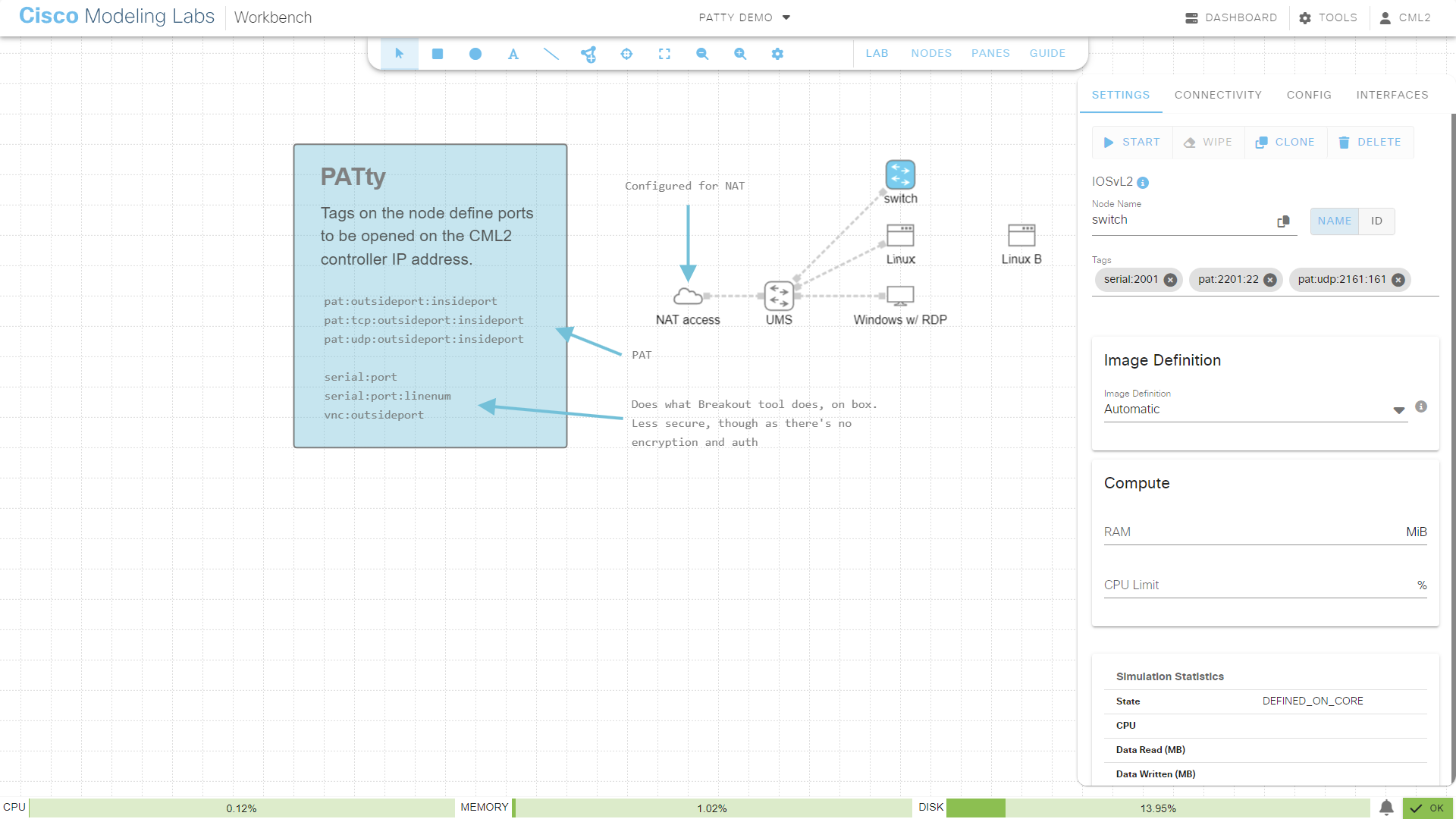
A CML lab with PATty configuration
Users in specific environments (mostly personal use but also enterprise environments with restrictive access policies in the environment where the CML controller runs) have asked about simplifying direct IP (TCP/UDP) and console access to lab nodes. While the latter can be (securely) achieved using the Breakout Tool, it is sometimes perceived as too complicated. The former is usually also referred to as “port forwarding”, “port address translation” (PAT) or “destination NAT” (DNAT). The technically correct term in this case is “PAT”.
Outside network access to nodes running in a CML lab is normally possible only when the nodes are connected to an L2 external connector. However, in some deployments L2 external connectors are not viable or convenient, mainly due to the following reasons:
In an ESXi environment, the connecting vSwitch must have its security loosened, e.g., promiscuous mode and MAC address forging must be permitted.
DHCP service should be available on the bridged network segment (it works without, but static addressing of nodes adds another level of complexity).
In some environments, the only MAC or IP address permitted to the CML controller is the CML controller address itself, i.e. lab node addresses get dropped.
The PATty tool provides a simple solution to both device access and IPv4 access. It lets you specify TCP or UDP ports opened on the CML server’s primary (bridge0) network interface, and associate them with consoles or ports on any lab node.
This service is not enabled by default, see Enabling PATty service.
Example Strategy for Allocating Ports
When used carefully (see “Caveats and limitations”) each node in a lab can have a consistent and persistent port to access devices. For example, the user could configure their labs so that the consoles of nodes R1, R2 and R3 are always on port 2001, 2002 and 2003, respectively. The allowed port range is configured in the PATty service to be ports 2000-7999.
Warning
This requires, however, that only one lab with mappings is running at any time as there’s always only ONE port 2001 available on the CML controller’s IP address!
The tool allows to add multiple mappings to a node. For example:
Map the first serial port / console to port TCP/2001 (device access)
Map SSH port TCP/22 on the device to TCP/2201 (PAT)
Map NETCONF port TCP/830 on the device to TCP/2301 (PAT)
This example also illustrates that using dedicated port ranges can be beneficial, this example suggests the following offsets:
0-99: used for consoles, for serial device access
200-299: used for SSH
300-399: used for NETCONF
800-899: TCP/80 HTTP (unused in the example, as PAT)
900-999: TCP/5900 VNC (unused in the example, as device access)
The first digit identifies the overall range (here 2000-2999), the second digit is the “service” (console, SSH, VNC, HTTP, …) and the 3rd/4th digit is the node number inside of the lab (like R1-R99 or similar).
Port Address Translation
To make PAT work, the user must provide a mapping which consists of:
Outside port. A unique and free TCP or UDP port which can be used to connect to from the outside, using the CML server’s primary IPv4 address.
Inside host. The lab node, directly or indirectly connected to the L3 NAT external connector, to which the traffic should be forwarded.
Inside port. The destination TCP or UDP port open on the lab node.
Note
There has to be a service running on the host to connect to (like SSH).
For example, when you connect to port TCP/4022 of the CML controller, the connection is forwarded to port TCP/22 of a CSR1000v in the lab. The IP address of the CSR1000v is visible on CML’s L3 NAT network.
Since NAT IP addresses of hosts inside a lab are dynamic, PATty automates the inside host address part for the user. The address is looked up for the node where the tag is attached to.
Console access
Console access for serial and VNC devices is provided by opening up ports on the CML controller’s outside bridge IP address and listening for incoming connections. This is the same address as for the UI, API and terminal server:
For VNC, use any VNC client to connect to the “outside” port, the connection is then forwarded to the host inside the lab. This only works, of course, when the target device actually is VNC-capable and enabled in its node definition.
For serial consoles use a Telnet client to connect to the “outside”, the connection is then forwarded to the designated serial port of the configured host. This also assumes that a node has this serial port, as set by its node definition.
Note
Both VNC and Telnet are inherently insecure as the protocols in use do not provide authentication or confidentiality / encryption. It is highly recommended to use the Breakout Tool if security is a concern. Only use PATty for console access on otherwise-secured private networks.