ANC_Quarantine_Script
Use the ANC quarantine script to view, obtain, and apply policy to an endpoint. In this example, the ANC query script is run, the ANC_Quarantine policy obtained, and applied to the endpoint.
- Run the ANCAction_query script:
./ANCAction_query.sh -a 192.168.1.23 -u pxGridClient -k alpha.jks -p cisco123 -t alpha_root.jks -q cisco123
ANCAction query script
------- properties -------

version=1.0.2-30-SNAPSHOT

hostnames=192.168.1.23

username=pxGridClient

group=ANC

description=null

keystoreFilename=alpha.jks

keystorePassword=cisco123

truststoreFilename=alpha_root.jks

truststorePassword=cisco123

--------------------------

21:27:57.849 [Thread-1] INFO com.cisco.pxgrid.ReconnectionManager - Started

Connecting...

Connected

21:28:00.252 [Thread-1] INFO com.cisco.pxgrid.ReconnectionManager - Connected

Operation selection:

1. ApplyEndpointPolicyByMAC

2. ClearEndpointPolicyByMAC

3. ApplyEndpointPolicyByIP

4. ClearEndpointPolicyByIP

5. GetEndpointByIP

6. Subscribe

7. CreatePolicy

8. UpdatePolicy

9. DeletePolicy

10. GetPolicyByName

11. GetAllPolicies

12. GetEndPointByMAC

13. GetAllEndpoints

14. GetEndpointByPolicy

Enter number (or <enter> to disconnect):
- Select 10 and enter the policy name.
Select 10 and enter the policy name
Enter number (or <enter> to disconnect): 10

Policy name (or <enter> to disconnect): ANC_Quarantine

ANCResult=com.cisco.pxgrid.model.anc.ANCResult@11758f2a[

ancStatus=SUCCESS

ancFailure=<null>

failureDescription=<null>

ancEndpoints=<null>

ancpolicies=[com.cisco.pxgrid.model.anc.ANCPolicy@74ad1f1f[

name=ANC_Quarantine

actions=[QUARANTINE]

]]

]
- Select 14 and enter the policy name.
Select 14 and enter the policy name
Operation selection:

1. ApplyEndpointPolicyByMAC

2. ClearEndpointPolicyByMAC

3. ApplyEndpointPolicyByIP

4. ClearEndpointPolicyByIP

5. GetEndpointByIP

6. Subscribe

7. CreatePolicy

8. UpdatePolicy

9. DeletePolicy

10. GetPolicyByName

11. GetAllPolicies

12. GetEndPointByMAC

13. GetAllEndpoints

14. GetEndpointByPolicy

Enter number (or <enter> to disconnect): 14

Policy name (or <enter> to disconnect): ANC_Quarantine

ANCResult=com.cisco.pxgrid.model.anc.ANCResult@66d1af89[

ancStatus=SUCCESS

ancFailure=<null>

failureDescription=<null>

ancEndpoints=[com.cisco.pxgrid.model.anc.ANCEndpoint@8646db9[

policyName=ANC_Quarantine

macAddress=00:0C:29:79:02:A8

ipAddress=<null>

]]
- Select 3 and enter the policy name.
Select 3 and enter the policy name
Operation selection:

1. ApplyEndpointPolicyByMAC

2. ClearEndpointPolicyByMAC

3. ApplyEndpointPolicyByIP

4. ClearEndpointPolicyByIP

5. GetEndpointByIP

6. Subscribe

7. CreatePolicy

8. UpdatePolicy

9. DeletePolicy

10. GetPolicyByName

11. GetAllPolicies

12. GetEndPointByMAC

13. GetAllEndpoints

14. GetEndpointByPolicy

Enter number (or <enter> to disconnect): 3

Policy name (or <enter> to disconnect): ANC_Quarantine

IP address (or <enter> to disconnect): 192.168.1.38

ANCResult=com.cisco.pxgrid.model.anc.ANCResult@462d5aee[

ancStatus=SUCCESS

ancFailure=<null>

failureDescription=<null>

ancEndpoints=<null>

ancpolicies=<null>

]
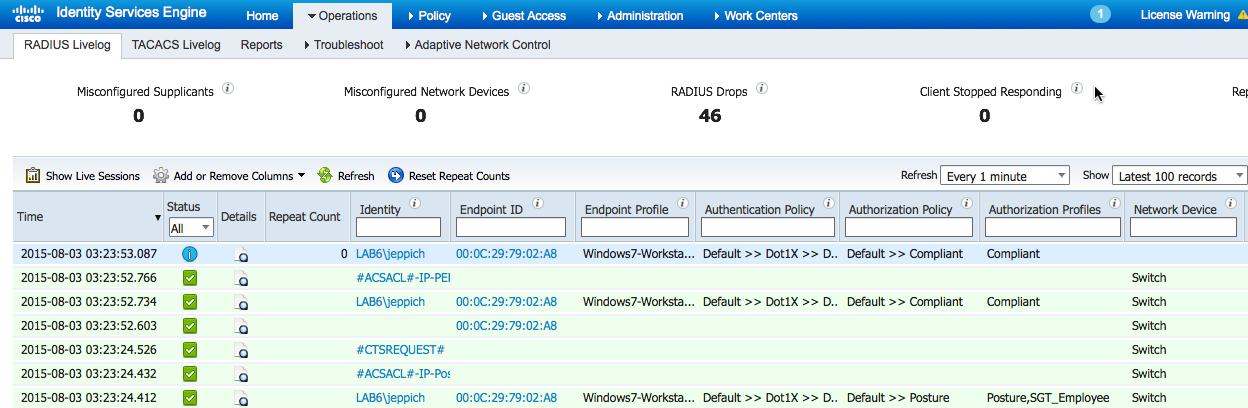
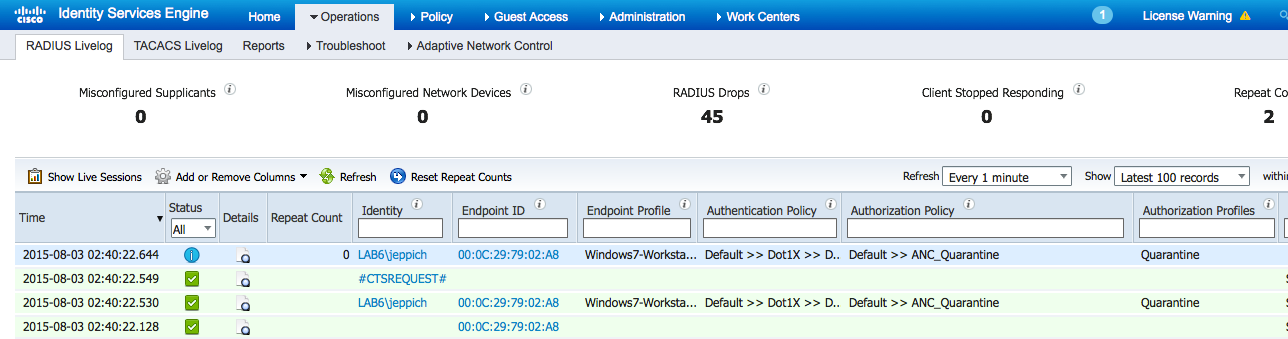
- Select Operations > RADIUS Livelog. Note the authenticated IP address has been quarantined.
- To unquarantine, clear. Then select 4 and provide the MAC address.
Unquarantine
Operation selection:

1. ApplyEndpointPolicyByMAC

2. ClearEndpointPolicyByMAC

3. ApplyEndpointPolicyByIP

4. ClearEndpointPolicyByIP

5. GetEndpointByIP

6. Subscribe

7. CreatePolicy

8. UpdatePolicy

9. DeletePolicy

10. GetPolicyByName

11. GetAllPolicies

12. GetEndPointByMAC

13. GetAllEndpoints

14. GetEndpointByPolicy

Enter number (or <enter> to disconnect): 2

MAC address (or <enter> to disconnect): 00:0C:29:79:02:A8

ANCResult=com.cisco.pxgrid.model.anc.ANCResult@11758f2a[

ancStatus=SUCCESS

ancFailure=<null>

failureDescription=<null>

ancEndpoints=<null>

ancpolicies=<null>
- Select Operations > RADIUS Livelog.