Authentication
Run RADIUS on the client PC under C:\RadiuSIM folder to simulate a user 802.1X authentication.
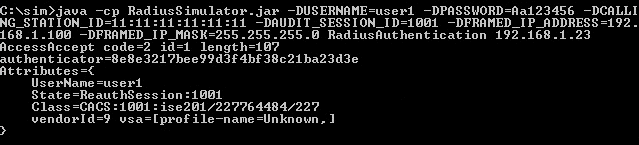
java -cp RadiusSimulator.jar -DUSERNAME=user1 -DPASSWORD=Cisco123 -DCALLING_STATION_ID=11:11:11:11:11:11 -DAUDIT_SESSION_ID=1001 -DFRAMED_IP_ADDRESS=192.168.1.60 -DFRAMED_IP_MASK=255.255.255.0 RadiusAuthentication 192.168.1.98
Note: the IP Address in Bold is the IP address of the PSN handling authentications. This and the user/password are the most important pieces, you don't need to worry about the ip address or mask as these are just labels that have nothing to do with that authentication
Testing Authentication
- Type the following authentication on parameters on ISE
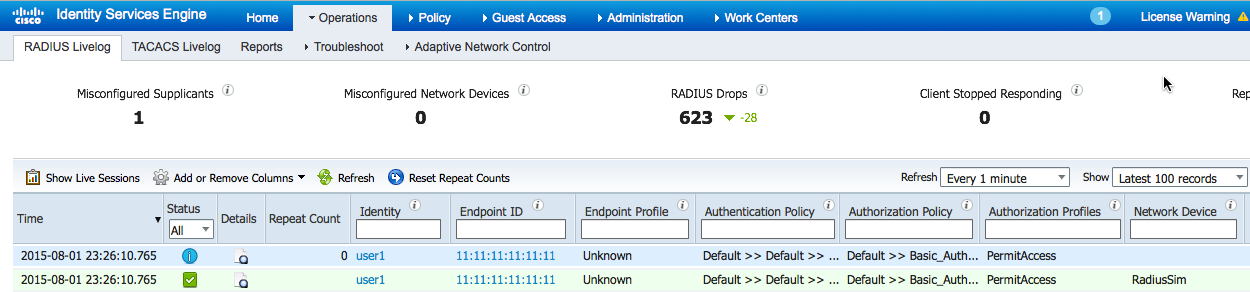
- View the authentication in ISE:
Select Operations > RADIUS Livelog
The RADIUS Simulator Parameters are:
| Parameter | Default |
|---|---|
| -DUSERNAME | |
| -DPASSWORD | |
| -DCALLING_STATION_ID | |
| -DAUDIT_SESSION_ID | |
| -DRADIUS_SECRET | Secret |
| -DNAS_IP_ADDRESS | |
| -DFRAMED_IP_ADDRESS | |
| -DFRAMED_IP_MASK | |
| RadiusAccountingStop | |
| RadiusAccountingStart | |
| RadiusAuthentication |