EndpointProfile Subscribe
Verification
This test verifies the ability of the 3rd party system to subscribe to the published Endpoint Profile topic.
Definition
The registered pxGrid client will subscribe to the EndpointProfileMetaData capability to obtain changes or modifications in the global profiling policy. Session notifications will include the Endpoint profile id, name, and fully qualified name.
Example
In this example, a pxGrid EndpointProfile Example policy will be created based on the static MAC address of the user's PC. Real-time session notifications on the running Linux script are seen when the pxGrid client subscribes to the EndpointprofileMetadata capability and for any modifications to the ISE profiling policies.
- Run endpointprofile_subscribe script.
Run endpointprofile_subscribe script
./endpointprofile_subscribe.sh -a 192.168.1.23 -u SIM01 -k alpha.jks -p cisco123 -t alpha_root.jks -q cisco123
Results
------- properties -------

version=1.0.2-30-SNAPSHOT

hostnames=192.168.1.23

username=SIM01

group=Session

description=null

keystoreFilename=alpha.jks

keystorePassword=cisco123

truststoreFilename=alpha_root.jks

truststorePassword=cisco123

--------------------------

12:41:22.280 [Thread-1] INFO com.cisco.pxgrid.ReconnectionManager - Started

Connecting...

Connected

12:41:23.552 [Thread-1] INFO com.cisco.pxgrid.ReconnectionManager - Connected

Press <enter> to disconnect...
- Select Administration>pxGrid Services.
The pxGrid client has subscribed to the EndpointProfileMetaData capability.

- Select Policy>Profiling>Add
- Provide the policy name and description
- Under If Condition>Create New Condition>IP>{provide IP address of device accessing network}
- Select Submit
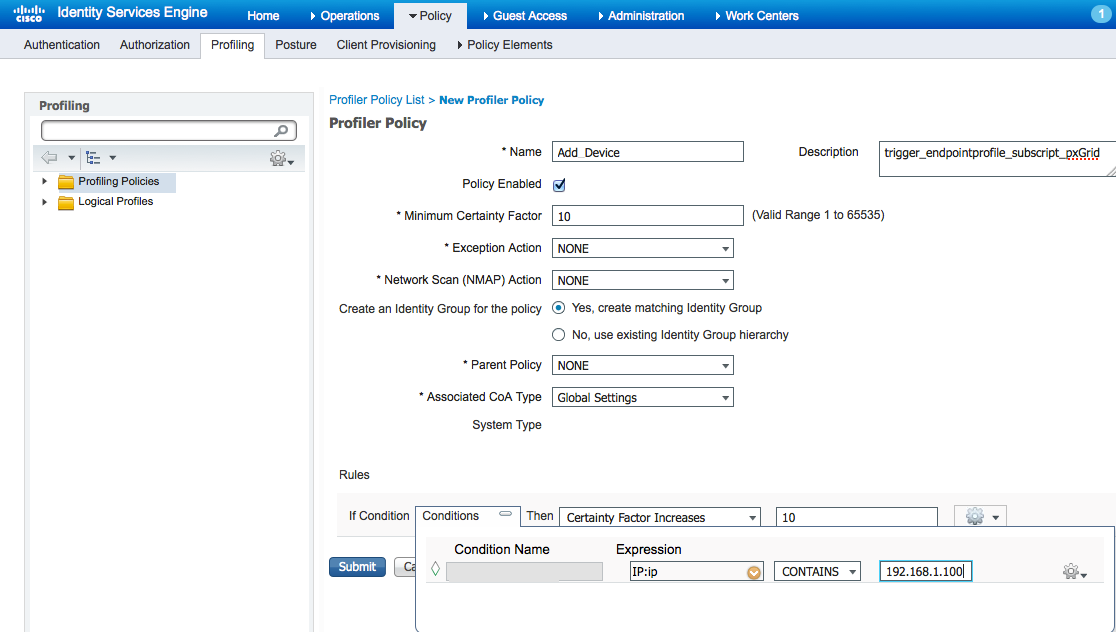
- An endpoint profile subscription notification is received indicating that the profiling policy created has been added.
Endpoint profile subscription notification
./endpointprofile_subscribe.sh -a 192.168.1.23 -u SIM01 -k alpha.jks -p cisco123 -t alpha_root.jks -q cisco123

------- properties -------

version=1.0.2-30-SNAPSHOT

hostnames=192.168.1.23

username=SIM01

group=Session

description=null

keystoreFilename=alpha.jks

keystorePassword=cisco123

truststoreFilename=alpha_root.jks

truststorePassword=cisco123

--------------------------

12:41:22.280 [Thread-1] INFO com.cisco.pxgrid.ReconnectionManager - Started

Connecting...

Connected

12:41:23.552 [Thread-1] INFO com.cisco.pxgrid.ReconnectionManager - Connected

Press <enter> to disconnect...EndpointProfileChangedNotification (changetype=ADD) Device profile : id=8c8f42b0-393f-11e5-ac86-000c297fb12a, name=Add_Device, fqname=Add_Device