Identification of Endpoints by NAS IP Address and MAC Address
MAC address is not always a valid way to identify an endpoint. Because of MAC address spoofing, shared ethernet USB dongles, and other reasons, a MAC address may not always be unique to a device. These ANC APIs identify the endpoint by both the MAC address and the Network Access Server (NAS) IP address. The new API also provides another ANC action called RE_AUTHENTICATE.
Requirements
- Configure the switch in the Cisco ISE CLI with
, where the server is the Cisco ISE Policy Administration Node(PAN). All the RADIUS CoA request are forwarded with the PAN IP address as the destination IP address. - Do not use both the old and the new APIs together. For example, if you create
with the new API, use the new API to revoke. - There is no automatic cleanup for Endpoint Policy assignment data with these APIs. Cisoc ISE doesn’t know when to cleanup the ANC Policy created by third party partners. Use clearEndpointPolicy,getEndpointPolicies and getEndpointByNasIpAddress APIs to cleanup the endpoint data.
- The new action RE_AUTHENTICATE requires pxGrid 2.0 which is part of the following versions of Cisco ISE: 2.6P7, 2.7P2 or 3.0.
- These APIs require pxGrid 2.0 and pxGrid REST clients only.
- USing the new APIs is not mandatory. The existing ByMAC address code is still supported.
Known Issues
- Upgrading to 2.6 Patch 7 or 2.7 Patch 1 may produce error messages when calling a RE_AUTHENTICATE ANC API. The APIs still work; you can ignore the error message. To eliminate the message in ISE 2.7, upgrade to patch 2. You can also delete your existing RE_AUTHENTICATE policies before upgrading and recreate them.
Code and Example Outputs
The APIs (applyEndpointPolicy, clearEndpointPolicy, getEndpointByNasIpAddress, getEndpointPolicies) are documented here. In addition, there is a new ANC Action constant "RE_AUTHENTICATE" to create a Re-authentication ANC Policy.
Create a ReAuthenticate Policy
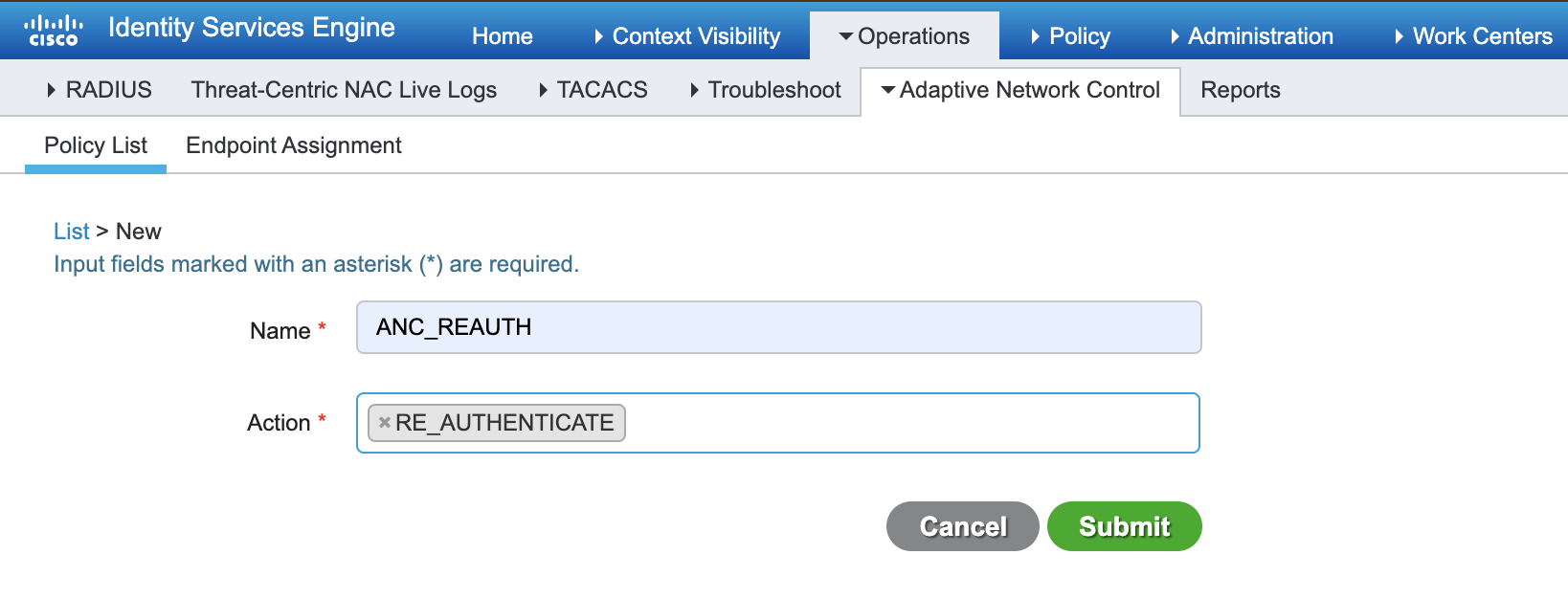
To create an ANC Re-authentication policy, you can use the Cisco ISE GUI or a Rest API as follows:
- URI: https://<ISEIP:8910/pxgrid/ise/config/anc/createPolicy
- Body: {"name": "ANC_REAUTH", "actions": ["RE_AUTHENTICATE"] }
The above REST API produces the same result as creating a new ANC Policy List in the Cisco ISE GUI:
applyEndpointPolicy
Apply an ANCPolicy based on a MACAddress connected to specific network device.
For example, to apply the ANC_REAUTH policy to endpoint 3C:07:71:53:C0:81, which is connected to network device with IP 10.10.120.1
The JSON body contains:
- Mandatory parameters: policyName, macAddress, nasIpAddress
- Additional optional parameters: sessionId(AuditSessionID), nasPortId, ipAddress, userName
- URI: https://
:8910/pxgrid/ise/config/anc/applyEndpointPolicy - Body: {"policyName":"ANC_REAUTH", "macAddress":"3C:07:71:53:C0:81","nasIpAddress":"10.10.120.1"}
Response
{
 "operationId": "posture-vm33.posture-sj.local:81",
 "macAddress": "3C:07:71:53:C0:81",
 "status": "RUNNING",
 "nasIPAddress": "10.10.120.1",
 "policyName": "ANC_REAUTH"
}
Once the policy has been successfully applied, a Change of Authorization (CoA) is triggered and the ANC Authorization policy is applied. You can see the results in the Cisco ISE GUI (Context Visibility > Endpoint)
getEndpointByNasIpAddress
This API helps you to retrieve the endpoint details using both MACAddress and NasIpAddress.
- URI: https://
:8910/pxgrid/ise/config/anc/getEndpointByNasIpAddress - Body: {"macAddress":"3C:07:71:53:C0:81","nasIpAddress":"10.10.120.1"}
Response
{
 "policyName": "ANC_REAUTH", "macAddress": "3C:07:71:53:C0:81", "nasIPAddress": "10.10.120.1", "ipAddress": "10.10.119.44",  "sessionId": "g1/0/7", "nasPortId": "6464761a0000b2795e55ac07",
"userName": "root"
}
getEndpointPolicies
- URI: https://
:8910/pxgrid/ise/config/anc/getEndpointPolicies - Body: {}
Response
This example response shows two endpoints with the same MAC Address 3C:07:71:53:C0:81. Those endpoints are connected to two different network devices (10.10.120.1,100.100.118.26) with the ANC policy applied.
{ "endpoints":[{"policyName":"ANC_REAUTH","macAddress":"3C:07:71:53:C0:81","nasIPAddress":"10.10.120.1"},
{"policyName":"ANC_QUARANTINE","macAddress":"3C:07:71:53:C0:81","nasIPAddress":"100.100.118.26"}]}
clearEndpointPolicy
Using this API you can clear an existing ANC policy for an endpoint based on MAC Address connected to specific network device.
For example, to clear an ANC_REAUTH policy from endpoint 3C:07:71:53:C0:81 connected to the network device 10.10.120.1:
The JSON body contains:
- Mandatory parameters: macAddress, nasIpAddress
- URI: https://
:8910/pxgrid/ise/config/anc/clearEndpointPolicy - Body: {"macAddress":"3C:07:71:53:C0:81","nasIpAddress":"10.10.120.1"}
Response
{
"operationId": "posture-vm33.posture-sj.local:81",
macAddress": "3C:07:71:53:C0:81",
status": "RUNNING",
nasIPAddress": "10.10.120.1"
 }
After an ANC_REAUTH policy is cleared, you can verify that the ReAuth authorization policy was revoked and that the endpoint now has full network access.