Propose New Capability
The propose_capability script defines new topic information to the pxGrid node or can modify an existing topic by providing the capability name, version, description, platform, query and action items. This topic will remain in a pending state until the pxGrid admin approves the topic.
- Run the following:
./propose_capability.sh -a 10.0.0.37 -u sdk01 -k alpha.jks -p cisco123 -t alpha_root.jks -q cisco123 -g -d pxGrid New Publisher
Capability information will be required. You will be prompted to enter the information.
propose_capability.sh
------- properties -------

version=1.0.2-30-SNAPSHOT

hostnames=10.0.0.37

username=sdk01

group=Basic

description=null

keystoreFilename=alpha.jks

keystorePassword=cisco123

truststoreFilename=alpha_root.jks

truststorePassword=cisco123

--------------------------

12:02:07.373 [Thread-1] INFO com.cisco.pxgrid.ReconnectionManager - Started

Connecting...

Connected

12:02:08.779 [Thread-1] INFO com.cisco.pxgrid.ReconnectionManager - Connected

New capability? (y/n): y

Enter capability name: Auction

Enter capability version: 1.0

Enter capability description: Auction Service

Enter vendor platform: ABC Auction Service

Enter query name (<enter> to continue): GetInventoryItems

Enter query name (<enter> to continue): GetCurrentBids

Enter query name (<enter> to continue):

Enter action name (<enter> to continue): BidOnItems

Enter action name (<enter> to continue):

Proposing new capability...

Press <enter> to disconnect...

Connection closed
- Select Administration > pxGrid Services and view by Capabilities.
The Auction Capability Name is set to Pending create.
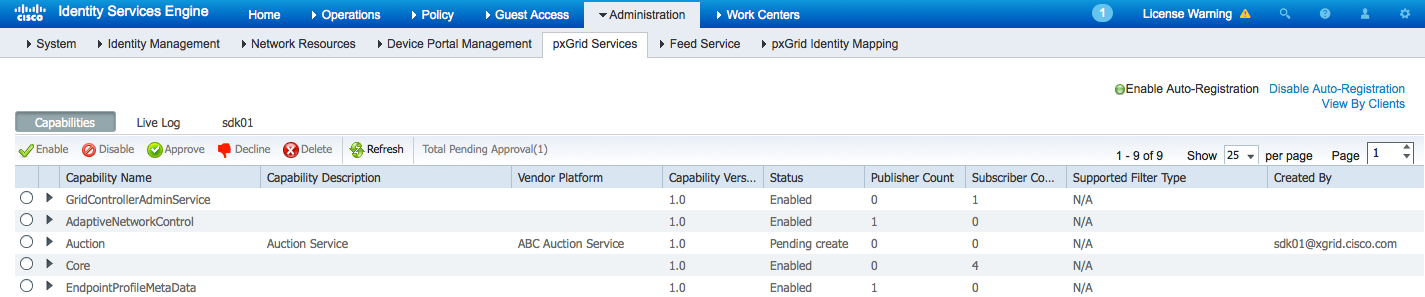
- Select the Auction topic, then select Approve.
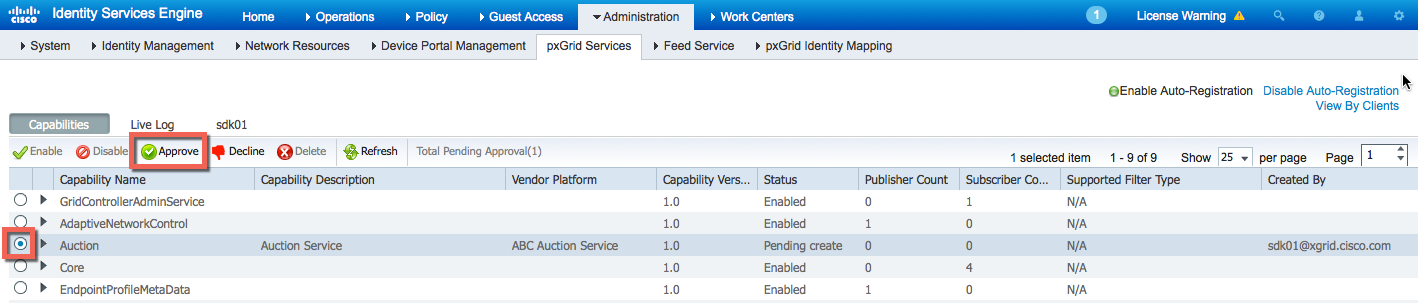
- The pxGrid admin approves the topic.
- The Auction topic is successfully created.
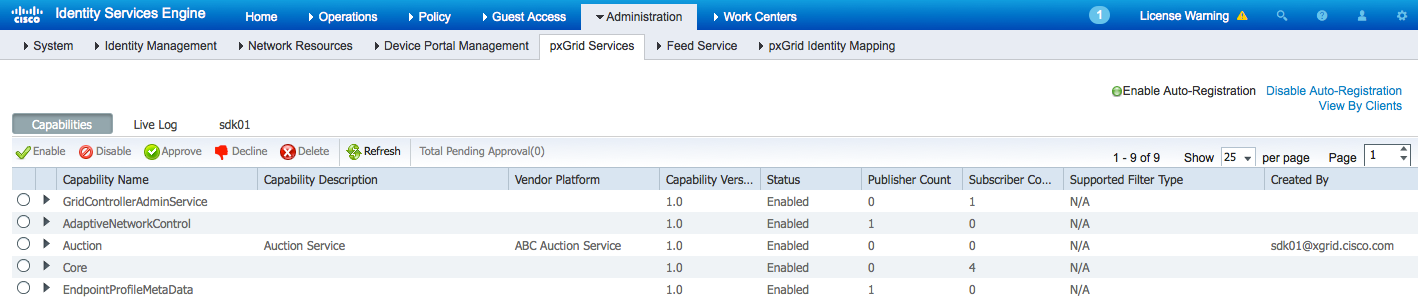
- The new topic notification will appear if the pxGrid clients have `core_subscribed` as highlighted below.
./core_subscribe.sh -a 10.0.0.37 -u core_user-01 -k alpha.jks -p cisco123 -t alpha_root.jks -q cisco123 -g Session -d pxGrid Client
core_subscribe.sh
------- properties -------

version=1.0.2-30-SNAPSHOT

hostnames=10.0.0.37

username=core_user-01

group=Session

description=pxGrid

keystoreFilename=alpha.jks

keystorePassword=cisco123

truststoreFilename=alpha_root.jks

truststorePassword=cisco123

--------------------------

11:48:41.155 [Thread-1] INFO com.cisco.pxgrid.ReconnectionManager - Started

Connecting...

Connected

11:48:42.946 [Thread-1] INFO com.cisco.pxgrid.ReconnectionManager - Connected

getList: status=CREATED capability=TrustSecMetaData, version=1.0

getList: status=CREATED capability=EndpointProfileMetaData, version=1.0

getList: status=CREATED capability=IdentityGroup, version=1.0

getList: status=CREATED capability=GridControllerAdminService, version=1.0

getList: status=CREATED capability=SessionDirectory, version=1.0

getList: status=CREATED capability=AdaptiveNetworkControl, version=1.0

getList: status=CREATED capability=EndpointProtectionService, version=1.0

getList: status=CREATED capability=Core, version=1.0

Capability name [, version] to query (or <enter> to quit) : notification: status=CREATED capability=Auction, version=1.0
- Select Live Log to see a record of the Auction topic setup.
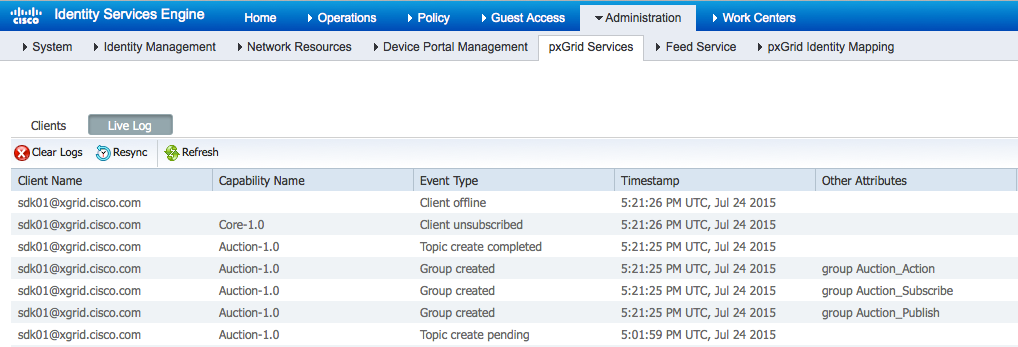
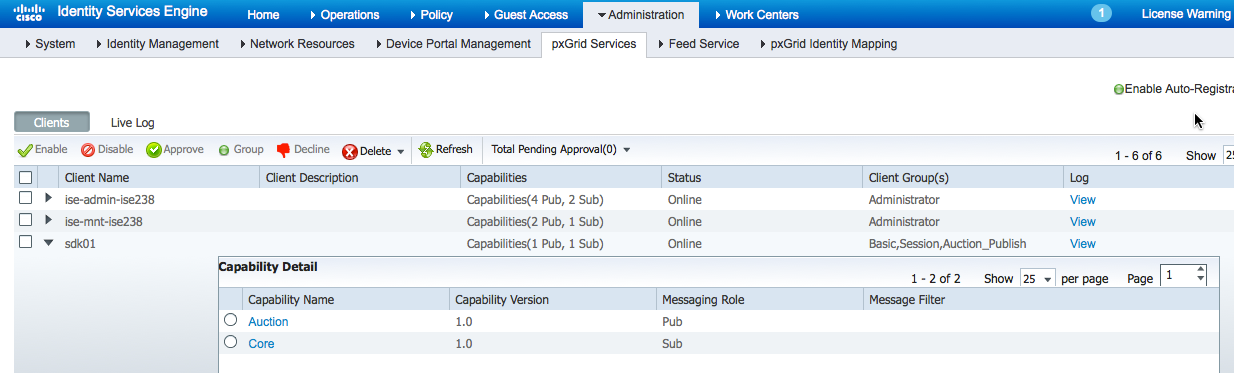
- Select Administration > pxGrid Services > sdk01 > Client Group > Basic, Session, Action Publish > Save.
Note: Admin must assign topic from basic group to other groups. The basic group is a pxGrid connection group.
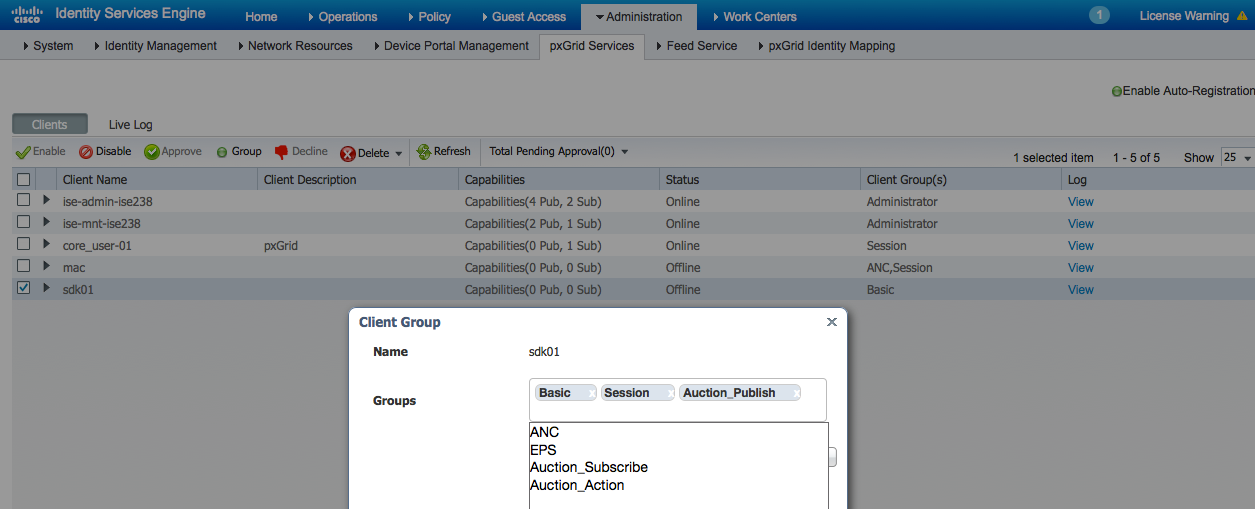
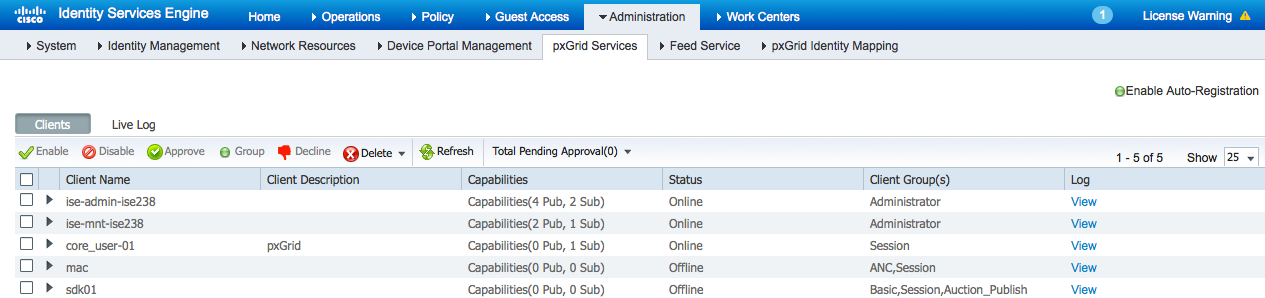
- Click View next to sdk01.
The published Auction topic is displayed.
- Edit the publisher.conf file to determine the publishers of events.
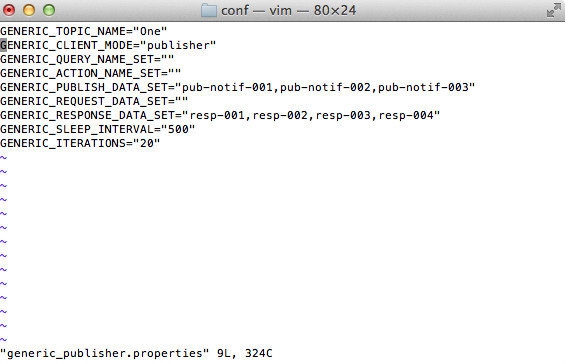
- Change GENERIC_TOPIC_NAME="AUCTION" and GENERIC_CLIENT_MODE= "PUBLISHER" to publish the data set and the response data set.
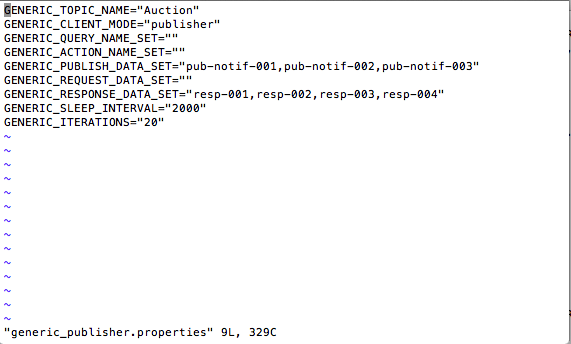
- Run the generic_client script for publisher.
./generic_client.sh -a 10.0.0.37 -u sdk01 -k alpha.jks -p cisco123 -t alpha_root.jks -q cisco123 -c generic_publisher.properties
Results: Refer to the results in the right hand panel.
Initialized : GenericClient:

topicName=Auction

clientMode=PUBLISHER

sleepInterval=2000

iterations=20

queryNameSet=[]

actionNameSet=[]

publishDataSet=[pub-notif-001, pub-notif-002, pub-notif-003]

requestDataSet=[]

responseDataSet=[resp-001, resp-002, resp-003, resp-004]

------- properties -------

version=1.0.2-30-SNAPSHOT

hostnames=10.0.0.37

username=sdk01

group=Auction_Publish

description=null

keystoreFilename=alpha.jks

keystorePassword=cisco123

truststoreFilename=alpha_root.jks

truststorePassword=cisco123

--------------------------

14:12:59.548 [Thread-1] INFO com.cisco.pxgrid.ReconnectionManager - Started

Connecting...

Connected

14:13:00.921 [Thread-1] INFO com.cisco.pxgrid.ReconnectionManager - Connected

Publishing notification: GenericMessage:

messageType=NOTIFICATION

capabilityName=Auction

operationName=sampleNotification

body:

content:

contentTags=[NOTIF-TAG-201]

contentType=PLAIN_TEXT

value=NOTIFICATION[1437847981189]pub-notif-001

Publishing notification: GenericMessage:

messageType=NOTIFICATION

capabilityName=Auction

operationName=sampleNotification

body:

content:

contentTags=[NOTIF-TAG-201]

contentType=PLAIN_TEXT

value=NOTIFICATION[1437847983193]pub-notif-002

Publishing notification: GenericMessage:

messageType=NOTIFICATION

capabilityName=Auction

operationName=sampleNotification

body:

content:

contentTags=[NOTIF-TAG-201]

contentType=PLAIN_TEXT

value=NOTIFICATION[1437847985194]pub-notif-003

Publishing notification: GenericMessage:

messageType=NOTIFICATION

capabilityName=Auction

operationName=sampleNotification

body:

content:

contentTags=[NOTIF-TAG-201]

contentType=PLAIN_TEXT

value=NOTIFICATION[1437847987195]pub-notif-001

Publishing notification: GenericMessage:

messageType=NOTIFICATION

capabilityName=Auction

operationName=sampleNotification

body:

content:

contentTags=[NOTIF-TAG-201]

contentType=PLAIN_TEXT

value=NOTIFICATION[1437847989196]pub-notif-002

Publishing notification: GenericMessage:

messageType=NOTIFICATION

capabilityName=Auction

operationName=sampleNotification

body:

content:

contentTags=[NOTIF-TAG-201]

contentType=PLAIN_TEXT

value=NOTIFICATION[1437847991197]pub-notif-003

Publishing notification: GenericMessage:

messageType=NOTIFICATION

capabilityName=Auction

operationName=sampleNotification

body:

content:

contentTags=[NOTIF-TAG-201]

contentType=PLAIN_TEXT

value=NOTIFICATION[1437847993199]pub-notif-001

Publishing notification: GenericMessage:

messageType=NOTIFICATION

capabilityName=Auction

operationName=sampleNotification

body:

content:

contentTags=[NOTIF-TAG-201]

contentType=PLAIN_TEXT

value=NOTIFICATION[1437847995200]pub-notif-002

Publishing notification: GenericMessage:

messageType=NOTIFICATION

capabilityName=Auction

operationName=sampleNotification

body:

content:

contentTags=[NOTIF-TAG-201]

contentType=PLAIN_TEXT

value=NOTIFICATION[1437847997201]pub-notif-003

Publishing notification: GenericMessage:

messageType=NOTIFICATION

capabilityName=Auction

operationName=sampleNotification

body:

content:

contentTags=[NOTIF-TAG-201]

contentType=PLAIN_TEXT

value=NOTIFICATION[1437847999202]pub-notif-001

Publishing notification: GenericMessage:

messageType=NOTIFICATION

capabilityName=Auction

operationName=sampleNotification

body:

content:

contentTags=[NOTIF-TAG-201]

contentType=PLAIN_TEXT

value=NOTIFICATION[1437848001203]pub-notif-002

Publishing notification: GenericMessage:

messageType=NOTIFICATION

capabilityName=Auction

operationName=sampleNotification

body:

content:

contentTags=[NOTIF-TAG-201]

contentType=PLAIN_TEXT

value=NOTIFICATION[1437848003207]pub-notif-003

Publishing notification: GenericMessage:

messageType=NOTIFICATION

capabilityName=Auction

operationName=sampleNotification

body:

content:

contentTags=[NOTIF-TAG-201]

contentType=PLAIN_TEXT

value=NOTIFICATION[1437848005209]pub-notif-001

Publishing notification: GenericMessage:

messageType=NOTIFICATION

capabilityName=Auction

operationName=sampleNotification

body:

content:

contentTags=[NOTIF-TAG-201]

contentType=PLAIN_TEXT

value=NOTIFICATION[1437848007210]pub-notif-002

Publishing notification: GenericMessage:

messageType=NOTIFICATION

capabilityName=Auction

operationName=sampleNotification

body:

content:

contentTags=[NOTIF-TAG-201]

contentType=PLAIN_TEXT

value=NOTIFICATION[1437848009211]pub-notif-003

Publishing notification: GenericMessage:

messageType=NOTIFICATION

capabilityName=Auction

operationName=sampleNotification

body:

content:

contentTags=[NOTIF-TAG-201]

contentType=PLAIN_TEXT

value=NOTIFICATION[1437848011213]pub-notif-001

Publishing notification: GenericMessage:

messageType=NOTIFICATION

capabilityName=Auction

operationName=sampleNotification

body:

content:

contentTags=[NOTIF-TAG-201]

contentType=PLAIN_TEXT

value=NOTIFICATION[1437848013214]pub-notif-002

Publishing notification: GenericMessage:

messageType=NOTIFICATION

capabilityName=Auction

operationName=sampleNotification

body:

content:

contentTags=[NOTIF-TAG-201]

contentType=PLAIN_TEXT

value=NOTIFICATION[1437848015216]pub-notif-003

Publishing notification: GenericMessage:

messageType=NOTIFICATION

capabilityName=Auction

operationName=sampleNotification

body:

content:

contentTags=[NOTIF-TAG-201]

contentType=PLAIN_TEXT

value=NOTIFICATION[1437848017217]pub-notif-001

Publishing notification: GenericMessage:

messageType=NOTIFICATION

capabilityName=Auction

operationName=sampleNotification

body:

content:

contentTags=[NOTIF-TAG-201]

contentType=PLAIN_TEXT

value=NOTIFICATION[1437848019218]pub-notif-002

Press <enter> to disconnect...
- pxGrid client sdk01 publishes the Auction topic.
- Configure subscriber to query published Auction topic on direct queries GetInventoryItems, GetCurrentBids.
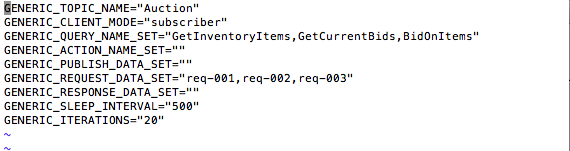
- Run the generic client script for subscriber. Note that the subscriber has access to query topics GetInventoryItems, GetCurrentBid, but not BidOnItems. BidOnItems is not defined as a Query topic.
./generic_client.sh -a 10.0.0.37 -u sdk01-sub -k alpha.jks -p cisco123 -t alpha_root.jks -q cisco123 -c
Results: Refer to the results in the right hand panel.
Initialized : GenericClient:

topicName=Auction

clientMode=SUBSCRIBER

sleepInterval=500

iterations=20

queryNameSet=[GetInventoryItems, GetCurrentBids, BidOnItems]

actionNameSet=[]

publishDataSet=[]

requestDataSet=[req-001, req-002, req-003]

responseDataSet=[]

------- properties -------

version=1.0.2-30-SNAPSHOT

hostnames=10.0.0.37

username=sdk01-sub

group=Auction_Subscribe

description=null

keystoreFilename=alpha.jks

keystorePassword=cisco123

truststoreFilename=alpha_root.jks

truststorePassword=cisco123

--------------------------

15:51:33.423 [Thread-1] INFO com.cisco.pxgrid.ReconnectionManager - Started

Connecting...

Connected

15:51:36.123 [Thread-1] INFO com.cisco.pxgrid.ReconnectionManager - Connected

Sending request: GenericMessage:

messageType=REQUEST

capabilityName=Auction

operationName=GetInventoryItems

body:

content:

contentTags=[QUERY-TAG-301]

contentType=PLAIN_TEXT

value=QUERY[1437853896264]req-001

Received response: GenericMessage:

messageType=RESPONSE

capabilityName=Auction

operationName=GetInventoryItems

body:

content:

contentTags=[RESP-TAG-101]

contentType=PLAIN_TEXT

value=RESPONSE[1437853896285]resp-003 - for request[QUERY[1437853896264]req-001]

Sending request: GenericMessage:

messageType=REQUEST

capabilityName=Auction

operationName=GetCurrentBids

body:

content:

contentTags=[QUERY-TAG-301]

contentType=PLAIN_TEXT

value=QUERY[1437853896885]req-002

Received response: GenericMessage:

messageType=RESPONSE

capabilityName=Auction

operationName=GetCurrentBids

body:

content:

contentTags=[RESP-TAG-101]

contentType=PLAIN_TEXT

value=RESPONSE[1437853896945]resp-004 - for request[QUERY[1437853896885]req-002]

Sending request: GenericMessage:

messageType=REQUEST

capabilityName=Auction

operationName=BidOnItems

body:

content:

contentTags=[QUERY-TAG-301]

contentType=PLAIN_TEXT

value=QUERY[1437853897457]req-003

Received response: GenericMessage:

messageType=RESPONSE

capabilityName=null

operationName=null

body:

error=not authorized

Sending request: GenericMessage:

messageType=REQUEST

capabilityName=Auction

operationName=GetInventoryItems

body:

content:

contentTags=[QUERY-TAG-301]

contentType=PLAIN_TEXT

value=QUERY[1437853898077]req-001

Received response: GenericMessage:

messageType=RESPONSE

capabilityName=Auction

operationName=GetInventoryItems

body:

content:

contentTags=[RESP-TAG-101]

contentType=PLAIN_TEXT

value=RESPONSE[1437853898428]resp-001 - for request[QUERY[1437853898077]req-001]
- Select Administration > pxGrid Services.
Note: The pxGrid client sdk01-sub has subscribed to the Auction topic.