Testing Sample Scripts Using 802.1X
Multigroupclient
Verification
This test verifies that the third party system can register, including authenticate and be authorized, on the pxGrid to multiple client groups, such as Session and ANC.
Definition
pxGrid client registration connects and registers the third party application, security devices, or in this case, the Linux host to the pxGrid controller to an authorized session or ANC group. Additional groups such as admin and basic are available. However, Admin groups are reserved for ISE and Basic groups which require pxGrid administration approval will not be used in any of the registration pxGrid examples.
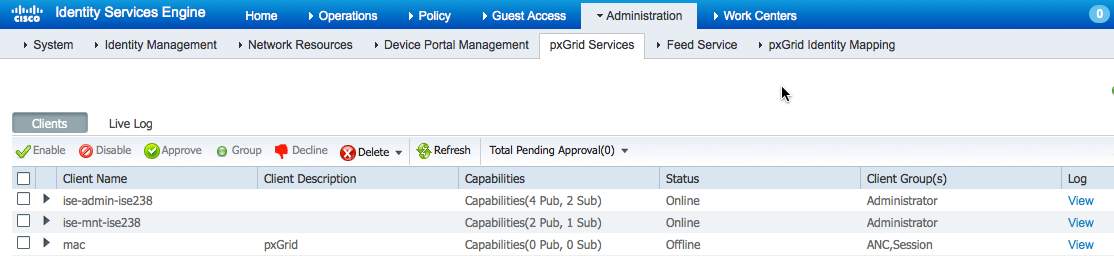
All registered pxGrid clients can be viewed in the ISE pxGrid services view under Administration.
pxGrid clients can be publishers or subscribers of information, as will be illustrated in Dynamic Topics. ISE will not be able to consume information; sharing of context will occur between registered clients. Once the pxGrid client has successfully registered to the authorized group, the client can then obtain the relevant session information or queries as determined by the pxGrid sample scripts.
Example
This example registers the Linux host as a pxGrid client to a session group to the pxGrid controller. For the Linux host, mac is the username of the pxGrid client. The example includes viewing the registered pxGrid client in ISE.
- Run the multigroupclient script
./multigroupclient.sh -a 10.0.0.37 -u mac -k alpha.jks -p cisco123 -t alpha_root.jks -q cisco123 -g Session -d pxGrid Client
Usage
Usage: ./multigroupclient.sh [options]
Main options:
- -a <PXGRID_HOSTNAMES> (comma separated hostnames)
- -u <PXGRID_USERNAME>
- -g <PXGRID_GROUP>
- -d <PXGRID_DESCRIPTION>
The following are certificate options:
- -k <PXGRID_KEYSTORE_FILENAME>
- -p <PXGRID_KEYSTORE_PASSWORD>
- -t <PXGRID_TRUSTSTORE_FILENAME>
- -q <PXGRID_TRUSTSTORE_PASSWORD>
If not specified, defaults are clientSample1.jks and rootSample.jks. Specifying values here can override the defaults.
Custom config file can fill or override parameters
-c <config_filename>
Config file is being sourced. Use these variables:
- PXGRID_HOSTNAMES
- PXGRID_USERNAME
- PXGRID_GROUP
- PXGRID_DESCRIPTION
- PXGRID_KEYSTORE_FILENAME
- PXGRID_KEYSTORE_PASSWORD
- PXGRID_TRUSTSTORE_FILENAME
- PXGRID_TRUSTSTORE_PASSWORD
Results: Refer to the right hand panel.
Results
------- properties -------

version=1.0.2-30-SNAPSHOT

hostnames=10.0.0.37

username=mac

group=Session,ANC,Session

description=pxGrid

keystoreFilename=alpha.jks

keystorePassword=cisco123

truststoreFilename=alpha_root.jks

truststorePassword=cisco123

--------------------------

09:35:31.772 [Thread-1] INFO com.cisco.pxgrid.ReconnectionManager - Started

Connecting...

Connected

09:35:35.769 [Thread-1] INFO com.cisco.pxgrid.ReconnectionManager - Connected

Create ANC Policy: ANC1437658531354 Result - com.cisco.pxgrid.model.anc.ANCResult@612fc6eb[

ancStatus=SUCCESS

ancFailure=<null>

failureDescription=<null>

ancEndpoints=<null>

ancpolicies=<null>

]

Session 1.1.1.2 not found

Connection closed
- Select Administration > pxGrid Services