VXLAN EVPN
VXLAN EVPN is a network overlay solution that
uses Virtual Extensible LAN (VXLAN) as the data plane to extend Layer 2 segments across a Layer 3 underlay
utilizes Ethernet VPN (EVPN) as the control plane for dynamic learning and distribution of MAC and IP reachability information, and
enables network devices to operate as VXLAN Tunnel Endpoints (VTEPs), providing scalable and flexible overlay services.
Key concepts of VXLAN EVPN
VXLAN
Virtual Extensible LAN (VXLAN) is a network virtualization technology that provides Layer 2 connectivity across a Layer 3 network. It encapsulates Ethernet frames within UDP packets for tunneling and utilizes a 24-bit VXLAN Network Identifier (VNID), supporting high scalability.
VXLAN terminology
- VXLAN Tunnel Endpoint (VTEP): A VTEP is a network device that connects local LAN segments to the VXLAN overlay network by encapsulating and deencapsulating Ethernet frames into VXLAN packets, which are transported over UDP and IP. Each VTEP has a unique IP address, typically assigned to a loopback interface, that identifies it within the transport IP network and serves as the source address for encapsulated VXLAN packets. VTEPs also map local MAC addresses to VXLAN segments, learn remote MAC-to-VTEP mappings, and communicate with other VTEPs to enable seamless Layer 2 connectivity across the IP-based transport network. This figure shows the functional components of VTEPs and the logical topology that is created for Layer 2 connectivity across the transport IP network.
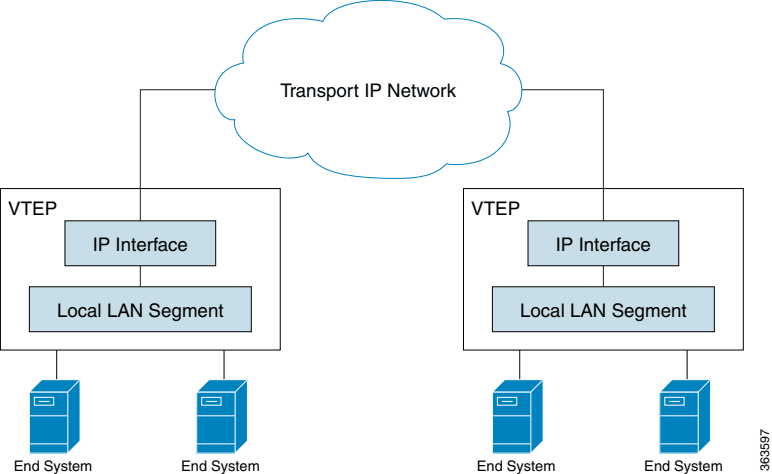
VXLAN Tunnel: The logical path created between two VTEPs over the Layer 3 underlay network, through which encapsulated VXLAN packets travel.
Underlay Network: The physical Layer 3 IP network that provides connectivity between VTEPs. It is responsible for routing the encapsulated VXLAN packets.
Overlay Network: The logical Layer 2 network created by VXLAN, which spans across the Layer 3 underlay.
VRF VLAN: A VRF VLAN is a dedicated VLAN, along with its associated VNI, configured for each Virtual Routing and Forwarding (VRF) instance. It is used to enable inter-VLAN routing within a specific VRF. You should use the same VRF VLAN ID and VNI on all leaf switches where this VRF is present.
PortChannel: A PortChannel, also known as a Link Aggregation Group (LAG), is a logical interface that combines multiple physical Ethernet links between an end host or server and one or more VXLAN Tunnel Endpoints (VTEPs), typically leaf switches. This aggregation provides the host with a single, high-bandwidth, and resilient connection. In the EVPN control plane, the PortChannel is identified as an Ethernet Segment (ES), with an Ethernet Segment Identifier (ESI) configured on the PortChannel to indicate that multiple VTEPs are connected to the same multi-homed device. PortChannels are essential for VXLAN EVPN deployments, enabling robust All-Active multi-homing.
VXLAN packet format
VXLAN defines a MAC-in-UDP encapsulation scheme in which the original Layer 2 frame has a VXLAN header added and is then placed in a UDP/IP packet. With this MAC-in-UDP encapsulation, VXLAN tunnels a Layer 2 network over a Layer 3 network. This figure shows the VXLAN packet format.
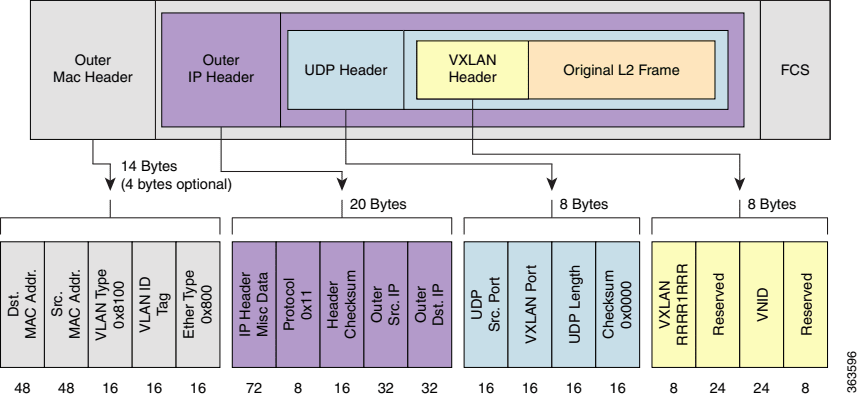
EVPN
Ethernet VPN (EVPN) is a control plane protocol that leverages Border Gateway Protocol (BGP) to exchange MAC addresses, IP addresses, and other Layer 2 and Layer 3 reachability information between VTEPs.
It enables dynamic learning of endpoint information, eliminates the need for data plane flooding, and supports advanced features such as multi-homing and distributed anycast gateways. EVPN supports All-Active multi-homing mode to provide redundancy and load balancing.
EVPN terminology
Ethernet segment (ES): A logical construct representing a set of Ethernet links that connect a host to one or more leaf switches, which act as VTEPs within the data center.
Ethernet segment identifier (ESI): A unique 10-octet identifier assigned to an ES. All leaf switches connected to the same ES must use the same ESI. ESI is optional for single-homing and mandatory for multi-homing.
Multi-homing: The ability for a host or server to connect simultaneously to multiple leaf switches for redundancy and load balancing. Supports Active-Active multi-homing mode.
All-Active multi-homing: All leaf switches connected to the ES can actively forward unicast traffic to and from the host or server, enabling load balancing and faster convergence.
Designated Forwarder (DF): In multi-homing scenarios—where a host or server is connected to multiple leaf switches via an ES—the DF is the single leaf switch elected to forward broadcast, unknown-unicast, and multicast (BUM) traffic from the multihomed ES into the EVPN network. This election prevents BUM traffic duplication. Non-DF leaf switches block BUM traffic from the ESI.
EVPN instance (EVI): A logical VPN instance within an EVPN domain that provides Layer 2 connectivity for a specific set of end systems. Each EVI is typically associated with one or more VNIDs and has its own set of route distinguishers (RDs) and route targets (RTs).
L2VPN EVPN address family: A specific BGP address family used to carry EVPN routes. BGP is extended to transport MAC and IP reachability information for virtual networks, enabling EVPN as the control plane for VXLAN. Configuring address-family l2vpn evpn in BGP allows the exchange of these specialized EVPN routes for dynamic endpoint learning and distribution across the data center network.
EVPN route types
EVPN Route Types (RTs) are BGP message types that are used by the EVPN control plane to signal different types of information and enable dynamic learning and distribution of network reachability information.
The EVPN control plane uses various BGP EVPN Route Types (RTs) to signal different types of information.
| Route type | Signaling/Advertisement | Purpose |
|---|---|---|
| RT1 (Ethernet Auto-Discovery Route per ESI) | Signaled per ESI | Allows remote leaf switches to determine how to load balance unicast traffic to a multihomed segment |
| RT2 (MAC/IP Advertisement Route) | Advertises MAC addresses and optionally IP addresses of endpoints | Enables VTEPs on leaf to learn remote MACs and IPs, and to program their forwarding tables |
| RT3 (Inclusive Multicast Ethernet Tag Route) | Signals information for BUM traffic replication | Ensures efficient delivery of BUM traffic across the VXLAN overlay |
| RT4 (Ethernet Segment Route) | Used for DF election for multihomed segments | Prevents duplicate BUM traffic by ensuring only the DF-elected leaf switch forwards such traffic |
| RT5 (IP Prefix Route) | Advertises IP prefixes for inter-subnet routing within the EVPN domain | Used in distributed anycast gateway scenarios for advertising host routes or subnet routes |
EVPN distributed anycast gateway
EVPN distributed anycast gateway is a Layer 3 gateway solution in which multiple VTEPs are configured with the same IP address and MAC address for a specific VLAN or VNI. This allows the VTEPs to operate as a single logical Layer 3 gateway, enabling active-active forwarding, high availability, and efficient load distribution for inter-subnet traffic.
Key benefits of VXLAN EVPN
- Scalability: BGP EVPN provides a highly scalable control plane for MAC and IP address learning, eliminating the need for traditional flooding-based learning.
- Flexibility: Supports both Layer 2 (L2VNI) and Layer 3 (L3VNI) services, allowing for efficient inter-subnet routing and multi-tenancy.
- Resilience: Multi-homing capabilities provide redundancy and load balancing for attached devices. We support only Active-Active multi-homing mode.
- Openness: SONiC, being an open-source network operating system, leverages standard protocols for VXLAN EVPN implementation.
Example VXLAN EVPN topology and workflow
This process describes how data packets are handled using VXLAN for data plane encapsulation and BGP EVPN for control plane signaling.
The key components involved in the VxLAN EVPN process are:
- Leaf Switches (Leaf1 and Leaf2): These switches act as VTEPs (VXLAN Tunnel Endpoints). They perform local MAC/IP learning for connected hosts, handle VXLAN encapsulation and decapsulation, and exchange reachability information via BGP EVPN.
- Host1: A single-homed host connected to Leaf1 via interface Ethernet84 on Vlan 2.
- Host2: A single-homed host connected to Leaf2 via interface Ethernet80 on Vlan 2.
- IPv6 Underlay Fabric: The physical network layer that provides connectivity between the leaf switches. It uses eBGP (IPv6) on the Ethernet0 interfaces (2001:3::1/64 and 2001:3::2/64) to route encapsulated VXLAN traffic.
Topology
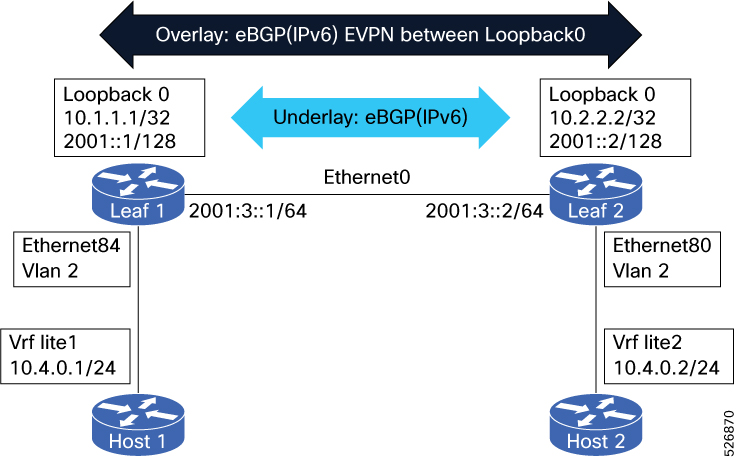
The VXLAN EVPN process uses BGP EVPN signaling to distribute host and network segment information across leaf L1, and leaf L2. It involves local MAC learning by the leaf, VXLAN encapsulation, forwarding, and decapsulation, and specific handling for flooded traffic to ensure optimal network performance and resilience.
Workflow
These stages describe how traffic flows through the VXLAN with EVPN topology.
VXLAN EVPN Process Workflow for the Provided Topology
This workflow describes how traffic is handled between Host1 and Host2 across the IPv6-based VXLAN fabric as shown in the diagram.
- Host connection and local learning
- Leaf1 learns Host1's MAC address via its local interface (Ethernet84, Vlan 2). For Layer 3 traffic, it also learns Host1’s IP address within the 10.4.0.1/24 subnet.
- Leaf2 learns Host2's MAC address via its local interface (Ethernet80, Vlan 2) and its IP address within the 10.4.0.2/24 subnet.
- BGP EVPN route advertisement
- Leaf1 advertises Host1’s reachability to Leaf2 using BGP EVPN:
- MAC/IP Advertisement (Route Type 2): Contains Host1’s MAC and IP address.
- Inclusive Multicast Ethernet Tag (Route Type 3): Used for handling BUM (Broadcast, Unknown Unicast, Multicast) traffic originating from Host1.
- Leaf2 similarly advertises Host2’s MAC/IP and BUM information to Leaf1.
- The BGP peering occurs between the IPv6 Loopback0 addresses: 2001::1/128 (Leaf1) and 2001::2/128 (Leaf2).
- VXLAN encapsulation and forwarding When Host1 sends a packet destined for Host2:
- Ingress Processing (Leaf1):
- Leaf1 performs a destination lookup. Based on the BGP EVPN routes received, it determines Host2 is reachable via Leaf2’s VTEP (2001::2).
- Leaf1 encapsulates the original frame into a VXLAN packet.
- Outer Header: The outer IPv6 source address is 2001::1 and the destination is 2001::2.
- VNI: The VXLAN Network Identifier (VNI) is mapped from the local VLAN (Vlan 2).
- Transit: The encapsulated packet is forwarded across the underlay via the physical link (2001:3::1/64 to 2001:3::2/64) using eBGP (IPv6) routing.
- VXLAN decapsulation and delivery
- Egress Processing (Leaf2):
- Leaf2 receives the packet on its Loopback0 interface.
- It strips the outer IPv6 and VXLAN headers (decapsulation).
- It performs a MAC lookup in the inner frame and delivers the original Ethernet frame to Host2 via Ethernet80.
- Distributed Anycast Gateway functionality
- Layer 3 Gateway: Both Leaf1 and Leaf2 act as a Distributed Anycast Gateway for the subnets associated with Vrf lite1 and Vrf lite2.
- Local Routing: If Host1 sends traffic to a destination outside its local subnet, Leaf1 performs local routing within the configured VRF.
Configure VXLAN EVPN on SONiC
Configure and verify VXLAN EVPN for seamless host connectivity, redundancy, and optimal traffic flow in a multi-leaf network fabric.
Configuring VXLAN EVPN on SONiC involves these steps:
- Configure underlay physical interface
- Configure loopback address
- Configure underlay eBGP on FRR
- Verify underlay eBGP
- Configure overlay eBGP
- Configure VLAN and VXLAN interfaces
- Verify BGP EVPN routes
- Verify Host connectivity
- Verify EVPN/VXLAN configuration
- Enable Counters
- Verify Counters
Before you begin
Ensure that these prerequisites are met:
- SONiC switches are running a version that supports VXLAN EVPN features.
- A fully routed IP network that provides IP reachability between all VTEP loopback interfaces.
- Each VTEP must have a dedicated loopback interface configured with an IP address, which will serve as the VXLAN tunnel source IP. This IP must be reachable across the underlay.
- If using BGP as the underlay routing protocol, ensure BGP peering is established between leaf and spine switches.
- Access ports and uplink ports should be configured appropriately.
Follow these steps to configure VXLAN EVPN on SONiC:
Configure and verify the underlay physical interface on SONiC for Leaf1 to Leaf2 connectivity.
a. Configure the physical interface on Leaf1 and Leaf2 to establish underlay connectivity.
sudo config interface ip add Ethernet0 2001:3::1/64sudo config interface ip add Ethernet0 2001:3::2/64b. Ensure the interface status is up/up.
    show ipv6 interface
    Interface    Master    IPv6 address/mask                         Admin/Oper
    -----------  --------  ----------------------------------------  ----------
    Ethernet0              2001:3::1/64                              up/up
show ipv6 interface Interface Master IPv6 address/mask Admin/Oper ----------- -------- ---------------------------------------- ---------- Ethernet0 2001:3::2/64 up/upc. Verify reachability using ping command. Make sure that ping is successful.
    ping 2001:3::2
    PING 2001:3::2 (2001:3::2) 56 data bytes
    64 bytes from 2001:3::2: icmp_seq=1 ttl=64 time=1.34 ms
    64 bytes from 2001:3::2: icmp_seq=2 ttl=64 time=1.19 ms
ping 2001:3::1 PING 2001:3::1/64 (2001:3::1) 56 data bytes 64 bytes from 2001:3::1: icmp_seq=1 ttl=64 time=0.928 ms 64 bytes from 2001:3::1: icmp_seq=2 ttl=64 time=1.16 msConfigure Loopback address on SONiC.
a. Configure IPv6 address for IPv6 eBGP EVPN neighborship (overlay) and IPv4 address for VTEP.
   sudo config interface ip add Loopback0 10.1.1.1/32
   sudo config interface ip add Loopback0 2001::1/128
sudo config interface ip add Loopback0 10.2.2.2/32 sudo config interface ip add Loopback0 2001::2/128b. Verify the loopback configuration. Ensure that the admin status is up.
    show ip interface
    Interface    Master    IPv4 address/mask    Admin/Oper
    -----------  --------  -------------------  ------------
    Loopback0              10.1.1.1/32          up/up


    show ipv6 interface
    Interface    Master    IPv6 address/mask                         Admin/Oper
    -----------  --------  ----------------------------------------  ----------
    Loopback0              2001::1/128                               up/up
show ip interface Interface Master IPv4 address/mask Admin/Oper ----------- -------- ------------------- ------------ Loopback0 10.2.2.2/32 up/up show ipv6 interface Interface Master IPv6 address/mask Admin/Oper ----------- -------- ---------------------------------------- ---------- Loopback0 2001::2/128 up/upConfigure underlay eBGP on FRR for Leaf1 to Leaf2 prefix connectivity. These BGP configurations are commonly used to modify default BGP behavior.
no bgp ebgp-requires-policy: This command disables the default requirement for explicit route policies on eBGP peers, simplifying configuration in a trusted underlay.no bgp default ipv4-unicast: This command forces explicit activation of the IPv4 unicast address family, enabling modular configuration for MP-BGP deployments like EVPN.bgp bestpath as-path multipath-relax: This command helps relax eBGP multipath requirements to allow ECMP load balancing across spines with different AS numbers but same AS path length.router bgp 65001 no bgp ebgp-requires-policy no bgp default ipv4-unicast bgp disable-ebgp-connected-route-check bgp bestpath as-path multipath-relax neighbor 2001:3::2 remote-as 65002 neighbor 2001:3::2 capability extended-nexthop >> Enable for RFC 5549 V4 over V6 ! address-family ipv4 unicast redistribute connected neighbor 2001:3::2 activate neighbor 2001:3::2 route-map SEND-RIF-ROUTES-V6 in >> Required to set NH as Global instead of Link Local neighbor 2001:3::2 route-map SEND-RIF-ROUTES-V6 out exit-address-family ! address-family ipv6 unicast redistribute connected neighbor 2001:3::2 activate neighbor 2001:3::2 route-map SEND-RIF-ROUTES-V6 in >> Required to set NH as Global instead of Link Local neighbor 2001:3::2 route-map SEND-RIF-ROUTES-V6 out exit-address-family route-map SEND-RIF-ROUTES-V6 permit 1 on-match next set ipv6 next-hop prefer-global >> Set NH to prefer globalrouter bgp 65002 no bgp ebgp-requires-policy no bgp default ipv4-unicast bgp disable-ebgp-connected-route-check bgp bestpath as-path multipath-relax neighbor 2001:3::1 remote-as 65001 neighbor 2001:3::1 capability extended-nexthop >> Enable for RFC 5549 V4 over V6 ! address-family ipv4 unicast redistribute connected neighbor 2001:3::1 activate neighbor 2001:3::1 route-map SEND-RIF-ROUTES-V6 in >> Required to set NH as Global instead of Link Local neighbor 2001:3::1 route-map SEND-RIF-ROUTES-V6 out exit-address-family ! address-family ipv6 unicast redistribute connected neighbor 2001:3::1 activate neighbor 2001:3::1 route-map SEND-RIF-ROUTES-V6 in >> Required to set NH as Global instead of Link Local neighbor 2001:3::1 route-map SEND-RIF-ROUTES-V6 out exit-address-family route-map SEND-RIF-ROUTES-V6 permit 1 on-match next set ipv6 next-hop prefer-global >> Set NH to prefer global
Verify underlay eBGP on FRR to confirm that BGP peering sessions are successfully established.
a. Verify the Underlay v4 routes received and sent.
    show bgp ipv4 unicast summary
    Neighbor            V         AS   MsgRcvd   MsgSent   TblVer  InQ OutQ  Up/Down State/PfxRcd   PfxSnt Desc
    2001:3::2           4      65002        83        81        0    0    0 00:11:46            1        2 N/A
show bgp ipv4 unicast summary Neighbor V AS MsgRcvd MsgSent TblVer InQ OutQ Up/Down State/PfxRcd PfxSnt Desc 2001:3::1 4 65001 75 76 0 0 0 00:08:10 1 2 N/Ab. Verify the Underlay v6 routes received and sent.
    show bgp ipv6 unicast summary
    Neighbor        V         AS   MsgRcvd   MsgSent   TblVer  InQ OutQ  Up/Down State/PfxRcd   PfxSnt Desc
    2001:3::2       4      65002        83        81        0    0    0 00:11:51            2        3 N/A
show bgp ipv6 unicast summary Neighbor V AS MsgRcvd MsgSent TblVer InQ OutQ Up/Down State/PfxRcd PfxSnt Desc 2001:3::1 4 65001 75 76 0 0 0 00:08:16 2 3 N/Ac. Verify the v4 routes and ensure that NH is Global address.
   show bgp ipv4 unicast >>
    Network          Next Hop            Metric LocPrf Weight Path
 *> 10.1.1.1/32       0.0.0.0               0          32768 ?
 *> 10.2.2.2/32       2001:3::2             0              0 65002 ?
show bgp ipv4 unicast Network Next Hop Metric LocPrf Weight Path *> 10.1.1.1/32 2001:3::1 0 0 65001 ? *> 10.2.2.2/32 0.0.0.0 0 32768 ?d. Verify the v6 routes and ensure that NH is Global address.
   show bgp ipv6 unicast
      Network             Next Hop               Metric LocPrf Weight Path
   *> 2001::1             ::                         0         32768 ?
   *> 2001::2             2001:3::2                  0             0 65002 ?
show bgp ipv6 unicast Network Next Hop Metric LocPrf Weight Path *> 2001::1 2001:3::1 0 0 65001 ? *> 2001::2 :: 0 32768 ?Configure and verify overlay eBGP on FRR.
a. Configure overlay eBGP on FRR. Ensure that the advertise-all-vni option is enabled as it is mandatory.
VNI advertisements can be selectively controlled by applying BGP route-maps to the address-family l2vpn evpn neighbor configuration. You can use the advertise-all-vni command to simplify configuration and provide comprehensive VNI visibility across a trusted fabric.
         router bgp 65001
           neighbor EVPN-RS-PEERS peer-group
           neighbor EVPN-RS-PEERS remote-as external
           neighbor EVPN-RS-PEERS ebgp-multihop 15
           neighbor EVPN-RS-PEERS disable-connected-check
           neighbor EVPN-RS-PEERS update-source Loopback0
           neighbor 2001::2 peer-group EVPN-RS-PEERS

           address-family l2vpn evpn
            neighbor EVPN-RS-PEERS activate
            advertise-all-vni
            advertise ipv4 unicast
            advertise ipv6 unicast
           exit-address-family
router bgp 65002 neighbor EVPN-RS-PEERS peer-group neighbor EVPN-RS-PEERS remote-as external neighbor EVPN-RS-PEERS ebgp-multihop 15 neighbor EVPN-RS-PEERS disable-connected-check neighbor EVPN-RS-PEERS update-source Loopback0 neighbor 2001::1 peer-group EVPN-RS-PEERS address-family l2vpn evpn neighbor EVPN-RS-PEERS activate advertise-all-vni >> Must have advertise ipv4 unicast advertise ipv6 unicast exit-address-familyb. Verify overlay eBGP on FRR. You can observe that there are no routes sent/received as VNI is not configured.
         show bgp l2vpn evpn summary
         Neighbor        V         AS   MsgRcvd   MsgSent   TblVer  InQ OutQ  Up/Down State/PfxRcd   PfxSnt Desc
         2001::2         4      65002         4         4        0    0    0 00:01:32            0        0 N/A
show bgp l2vpn evpn summary Neighbor V AS MsgRcvd MsgSent TblVer InQ OutQ Up/Down State/PfxRcd PfxSnt Desc 2001::1 4 65001 5 6 0 0 0 00:02:35 0 0 N/AConfigure and verify VLAN and VXLAN interfaces on SONiC.
a. Configure VLAN and VXLAN interfaces. Configure the VTEP tunnel interface to define the VXLAN encapsulation parameters. These configurations define the VTEP tunnel interface to establish VXLAN encapsulation parameters and integrate it with an EVPN Network Virtualization Overlay (NVO):
          sudo config vlan add 2
          sudo config vlan member add 2 Ethernet84 >> Host facing interface
          sudo config vxlan add VXLAN 10.1.1.1  >> VTEP IP, Loopback0
          sudo config vxlan evpn_nvo add NVO VXLAN >> NVO: VXLAN overlay, Creates VXLAN interface: Mandatory
          sudo config vxlan map add VXLAN 2 500040 >> Map VLAN to VNI
            sudo config vlan add 2
            sudo config vlan member add 2 Ethernet80 >> Host facing interface
            sudo config vxlan add VXLAN 10.2.2.2  >> VTEP IP, Loopback0
            sudo config vxlan evpn_nvo add NVO VXLAN >> NVO: VXLAN overlay, Creates VXLAN interface: Mandatory
            sudo config vxlan map add VXLAN 2 500040 >> Map VLAN to VNI
b. Verify VLAN and VXLAN interfaces using the show vlan brief and show vxlan interface commands. Ensure that source interface is Loopback0
          show vlan brief
          +-----  ------+--------------+------------+----------------+
          |   VLAN ID | IP Address   | Ports      | Port Tagging   |
          +===========+==============+============+================+
          |         2 |              | Ethernet84 | tagged         |
          +-----------+--------------+------------+----------------+

          show vxlan interface
          VTEP Information:

          VTEP Name : VXLAN, SIP  : 10.1.1.1
          NVO Name  : NVO,  VTEP : VXLAN
          Source interface  : Loopback0
          show vlan brief
          +-----------+--------------+------------+----------------+
          |   VLAN ID | IP Address   | Ports      | Port Tagging   |
          +===========+==============+============+================+
          |         2 |              | Ethernet80 | tagged         |
          +-----------+--------------+------------+----------------+

          show vxlan interface
          VTEP Information:
          VTEP Name : VXLAN, SIP  : 10.2.2.2
          NVO Name  : NVO,  VTEP : VXLAN
          Source interface  : Loopback0 >> Ensure that Src interface is Loopback0
Verify BGP EVPN routes after VXLAN configuration on FRR. Confirm that BGP EVPN routes are received following the VXLAN setup.
      show bgp l2vpn evpn
         Network          Next Hop            Metric LocPrf Weight Path
      Route Distinguisher: 10.1.1.1:10
       *> [3]:[0]:[32]:[10.1.1.1]
                          10.1.1.1                            32768 i
                          ET:8 RT:65001:500040
      Route Distinguisher: 10.2.2.2:8
       *> [3]:[0]:[32]:[10.2.2.2]
                          10.2.2.2                                0 65002 i
                          RT:65002:500040 ET:8

      Displayed 2 out of 2 total prefixes
show bgp l2vpn evpn Network Next Hop Metric LocPrf Weight Path Route Distinguisher: 10.1.1.1:10 *> [3]:[0]:[32]:[10.1.1.1] 10.1.1.1 0 65001 i RT:65001:500040 ET:8 Route Distinguisher: 10.2.2.2:8 *> [3]:[0]:[32]:[10.2.2.2] 10.2.2.2 32768 i ET:8 RT:65002:500040 Displayed 2 out of 2 total prefixesVerify the host connectivity using the Ping command. Ensure that the Host1 to Host2 ping is successful.
    show arp vrf lite1 >> ARP not resolved for 10.4.0.2

    -------------------------------------------------------------------------------
    0/0/CPU0
    -------------------------------------------------------------------------------
    Address         Age        Hardware Addr   State      Type  Interface
    10.4.0.1         -          68e5.9e49.6ef0  Interface  ARPA  HundredGigE0/0/0/20.2


    ping vrf lite1 10.4.0.2  >> Host1 to Host2 ping Successful
    Type escape sequence to abort.
    Sending 5, 100-byte ICMP Echos to 10.4.0.2 timeout is 2 seconds:
    !!!!!

    show arp vrf lite1   >> ARP resolved for 10.4.0.2

    -------------------------------------------------------------------------------
    0/0/CPU0
    -------------------------------------------------------------------------------
    Address         Age        Hardware Addr   State      Type  Interface
    10.4.0.1         -          68e5.9e49.6ef0  Interface  ARPA  HundredGigE0/0/0/20.2
    10.4.0.2         00:00:06   68e5.9e49.6ef8  Dynamic    ARPA  HundredGigE0/0/0/20.2
Verify the EVPN and VXLAN configuration as follows:
a. Verify EVPN routes on FRR using the show bgp l2vpn evpn command.
show bgp l2vpn evpn
               Network          Next Hop            Metric LocPrf Weight Path
           Route Distinguisher: 10.1.1.1:10
            *> [2]:[0]:[48]:[68:e5:9e:49:6e:f0]
                               10.1.1.1                            32768 i
                               ET:8 RT:65001:500040
            *> [3]:[0]:[32]:[10.1.1.1]
                               10.1.1.1                            32768 i
                               ET:8 RT:65001:500040
           Route Distinguisher: 10.2.2.2:8
            *> [2]:[0]:[48]:[68:e5:9e:49:6e:f8]
                               10.2.2.2                                0 65002 i
                               RT:65002:500040 ET:8
            *> [3]:[0]:[32]:[10.2.2.2]
                               10.2.2.2                                0 65002 i
                               RT:65002:500040 ET:8
           Displayed 4 out of 4 total prefixes
      show bgp l2vpn evpn
         Network          Next Hop            Metric LocPrf Weight Path
      Route Distinguisher: 10.1.1.1:10
       *> [2]:[0]:[48]:[68:e5:9e:49:6e:f0]
                          10.1.1.1                             0 65001 i
                          RT:65001:500040 ET:8
       *> [3]:[0]:[32]:[10.1.1.1]
                          10.1.1.1                              0 65001 i
                          RT:65001:500040 ET:8
      Route Distinguisher: 10.2.2.2:8
       *> [2]:[0]:[48]:[68:e5:9e:49:6e:f8]
                          10.2.2.2                            32768 i
                          ET:8 RT:65002:500040
       *> [3]:[0]:[32]:[10.2.2.2]
                          10.2.2.2                            32768 i
                          ET:8 RT:65002:500040
      Displayed 4 out of 4 total prefixes
b. Verify VXLAN tunnel and remote VTEP status on SONiC.
       show vxlan tunnel (SONiC)
        vxlan tunnel name    source ip    destination ip    tunnel map name    tunnel map mapping(vni -> vlan)
        -------------------  -----------  ----------------  -----------------  ---------------------------------
        VXLAN                10.1.1.1                        map_500040_Vlan2   500040 -> Vlan2


       show vxlan remotevtep (SONiC)
        +---------+---------+-------------------+--------------+
        | SIP     | DIP     | Creation Source   | OperStatus   |
        +=========+=========+===================+==============+
        | 10.1.1.1 | 10.2.2.2 | EVPN              | oper_up      |
        +---------+---------+-------------------+--------------+
        Total count : 1
       show vxlan tunnel (SONiC)
        vxlan tunnel name    source ip    destination ip    tunnel map name    tunnel map mapping(vni -> vlan)
        -------------------  -----------  ----------------  -----------------  ---------------------------------
        VXLAN                10.2.2.2                        map_500040_Vlan2   500040 -> Vlan2

        show vxlan remotevtep (SONiC)
        +---------+---------+-------------------+--------------+
        | SIP     | DIP     | Creation Source   | OperStatus   |
        +=========+=========+===================+==============+
        | 10.2.2.2 | 10.1.1.1 | EVPN              | oper_up    |
        +---------+---------+-------------------+--------------+
c. Verify EVPN routes and VNI on FRR.
        show bgp l2vpn evpn summary
        Neighbor     V         AS   MsgRcvd   MsgSent   TblVer  InQ OutQ  Up/Down        State/PfxRcd   PfxSnt Desc
        2001::2      4      65002        50        50        0    0    0 00:41:38            2        4 N/A

        show evpn vni
        VNI        Type VxLAN IF              # MACs   # ARPs   # Remote VTEPs  Tenant VRF
        500040     L2   VXLAN-2               2        0        1               default
          show bgp l2vpn evpn summary
          Neighbor     V         AS   MsgRcvd   MsgSent   TblVer  InQ OutQ  Up/Down        State/PfxRcd   PfxSnt Desc
          2001::1      4      65001        49        50        0    0    0 00:40:57            2        4 N/A

         show evpn vni
          VNI        Type VxLAN IF              # MACs   # ARPs   # Remote VTEPs  Tenant VRF
          500040     L2   VXLAN-2               2        0        1               default
d. Verify MAC Address on SONiC.
       show mac
          No.    Vlan  MacAddress         Port        Type
        -----  ------  -----------------  ----------  -------
            1       2  68:E5:9E:49:6E:F0  Ethernet84  Dynamic
            2       2  68:E5:9E:49:6E:F8  10.2.2.2     Static
        Total number of entries 2

        /sbin/bridge fdb | grep "vlan 2”
        68:e5:9e:49:6e:f0 dev Ethernet84 vlan 2 extern_learn master Bridge
        68:e5:9e:49:6e:f8 dev VXLAN-2 vlan 2 extern_learn master Bridge

        show vxlan remotemac all
        +--------+-------------------+----------------+--------+---------+
        | VLAN   | MAC               | RemoteTunnel   |    VNI | Type    |
        +========+===================+================+========+=========+
        | Vlan2  | 68:e5:9e:49:6e:f8 | 10.2.2.2        | 500040 | dynamic |
        +--------+-------------------+----------------+--------+---------+
        Total count : 1
   show mac
      No.    Vlan  MacAddress         Port        Type
    -----  ------  -----------------  ----------  -------
        1       2  68:E5:9E:49:6E:F0  10.1.1.1     Static
        2       2  68:E5:9E:49:6E:F8  Ethernet80  Dynamic
    Total number of entries 2


    /sbin/bridge fdb | grep "vlan 2” (SONiC)
    68:e5:9e:49:6e:f8 dev Ethernet80 vlan 2 extern_learn master Bridge
    68:e5:9e:49:6e:f0 dev VXLAN-2 vlan 2 extern_learn master Bridge


    show vxlan remotemac all (SONiC)
    +--------+-------------------+----------------+--------+---------+
    | VLAN   | MAC               | RemoteTunnel   |    VNI | Type    |
    +========+===================+================+========+=========+
    | Vlan2  | 68:e5:9e:49:6e:f0 | 10.1.1.1        | 500040 | dynamic |
    +--------+-------------------+----------------+--------+---------+
    Total count : 1
e. Verify VNI and MAC address information.
    show vxlan remotevni all
    +--------+--------------+--------+
    | VLAN   | RemoteVTEP   |    VNI |
    +========+==============+========+
    | Vlan2  | 10.2.2.2      | 500040 |
    +--------+--------------+--------+
    Total count : 1

    vtysh

    show evpn mac vni all

    VNI 500040 #MACs (local and remote) 2
    Flags: N=sync-neighs, I=local-inactive, P=peer-active, X=peer-proxy, L=local
    MAC               Type   Flags Intf/Remote ES/VTEP            VLAN  Seq #'s
    68:e5:9e:49:6e:f8 remote        10.2.2.2                              0/0
    68:e5:9e:49:6e:f0 local  L      Ethernet84                     2     0/0
      show vxlan remotevni all
      +--------+--------------+--------+
      | VLAN   | RemoteVTEP   |    VNI |
      +========+==============+========+
      | Vlan2  | 10.1.1.1      | 500040 |
      +--------+--------------+--------+
      Total count : 1

     vtysh

    show evpn mac vni all
    VNI 500040 #MACs (local and remote) 2
    Flags: N=sync-neighs, I=local-inactive, P=peer-active, X=peer-proxy, L=local
    MAC               Type   Flags Intf/Remote ES/VTEP            VLAN  Seq #'s
    68:e5:9e:49:6e:f8 local  L      Ethernet80                     2     0/0
    68:e5:9e:49:6e:f0 remote        10.1.1.1                              0/0
- Enable counters on Leaf 1 and Leaf 2. This configuration enables tunnel monitoring using a polling mechanism and sets the polling interval to 2000 milliseconds on Leaf 1 and Leaf 2
      counterpoll tunnel enable
      counterpoll tunnel interval 2000
- Verify counters on SONiC.
         show vxlan counters
               IFACE    RX_PKTS    RX_BYTES    RX_PPS    TX_PKTS    TX_BYTES    TX_PPS
        ------------  ---------  ----------  --------  ---------  ----------  --------
        EVPN_10.2.2.2     100490    16882322   72.06/s     100481    16880882   71.80/s
               VXLAN          0           0    0.00/s          0           0    0.00/s


          counterpoll show
          Type                        Interval (in ms)    Status
          --------------------------  ------------------  --------
          QUEUE_STAT                  default (10000)     enable
          PORT_STAT                   default (1000)      enable
          PORT_BUFFER_DROP            default (60000)     enable
          RIF_STAT                    default (1000)      enable
          QUEUE_WATERMARK_STAT        default (60000)     enable
          PG_WATERMARK_STAT           default (60000)     enable
          PG_DROP_STAT                default (10000)     enable
          BUFFER_POOL_WATERMARK_STAT  default (60000)     enable
          ACL                         10000               disable
          TUNNEL_STAT                 2000                enable
          show vxlan counters
                 IFACE    RX_PKTS    RX_BYTES    RX_PPS    TX_PKTS    TX_BYTES    TX_PPS
          ------------  ---------  ----------  --------  ---------  ----------  --------
          EVPN_10.1.1.1     100488    16881954   42.75/s     100481    16880794   42.67/s
                 VXLAN          0           0    0.00/s          0           0    0.00/s


          counterpoll show
          Type                        Interval (in ms)    Status
          --------------------------  ------------------  --------
          QUEUE_STAT                  default (10000)     enable
          PORT_STAT                   default (1000)      enable
          PORT_BUFFER_DROP            default (60000)     enable
          RIF_STAT                    default (1000)      enable
          QUEUE_WATERMARK_STAT        default (60000)     enable
          PG_WATERMARK_STAT           default (60000)     enable
          PG_DROP_STAT                default (10000)     enable
          BUFFER_POOL_WATERMARK_STAT  default (60000)     enable
          ACL                         10000               disable
          TUNNEL_STAT                 2000                enable