CreateTeleconferenceSession
Allows hosts to schedule a teleconference-only meeting. Returns a unique teleconference-only meeting key for the session. If the Primary Large Telephony Server is unavailable, the page first tries to connect to the NextGen telephony server. If that connection is unavailable, the page will connect to the Backup 2 Large server instead.
Request
The sample XML document creates a new teleconference-only meeting service instance with the name of Sample Teleconference-only meeting.
<?xml version="1.0" encoding="UTF-8"?>
<serv:message xmlns:xsi="http://www.w3.org/2001/XMLSchema-instance"
    xmlns:serv="http://www.webex.com/schemas/2002/06/service">
    <header>
        <securityContext>
            <webExID>hostid</webExID>
            <password>hostpassword</password>
            <siteID>0000</siteID>
            <partnerID>9999</partnerID>
            <email>johnsmith@xyz.com</email>
        </securityContext>
    </header>
    <body>
        <bodyContent
            xsi:type="java:com.webex.service.binding.meeting.auo.CreateTeleconf
            erenceSession"
            xmlns:att="http://www.webex.com/schemas/2002/06/service/meeting">
            <accessControl>
                <listing>PUBLIC</listing>
                <sessionPassword>123456</sessionPassword>
            </accessControl>
            <metaData>
                <confName>Sample Teleconference-only meeting</confName>
            </metaData>
            <fullAccessAttendees>
                <attendee>
                    <name>1</name>
                    <phones>
                        <phone/>
                        <mobilePhone/>
                        <fax/>
                    </phones>
                    <email>1@1.com</email>
                </attendee>
            </fullAccessAttendees>
            <limitedAccessAttendees>
                <attendee>
                    <name>2</name>
                    <phones>
                        <phone/>
                        <mobilePhone/>
                        <fax/>
                    </phones>
                    <email>2@2.com</email>
                </attendee>
            </limitedAccessAttendees>
            <schedule>
                <startDate>04/18/2005 15:08:51</startDate>
                <timeZoneID>45</timeZoneID>
                <entryExitTone>ANNOUNCENAME</entryExitTone>
            </schedule>
            <teleconference>
                <extTelephonyDescription>xml</extTelephonyDescription>
            </teleconference>
            <tracking>
                <trackingCode1>1</trackingCode1>
                <trackingCode2>2</trackingCode2>
                <trackingCode3>3</trackingCode3>
                <trackingCode4>4</trackingCode4>
                <trackingCode5>5</trackingCode5>
                <trackingCode6>6</trackingCode6>
                <trackingCode7>7</trackingCode7>
                <trackingCode8>8</trackingCode8>
                <trackingCode9>9</trackingCode9>
                <trackingCode10>10</trackingCode10>
            </tracking>
            <repeat>
                <repeatType>DAILY</repeatType>
                <interval>1</interval>
            </repeat>
            <attendeeOptions>
                <emailInvitations>true</emailInvitations>
            </attendeeOptions>
        </bodyContent>
    </body>
</serv:message>
The following schema diagram shows the structure of the elements in thecreateTeleconferenceSession request message.
Schema diagram for createTeleconferenceSession
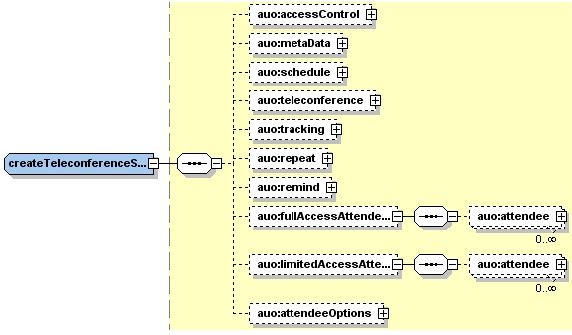
For descriptions of the global elements in the security context of the header, see Global Request Elements in Security Context. For descriptions of the non-global elements, refer to “Elements in WebEx XML Schema Definitions for the Meeting Service”.
Response
The sample XML document shows an example of a response document populated with values based upon the preceding sample XML request.
<?xml version="1.0" encoding="UTF-8"?>
<serv:message xmlns:serv="http://www.webex.com/schemas/2002/06/service"
    xmlns:com="http://www.webex.com/schemas/2002/06/common"
    xmlns:auo="http://www.webex.com/schemas/2002/06/service/meeting/auo">
    <serv:header>
        <serv:response>
            <serv:result>SUCCESS</serv:result>
            <serv:gsbStatus>PRIMARY</serv:gsbStatus>
        </serv:response>
    </serv:header>
    <serv:body>
        <serv:bodyContent xsi:type="auo:createTeleconferenceSessionResponse"
            xmlns:xsi="http://www.w3.org/2001/XMLSchema-instance">
            <auo:sessionKey>11320765</auo:sessionKey>
        </serv:bodyContent>
    </serv:body>
</serv:message>
The following schema diagram shows the structure of the elements in thecreateTeleconferenceSessionResponse message.
Figure 5-3 • Schema diagram for createTeleconferenceSessionResponse

The result and exceptionID global elements allow you to confirm that an instantiation request was successful. These elements are described in “Global Response Elements Showing Results and Errors”.