CreateTrainingSession
Allows training session hosts to schedule a new training session. CreateTrainingSession returns a unique training session key. This API filters for unsafe HTML input fields. See Table 2-8, “HTML Tags Checked” for the fields affected.
Note: Lower Case email address modification
When creating meetings, events, and training sessions as well as creating or registering meeting attendees, email addresses will be converted to lower case when saved in the report DB to match with the URL APIs behavior that converts the email into lower case. Not backward compatible: this may impact older integrations that have attendee email in mixed case.
Request
CreateTrainingSession allows users to determine whether or not attendees can join the teleconference before the host does. This functionality is located in the schedule element.
-
CreateTrainingSessionsupports Join Before Host Telephony for TSP sessions. - Set
<role>=HOSTto add the user as an alternate host.
The sample XML document creates a training session with the corresponding information specified.
<?xml version="1.0" encoding="UTF-8"?>
<serv:message xmlns:xsi="http://www.w3.org/2001/XMLSchema-instance">
    <header>
        <securityContext>
            <webExID>hostid</webExID>
            <password>hostpassword</password>
            <siteID>0000</siteID>
            <partnerID>9999</partnerID>
            <email>johnsmith@xyz.com</email>
        </securityContext>
    </header>
    <body>
        <bodyContent xsi:type=
            "java:com.webex.service.binding.training.CreateTrainingSession">
            <accessControl>
                <listing>PUBLIC</listing>
                <sessionPassword>111111</sessionPassword>
            </accessControl>
            <schedule>
                <startDate>4/05/2004 10:00:00</startDate>
                <timeZone>GMT-12:00, Dateline (Eniwetok)</timeZone>
                <duration>60</duration>
                <timeZoneID>46</timeZoneID>
                <openTime>20</openTime>
            </schedule>
            <metaData>
                <confName>jimz hol test</confName>
                <agenda>agenda 1</agenda>
                <description>description</description>
                <greeting>greeting</greeting>
                <location>location</location>
                <invitation>invitation</invitation>
            </metaData>
            <enableOptions>
                <attendeeList>false</attendeeList>
                <javaClient>false</javaClient>
                <nativeClient>true</nativeClient>
                <chat>false</chat>
                <poll>false</poll>
                <audioVideo>false</audioVideo>
                <fileShare>false</fileShare>
                <presentation>false</presentation>
                <applicationShare>false</applicationShare>
                <desktopShare>false</desktopShare>
                <webTour>false</webTour>
                <trainingSessionRecord>false</trainingSessionRecord>
                <annotation>false</annotation>
                <importDocument>false</importDocument>
                <saveDocument>false</saveDocument>
                <printDocument>false</printDocument>
                <pointer>false</pointer>
                <switchPage>false</switchPage>
                <fullScreen>false</fullScreen>
                <thumbnail>false</thumbnail>
                <zoom>false</zoom>
                <copyPage>false</copyPage>
                <rcAppShare>false</rcAppShare>
                <rcDesktopShare>false</rcDesktopShare>
                <rcWebTour>false</rcWebTour>
                <attendeeRecordTrainingSession>false
                </attendeeRecordTrainingSession>
                <voip>false</voip>
                <faxIntoTrainingSession>false</faxIntoTrainingSession>
                <autoDeleteAfterMeetingEnd>true</autoDeleteAfterMeetingEnd>
            </enableOptions>
            <telephony>
                <telephonySupport>NONE</telephonySupport>
                <numPhoneLines>4</numPhoneLines>
                <extTelephonyURL>String</extTelephonyURL>
                <extTelephonyDescription>String</extTelephonyDescription>
                <enableTSP>false</enableTSP>
                <tspAccountIndex>1</tspAccountIndex>
            </telephony>
            <tracking>
                <trackingCode1>trackingCode1</trackingCode1>
                <trackingCode2>trackingCode2</trackingCode2>
                <trackingCode3>trackingCode3</trackingCode3>
                <trackingCode4>trackingCode4</trackingCode4>
                <trackingCode5>trackingCode5</trackingCode5>
                <trackingCode6>trackingCode6</trackingCode6>
                <trackingCode7>trackingCode7</trackingCode7>
                <trackingCode8>trackingCode8</trackingCode8>
                <trackingCode9>trackingCode9</trackingCode9>
                <trackingCode10>trackingCode10</trackingCode10>
            </tracking>
            <repeat>
                <repeatType>RECURRING_SINGLE</repeatType>
                <dayInWeek>
                    <day>SUNDAY</day>
                </dayInWeek>
                <endAfter>5</endAfter>
                <occurenceType>WEEKLY</occurenceType>
                <interval>5</interval>
                <dayInMonth>1</dayInMonth>
                <weekInMonth>1</weekInMonth>
                <monthInYear>1</monthInYear>
                <dayInYear>1</dayInYear>
            </repeat>
            <remind>
                <enableReminder>true</enableReminder>
                <emails>
                    <email>String</email>
                </emails>
                <sendEmail>false</sendEmail>
                <mobile>String</mobile>
                <sendMobile>false</sendMobile>
                <daysAhead>1</daysAhead>
                <hoursAhead>1</hoursAhead>
                <minutesAhead>1</minutesAhead>
            </remind>
            <presenters>
                <participants>
                    <participant>
                        <person>
                            <name>alternatehost1</name>
                            <email>host1@test.com</email>
                            <type>MEMBER</type>
                        </person>
                        <role>HOST</role>
                    </participant>
                </participants>
            </presenters>
            <attendees>
                <participants>
                    <participant>
                        <person>
                            <name>alternatehost3</name>
                            <email>host3@test.com</email>
                            <type>MEMBER</type>
                        </person>
                        <role>HOST</role>
                    </participant>
                </participants>
            </attendees>
            <attendeeOptions>
                <request>true</request>
                <registration>true</registration>
                <auto>true</auto>
                <registrationPWD>pass</registrationPWD>
                <maxRegistrations>10</maxRegistrations>
                <registrationCloseDate>04/10/2004 00:00:00
                </registrationCloseDate>
                <emailInvitations>true</emailInvitations>
            </attendeeOptions>
        </bodyContent>
    </body>
</serv:message>
The following schema diagram shows the structure of the elements in the createTrainingSession request message.
 Figure 6-7 • Schema diagram for `createTrainingSession` Figure 6-7 • Schema diagram for `createTrainingSession` |
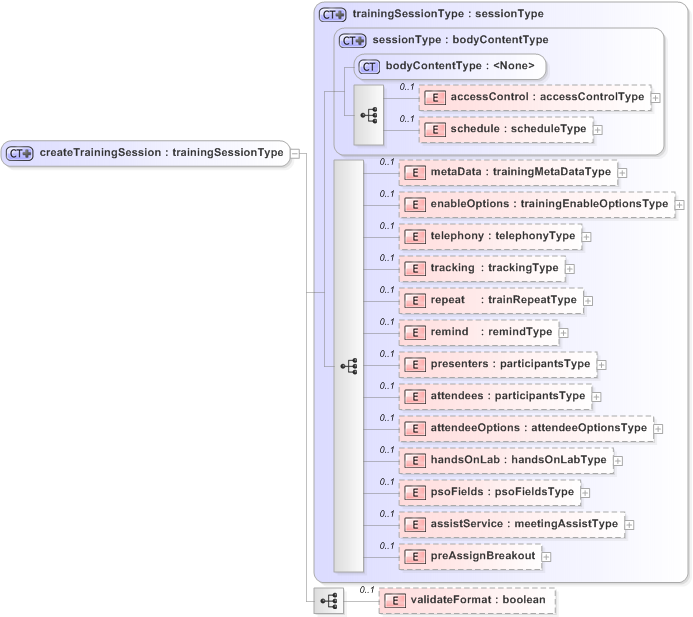 |
For descriptions of the global elements in the security context of the header, please see Global Request Elements in Security Context. For descriptions of the non-global elements, please refer to “Elements in WebEx XML Schema Definitions for the Training Session Service”.
Response
The sample XML document shows a possible response to the preceding request document.
<?xml version="1.0" encoding="UTF-8"?>
<serv:message xmlns:serv="http://www.webex.com/schemas/2002/06/service"
    xmlns:com="http://www.webex.com/schemas/2002/06/common"
    xmlns:sess="http://www.webex.com/schemas/2002/06/service/session"
    xmlns:train="http://www.webex.com/schemas/2002/06/service/trainingsession"
    xmlns:qti="http://www.webex.com/schemas/2002/06/service/trainingsessionqti"
    xmlns:qtiasi=
    "http://www.webex.com/schemas/2002/06/service/trainingsessionqtiasi">
    <serv:header>
        <serv:response>
            <serv:result>SUCCESS</serv:result>
            <serv:gsbStatus>PRIMARY</serv:gsbStatus>
        </serv:response>
    </serv:header>
    <serv:body>
        <serv:bodyContent xsi:type="train:createTrainingSessionResponse"
            xmlns:xsi="http://www.w3.org/2001/XMLSchema-instance">
            <train:sessionkey>807643542</train:sessionkey>
            <train:additionalInfo>
                <train:sessionkey>807643542</train:sessionkey>
                <train:guestToken>514d8fd53f1ce7d22107bbc25e586fc1
                </train:guestToken>
            </train:additionalInfo>
        </serv:bodyContent>
    </serv:body>
</serv:message>
The following schema diagram shows the structure of the elements in the createTrainingSessionResponse message.
| Figure 6-8 • Schema diagram for `createTrainingSessionResponse` |
 |
The result and exceptionID global elements allow you to confirm that
an instantiation request was successful. See Global Response Elements Showing Results and Errors.