LsteventattendeeHistory
Allows event hosts or site administrators to request detailed attendee information for the event sessions previously hosted on the site.
Note Site administrators can retrieve the attendee information of all the event sessions hosted on their sites, whereas regular hosts can only retrieve the attendee information of their own event sessions.
Request
The sample XML document shows an example of a request for attendee information related to the events hosted during the specified period of time.
<?xml version="1.0" encoding="UTF-8"?>
<serv:message xmlns:xsi="http://www.w3.org/2001/XMLSchema-instance">
    <header>
        <securityContext>
            <webExID>hostid</webExID>
            <password>hostpassword</password>
            <siteID>0000</siteID>
            <partnerID>9999</partnerID>
            <email>johnsmith@xyz.com</email>
        </securityContext>
    </header>
    <body>
        <bodyContent xsi:type=
            "java:com.webex.service.binding.history.LsteventattendeeHistory">
            <startTimeScope>
                <sessionStartTimeStart>03/08/2004 07:34:45
                </sessionStartTimeStart>
                <sessionStartTimeEnd>03/09/2004 09:34:45</sessionStartTimeEnd>
            </startTimeScope>
            <endTimeScope>
                <sessionEndTimeStart>03/08/2004 08:34:45</sessionEndTimeStart>
                <sessionEndTimeEnd>03/09/2004 10:34:45</sessionEndTimeEnd>
            </endTimeScope>
            <listControl>
                <startFrom>1</startFrom>
                <maximumNum>10</maximumNum>
                <listMethod>AND</listMethod>
            </listControl>
            <order>
                <orderBy>ATTENDEENAME</orderBy>
                <orderAD>ASC</orderAD>
                <orderBy>STARTTIME</orderBy>
                <orderAD>ASC</orderAD>
                <orderBy>CONFID</orderBy>
                <orderAD>ASC</orderAD>
            </order>
        </bodyContent>
    </body>
</serv:message></securityContext>
The following schema diagram shows the structure of the elements in the lsteventattendeeHistory request message.
Figure 9-1 • Schema diagram for lsteventattendeeHistory
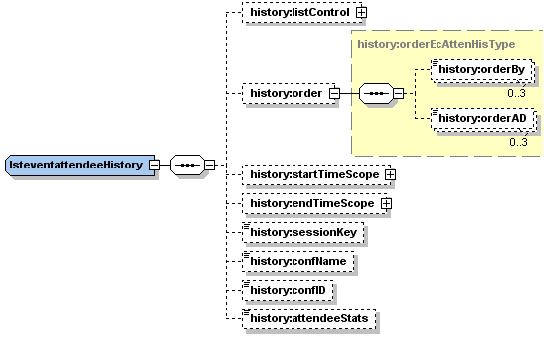
For descriptions of the global elements in the security context of the header, please see Global Request Elements in Security Context. For descriptions of the non-global elements, please refer to “Elements in WebEx XML Schema Definitions for the History Service”.
Response
The sample XML document shows an example of a possible response to the preceding request document.
<?xml version="1.0" encoding="UTF-8"?>
<serv:message xmlns:serv="http://www.webex.com/schemas/2002/06/service"
xmlns:com="http://www.webex.com/schemas/2002/06/common"
xmlns:history="http://www.webex.com/schemas/2002/06/service/history">
  <serv:header>
    <serv:response>
      <serv:result>SUCCESS</serv:result>
      <serv:gsbStatus>PRIMARY</serv:gsbStatus>
    </serv:response>
  </serv:header>
  <serv:body>
    <serv:bodyContent xsi:type="history:LsteventattendeeHistoryResponse"
    xmlns:xsi="http://www.w3.org/2001/XMLSchema-instance">
      <history:eventAttendeeHistory>
        <history:sessionKey>101316464</history:sessionKey>
        <history:attendeeName>1111 1111</history:attendeeName>
        <history:attendeeEmail>asdf@asdf.asdf</history:attendeeEmail>
        <history:startTime>03/09/2004 07:34:45</history:startTime>
        <history:endTime>03/09/2004 07:35:21</history:endTime>
        <history:duration>1</history:duration>
        <history:registered>N</history:registered>
        <history:invited>N</history:invited>
        <history:ipAddress>172.16.244.122</history:ipAddress>
        <history:participantType>ATTENDEE</history:participantType>
        <history:voipDuration>0</history:voipDuration>
        <history:clientAgent>Windows,IE</history:clientAgent>
        <history:confID>4686965</history:confID>
      </history:eventAttendeeHistory>
      <history:matchingRecords>
        <serv:total>15</serv:total>
        <serv:returned>1</serv:returned>
        <serv:startFrom>1</serv:startFrom>
      </history:matchingRecords>
    </serv:bodyContent>
  </serv:body>
</serv:message>
The following schema diagram shows the structure of the elements in the lsteventattendeeHistoryResponse message.
Figure 9-2 • Schema diagram for lsteventattendeeHistoryResponse

The result and exceptionID global elements allow you to confirm that an instantiation request was successful. See Global Response Elements Showing Results and Errors.