LstMeetingType
Lists detailed information of the meeting types on the current site.
| Element | Parent | Definition | Type | Default |
|---|---|---|---|---|
hideInScheduler |
LstMeetingType:<meetingType>``GetMeetingType:root |
Returns "Do not display in scheduler (For Telepresence only)" checkbox status for session type | boolean 0..1 | FALSE |
Request
The sample XML is an example of a request for all meeting type service instances with a siteID value of 0000.
<?xml version="1.0" encoding="UTF-8"?>
<serv:message xmlns:xsi="http://www.w3.org/2001/XMLSchema-instance">
    <header>
        <securityContext>
            <webExID>hostid</webExID>
            <password>hostpassword</password>
            <siteID>0000</siteID>
            <partnerID>9999</partnerID>
            <email>johnsmith@xyz.com</email>
        </securityContext>
    </header>
    <body>
        <bodyContent
            xsi:type="java:com.webex.service.binding.meetingtype.LstMeetingType">
            <listControl>
                <startFrom>1</startFrom>
                <maximumNum>10</maximumNum>
                <listMethod>OR</listMethod>
            </listControl>
            <meetingTypeID>1</meetingTypeID>
        </bodyContent>
    </body>
</serv:message>
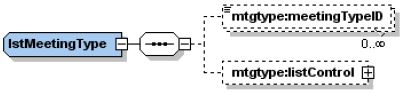
The following schema diagram shows the structure of the elements in the lstMeetingType request message.
Figure 12-3 • Schema diagram for lstMeetingType
For descriptions of the global elements in the security context of the header, see Global Request Elements in Security Context. For descriptions of the non-global elements, refer to “Elements in WebEx XML Schema Definitions for the Meeting Type Service”.
Response
The sample XML document shows an example of a possible response to the preceding request document.
<?xml version="1.0" encoding="UTF-8"?>
<serv:message xmlns:serv="http://www.webex.com/schemas/2002/06/service"
    xmlns:com="http://www.webex.com/schemas/2002/06/common"
    xmlns:mtgtype="http://www.webex.com/schemas/2002/06/service/meetingtype">
    <serv:header>
        <serv:response>
            <serv:result>SUCCESS</serv:result>
            <serv:gsbStatus>PRIMARY</serv:gsbStatus>
        </serv:response>
    </serv:header>
    <serv:body>
        <serv:bodyContent xsi:type="mtgtype:lstMeetingTypeResponse"
            xmlns:xsi="http://www.w3.org/2001/XMLSchema-instance">
            <mtgtype:matchingRecords>
                <serv:total>1</serv:total>
                <serv:returned>1</serv:returned>
                <serv:startFrom>1</serv:startFrom>
            </mtgtype:matchingRecords>
            <mtgtype:meetingType>
                <mtgtype:productCodePrefix>FRE</mtgtype:productCodePrefix>
                <mtgtype:active>ACTIVATED</mtgtype:active>
                <mtgtype:name>Free meeting</mtgtype:name>
                <mtgtype:displayName>Free meeting</mtgtype:displayName>
                <mtgtype:limits>
                    <mtgtype:maxAppShareDuration>108</mtgtype:maxAppShareDuration>
                    <mtgtype:maxAppShareUser>908</mtgtype:maxAppShareUser>
                    <mtgtype:maxDesktopShareDuration>107
                    </mtgtype:maxDesktopShareDuration>
                    <mtgtype:maxDesktopShareUser>907</mtgtype:maxDesktopShareUser>
                    <mtgtype:maxFileTransferUser>904</mtgtype:maxFileTransferUser>
                    <mtgtype:maxMeetingDuration>60</mtgtype:maxMeetingDuration>
                    <mtgtype:maxMeetingUser>60</mtgtype:maxMeetingUser>
                    <mtgtype:maxRecordUser>902</mtgtype:maxRecordUser>
                    <mtgtype:maxVideoDuration>103</mtgtype:maxVideoDuration>
                    <mtgtype:maxVideoUser>903</mtgtype:maxVideoUser>
                    <mtgtype:maxWebTourDuration>105</mtgtype:maxWebTourDuration>
                    <mtgtype:maxWebTourUser>905</mtgtype:maxWebTourUser>
                </mtgtype:limits>
                <mtgtype:options>
                    <mtgtype:supportAppShare>true</mtgtype:supportAppShare>
                    <mtgtype:supportAppShareRemote>true
                    </mtgtype:supportAppShareRemote>
                    <mtgtype:supportAttendeeRegistration>true
                    </mtgtype:supportAttendeeRegistration>
                    <mtgtype:supportRemoteWebTour>true
                    </mtgtype:supportRemoteWebTour>
                    <mtgtype:supportWebTour>true</mtgtype:supportWebTour>
                    <mtgtype:supportFileShare>false</mtgtype:supportFileShare>
                    <mtgtype:supportChat>true</mtgtype:supportChat>
                    <mtgtype:supportCobrowseSite>false
                    </mtgtype:supportCobrowseSite>
                    <mtgtype:supportCorporateOfficesSite>false
                    </mtgtype:supportCorporateOfficesSite>
                    <mtgtype:supportDesktopShare>true
                    </mtgtype:supportDesktopShare>
                    <mtgtype:supportDesktopShareRemote>true
                    </mtgtype:supportDesktopShareRemote>
                    <mtgtype:supportFileTransfer>true
                    </mtgtype:supportFileTransfer>
                    <mtgtype:supportInternationalCallOut>true
                    </mtgtype:supportInternationalCallOut>
                    <mtgtype:supportJavaClient>true</mtgtype:supportJavaClient>
                    <mtgtype:supportMacClient>true</mtgtype:supportMacClient>
                    <mtgtype:supportMeetingCenterSite>true
                    </mtgtype:supportMeetingCenterSite>
                    <mtgtype:supportMeetingRecord>true
                    </mtgtype:supportMeetingRecord>
                    <mtgtype:supportMultipleMeeting>true
                    </mtgtype:supportMultipleMeeting>
                    <mtgtype:supportOnCallSite>false</mtgtype:supportOnCallSite>
                    <mtgtype:supportOnStageSite>false</mtgtype:supportOnStageSite>
                    <mtgtype:supportPartnerOfficesSite>false
                    </mtgtype:supportPartnerOfficesSite>
                    <mtgtype:supportPoll>true</mtgtype:supportPoll>
                    <mtgtype:supportPresentation>true
                    </mtgtype:supportPresentation>
                    <mtgtype:supportSolarisClient>true
                    </mtgtype:supportSolarisClient>
                    <mtgtype:supportSSL>true</mtgtype:supportSSL>
                    <mtgtype:E2E>false</mtgtype:supportE2E>
                    <mtgtype:PKI>false</mtgtype:supportPKI>
                    <mtgtype:supportTeleconfCallIn>true
                    </mtgtype:supportTeleconfCallIn>
                    <mtgtype:supportTeleconfCallOut>true
                    </mtgtype:supportTeleconfCallOut>
                    <mtgtype:supportTollFreeCallIn>true
                    </mtgtype:supportTollFreeCallIn>
                    <mtgtype:supportVideo>true</mtgtype:supportVideo>
                    <mtgtype:supportVoIP>true</mtgtype:supportVoIP>
                    <mtgtype:supportWebExComSite>false
                    </mtgtype:supportWebExComSite>
                    <mtgtype:supportWindowsClient>true
                    </mtgtype:supportWindowsClient>
                    <mtgtype:supportQuickStartAttendees>false
                    </mtgtype:supportQuickStartAttendees>
                    <mtgtype:supportQuickStartHost>false
                    </mtgtype:supportQuickStartHost>
                </mtgtype:options>
                <mtgtype:phoneNumbers>
                    <mtgtype:primaryTollCallInNumber>1-408197043
                    </mtgtype:primaryTollCallInNumber>
                    <mtgtype:primaryTollFreeCallInNumber>1-40897041
                    </mtgtype:primaryTollFreeCallInNumber>
                </mtgtype:phoneNumbers>
                <mtgtype:meetingTypeID>1</mtgtype:meetingTypeID>
                <mtgtype:serviceTypes>
                    <mtgtype:serviceType>MeetingCenter</mtgtype:serviceType>
                    <mtgtype:serviceType>EventCenter</mtgtype:serviceType>
                </mtgtype:serviceTypes>
            </mtgtype:meetingType>
        </serv:bodyContent>
    </serv:body>
</serv:message>
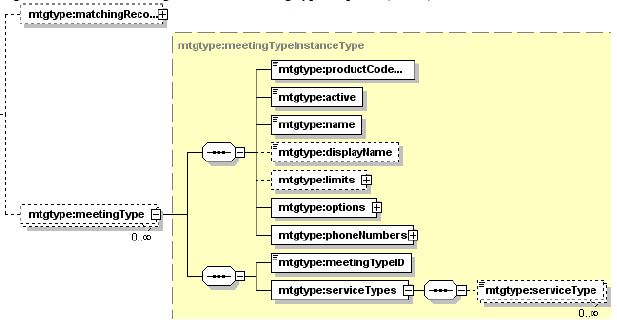
The following schema diagram shows the structure of the elements in the lstMeetingTypeResponse message.
Figure 12-4 • Schema diagram for lstMeetingTypeResponse

Figure 12-5 • Schema diagram for meetingType
The result and exceptionID global elements allow you to confirm that an instantiation request was successful. These elements are described in Ch.2, “Global Response Elements Showing Results and Errors”.