LstsummaryTrainingSession
Lists summary information for your scheduled training sessions.This function should be used instead of LstTrainingSession.
Note Site administrators can list training sessions scheduled by all users on the site. Regular hosts can list only their own sessions of any access type (PUBLIC, PRIVATE, and UNLISTED).
Request
The sample XML shows an example of a request for the summary information of the training sessions hosted during the specified period of time.
<?xml version="1.0" encoding="UTF-8"?>
<serv:message xmlns:xsi="http://www.w3.org/2001/XMLSchema-instance">
    <header>
        <securityContext>
            <webExID>hostid</webExID>
            <password>hostpassword</password>
            <siteID>0000</siteID>
            <partnerID>9999</partnerID>
            <email>johnsmith@xyz.com</email>
        </securityContext>
    </header>
    <body>
        <bodyContent xsi:type=
            "java:com.webex.service.binding.training.LstsummaryTrainingSession">
            <listControl>
                <startFrom>1</startFrom>
                <maximumNum>10</maximumNum>
                <listMethod>OR</listMethod>
            </listControl>
            <order>
                <orderBy>HOSTWEBEXID</orderBy>
                <orderAD>ASC</orderAD>
                <orderBy>CONFNAME</orderBy>
                <orderAD>ASC</orderAD>
                <orderBy>STARTTIME</orderBy>
                <orderAD>ASC</orderAD>
            </order>
            <dateScope>
                <startDateStart>03/10/2004 00:00:00</startDateStart>
                <timeZoneID>45</timeZoneID>
            </dateScope>
        </bodyContent>
    </body>
</serv:message>
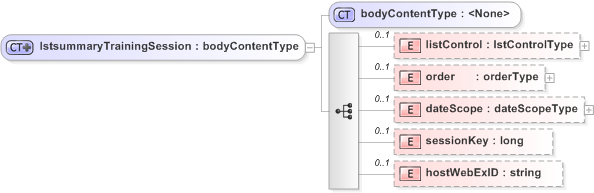
The following schema diagram shows the structure of the elements in the lstsummaryTrainingSession request message.
 Figure 6-34 • Schema diagram of `lstsummaryTrainingSession` Figure 6-34 • Schema diagram of `lstsummaryTrainingSession`
|
 |
For descriptions of the global elements in the security context of the header, please see Global Request Elements in Security Context. For descriptions of the non-global elements, please refer to “Elements in WebEx XML Schema Definitions for the Training Session Service”.
Response
The sample XML document shows an example of a possible response to the preceding request document.
<?xml version="1.0" encoding="UTF-8"?>
<serv:message xmlns:serv="http://www.webex.com/schemas/2002/06/service"
    xmlns:com="http://www.webex.com/schemas/2002/06/common"
    xmlns:sess="http://www.webex.com/schemas/2002/06/service/session"
    xmlns:train="http://www.webex.com/schemas/2002/06/service/trainingsession"
    xmlns:qti="http://www.webex.com/schemas/2002/06/service/trainingsessionqti"
    xmlns:qtiasi=
    "http://www.webex.com/schemas/2002/06/service/trainingsessionqtiasi">
    <serv:header>
        <serv:response>
            <serv:result>SUCCESS</serv:result>
            <serv:gsbStatus>PRIMARY</serv:gsbStatus>
        </serv:response>
    </serv:header>
    <serv:body>
        <serv:bodyContent xsi:type="train:lstsummaryTrainingSessionResponse"
            xmlns:xsi="http://www.w3.org/2001/XMLSchema-instance">
            <train:trainingSession>
                <train:sessionKey>60740226</train:sessionKey>
                <train:confName>waynez-xmlapi-test002</train:confName>
                <train:meetingType>11</train:meetingType>
                <train:hostWebExID>java</train:hostWebExID>
                <train:otherHostWebExID>java</train:otherHostWebExID>
                <train:timeZoneID>45</train:timeZoneID>
                <train:timeZone>GMT+08:00, China (Beijing)</train:timeZone>
                <train:status>NOT_INPROGRESS</train:status>
                <train:startDate>04/01/2004 20:00:00</train:startDate>
                <train:duration>60</train:duration>
                <train:listStatus>PUBLIC</train:listStatus>
            </train:trainingSession>
            <train:trainingSession>
                <train:sessionKey>16318987</train:sessionKey>
                <train:confName>attendee verify</train:confName>
                <train:meetingType>11</train:meetingType>
                <train:hostWebExID>java</train:hostWebExID>
                <train:otherHostWebExID>java</train:otherHostWebExID>
                <train:timeZoneID>45</train:timeZoneID>
                <train:timeZone>GMT+08:00, China (Beijing)</train:timeZone>
                <train:status>NOT_INPROGRESS</train:status>
                <train:startDate>04/01/2004 06:00:10</train:startDate>
                <train:duration>60</train:duration>
                <train:listStatus>PUBLIC</train:listStatus>
            </train:trainingSession>
            <train:trainingSession>
                <train:sessionKey>11859182</train:sessionKey>
                <train:confName>jim test reminder</train:confName>
                <train:meetingType>11</train:meetingType>
                <train:hostWebExID>java</train:hostWebExID>
                <train:otherHostWebExID>java</train:otherHostWebExID>
                <train:timeZoneID>4</train:timeZoneID>
                <train:timeZone>GMT-08:00, Pacific (San Jose)</train:timeZone>
                <train:status>NOT_INPROGRESS</train:status>
                <train:startDate>03/30/2004 17:15:10</train:startDate>
                <train:duration>60</train:duration>
                <train:listStatus>PUBLIC</train:listStatus>
            </train:trainingSession>
            <train:trainingSession>
                <train:sessionKey>76736484</train:sessionKey>
                <train:confName>jimz hol test</train:confName>
                <train:meetingType>11</train:meetingType>
                <train:hostWebExID>hostid</train:hostWebExID>
                <train:otherHostWebExID>hostid</train:otherHostWebExID>
                <train:timeZoneID>46</train:timeZoneID>
                <train:timeZone>GMT+08:00, Australia Western (Perth)
                </train:timeZone>
                <train:status>NOT_INPROGRESS</train:status>
                <train:startDate>04/11/2004 10:00:00</train:startDate>
                <train:duration>60</train:duration>
                <train:listStatus>PUBLIC</train:listStatus>
            </train:trainingSession>
            <train:trainingSession>
                <train:sessionKey>11265015</train:sessionKey>
                <train:confName>sdfg</train:confName>
                <train:meetingType>11</train:meetingType>
                <train:hostWebExID>hostid</train:hostWebExID>
                <train:otherHostWebExID>hostid</train:otherHostWebExID>
                <train:timeZoneID>4</train:timeZoneID>
                <train:timeZone>GMT-08:00, Pacific (San Jose)</train:timeZone>
                <train:status>NOT_INPROGRESS</train:status>
                <train:startDate>04/01/2004 18:02:44</train:startDate>
                <train:duration>60</train:duration>
                <train:listStatus>PUBLIC</train:listStatus>
            </train:trainingSession>
            <train:matchingRecords>
                <serv:total>5</serv:total>
                <serv:returned>5</serv:returned>
                <serv:startFrom>1</serv:startFrom>
            </train:matchingRecords>
        </serv:bodyContent>
    </serv:body>
</serv:message>
The following schema diagram shows the structure of the elements in the lstsummaryTrainingSessionResponse message.
| Figure 6-35 • Schema diagram of `lstsummaryTrainingSessionResponse`
|
 |
The result and exceptionID global elements allow you to confirm that an instantiation request was successful. They are described in Global Response Elements Showing Results and Errors.