LstsummaryUser
Lists summary information of the users on your site. This API replaces LstUser. On control hub managed sites LstSummaryUser also returns an objectGUID for users.
Request
The sample XML requests the summary information of the users on the current site.
<?xml version="1.0" encoding="UTF-8"?>
<serv:message xmlns:xsi="http://www.w3.org/2001/XMLSchema-instance">
    <header>
        <securityContext>
          <siteName>acme</siteName>
          <webExID>admincred@acme.com</webExID>
          <password>P@ssword123</password>
        </securityContext>
    </header>
    <body>
        <bodyContent
            xsi:type="java:com.webex.service.binding.user.LstsummaryUser">
            <listControl>
                <serv:startFrom>1</serv:startFrom>
                <serv:maximumNum>10</serv:maximumNum>
                <serv:listMethod>AND</serv:listMethod>
            </listControl>
            <order>
                <orderBy>UID</orderBy>
                <orderAD>ASC</orderAD>
            </order>
            <dataScope>
                <regDateStart>06/23/2004 01:00:00</regDateStart>
                <regDateEnd>06/23/2014 10:00:00</regDateEnd>
            </dataScope>
        </bodyContent>
    </body>
</serv:message>
The following schema diagram shows the structure of the elements in the lstsummaryUser request message.
Figure 3-20 • Schema diagram for lstsummaryUser
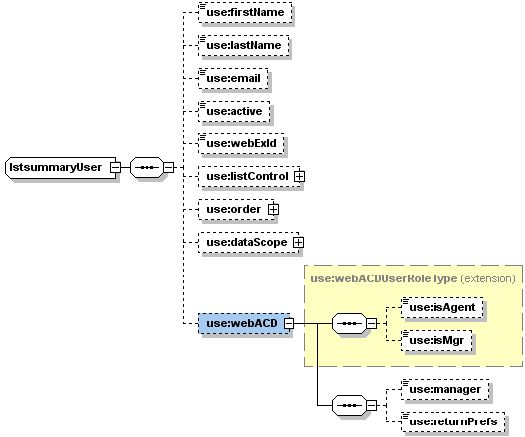
For descriptions of the global elements in the security context of the header, see Global Request Elements in Security Context. For descriptions of the non-global elements, see Elements in WebEx XML Schema Definitions for the User Service.
Response
The sample XML document shows an example of a possible response to the preceding request document.
<?xml version="1.0" encoding="UTF-8"?>
<serv:message xmlns:serv="http://www.webex.com/schemas/2002/06/service"
    xmlns:com="http://www.webex.com/schemas/2002/06/common"
    xmlns:use="http://www.webex.com/schemas/2002/06/service/user">
    <serv:header>
        <serv:response>
            <serv:result>SUCCESS</serv:result>
            <serv:gsbStatus>PRIMARY</serv:gsbStatus>
        </serv:response>
    </serv:header>
    <serv:body>
        <serv:bodyContent xsi:type="use:LstsummaryUserResponse"
            xmlns:xsi="http://www.w3.org/2001/XMLSchema-instance">
            <use:user>
                <use:webExId>hostid</use:webExId>
                <use:email>email@domain.com</use:email>
                <use:registrationDate>06/23/2004 20:53:08</use:registrationDate>
                <use:active>ACTIVATED</use:active>
                <use:timeZoneID>4</use:timeZoneID>
            </use:user>
            <use:user>
                <use:webExId>bush</use:webExId>
                <use:firstName>bush</use:firstName>
                <use:lastName>bush</use:lastName>
                <use:email>bush@email.com</use:email>
                <use:registrationDate>06/23/2005 21:07:55</use:registrationDate>
                <use:active>ACTIVATED</use:active>
                <use:timeZoneID>4</use:timeZoneID>
            </use:user>
            <use:user>
                <use:webExId>java</use:webExId>
                <use:firstName>java</use:firstName>
                <use:lastName>java</use:lastName>
                <use:email>java@email.com</use:email>
                <use:registrationDate>06/23/2006 21:36:05</use:registrationDate>
                <use:active>ACTIVATED</use:active>
                <use:timeZoneID>4</use:timeZoneID>
            </use:user>
            <use:user>
                <use:webExId>xml</use:webExId>
                <use:firstName>xml</use:firstName>
                <use:lastName>xml</use:lastName>
                <use:email>xml@email.com</use:email>
                <use:registrationDate>06/23/2007 16:56:41</use:registrationDate>
                <use:active>ACTIVATED</use:active>
                <use:timeZoneID>4</use:timeZoneID>
            </use:user>
            <use:matchingRecords>
                <serv:total>4</serv:total>
                <serv:returned>4</serv:returned>
                <serv:startFrom>1</serv:startFrom>
            </use:matchingRecords>
        </serv:bodyContent>
    </serv:body>
</serv:message>
The following schema diagram shows the structure of the elements in the lstsummaryUserResponse message.
Figure 3-21 • Schema diagram for lstsummaryUserResponse
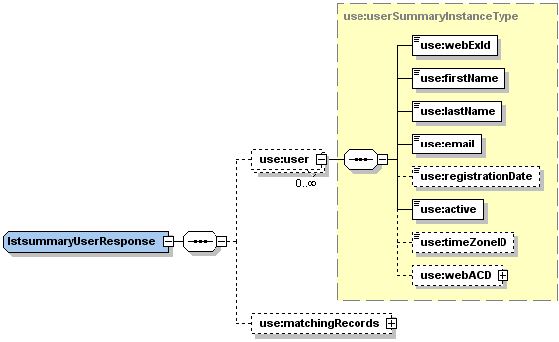
The result and exceptionID global elements allow you to confirm that an instantiation request was successful. These elements are described in “Global Response Elements Showing Results and Errors”.