SetOneClickSettings
Sets one-click settings for a host.
Note Site administrator can set the one-click settings for any host with a webExID specified, while a host can only set his or her own one-click settings.
Request
The sample XML document sets up the default one-click settings for a host with the specified WebEx ID.
<?xml version="1.0" encoding="UTF-8"?>
<serv:message xmlns:xsi="http://www.w3.org/2001/XMLSchema-instance"
    xmlns:serv="http://www.webex.com/schemas/2002/06/service"
    xsi:schemaLocation="http://www.webex.com/schemas/2002/06/service/service.xsd">
    <header>
        <securityContext>
            <webExID>hostid</webExID>
            <password>hostpassword</password>


        </securityContext>
    </header>
    <body>
        <bodyContent
            xsi:type="java:com.webex.service.binding.ep.SetOneClickSettings">
            <hostWebExID>hostid</hostWebExID>
            <oneClickMetaData>
                <serviceType>MeetingCenter</serviceType>
                <sessionType>1</sessionType>
            </oneClickMetaData>
        </bodyContent>
    </body>
</serv:message>
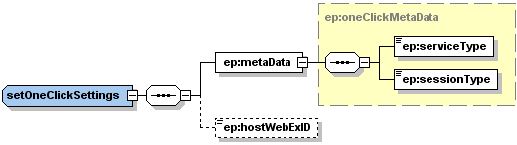
The following schema diagram shows the structure of the elements in the setOneClickSettings request message.
Figure 4-23 • Schema diagram for setOneClickSettings
Response
The sample XML document shows an example of a possible response to the preceding request document.
<?xml version="1.0" encoding="UTF-8"?>
<serv:message xmlns:serv="http://www.webex.com/schemas/2002/06/service"
    xmlns:com="http://www.webex.com/schemas/2002/06/common"
    xmlns:ep="http://www.webex.com/schemas/2002/06/service/ep">
    <serv:header>
        <serv:response>
            <serv:result>SUCCESS</serv:result>
            <serv:gsbStatus>PRIMARY</serv:gsbStatus>
        </serv:response>
    </serv:header>
    <serv:body>
        <serv:bodyContent xsi:type="ep:setOneClickSettingsResponse"
            xmlns:xsi="http://www.w3.org/2001/XMLSchema-instance" />
    </serv:body>
</serv:message>
The following schema diagram shows the structure of the elements in the setOneClickSettingsResponse message.
Figure 4-24 • Schema diagram for setOneClickSettingsResponse
